Recording video or TV programs
Using the AN connecting cable _
You carl record a tape from another VCR oi-TV program from TV that has video/audio
outputs. Use your camcorder as a recorder.
Before operation
Set DISPLAY to LCD in the menu settings. (The default setting is LCD.)
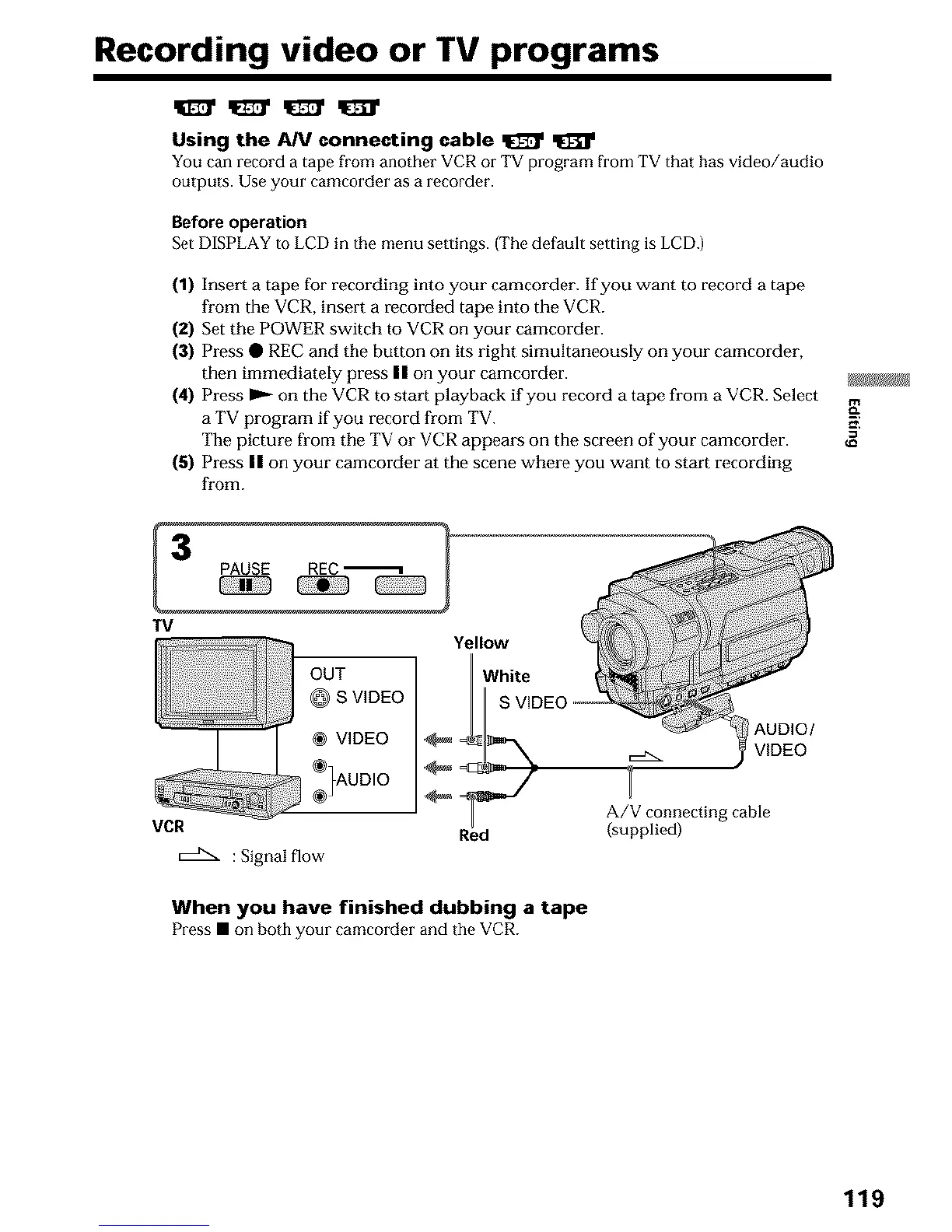
(1) Insert a tape for recording into your camcorder. If you want to record a tape
from the VCR, insert a recorded tape into the VCR.
(2) Set the POWER switch to VCR on your camcorder.
(3) Press • REC and the button on its right simultaneously on your camcorder,
then immediately press II on your camcorder.
(4) Press I_ on the VCR to start playback if you record a tape from a VCR. Select
a TV program if you record from TV.
The picture from the TV or VCR appears on the screen of your camcorder.
(5) Press II on your camcorder at the scene where you want to start recording
from.
TV
OUT
@ S VIDEO
® VIDEO
_)UD,O
VCR
:Signal flow
Yellow
_/hite
S VI
Red
AUDIO/
A/V connecting cable
(supplied)
When you have finished dubbing a tape
Press • on both your camcorder and tile VCR.
_z
119





 To Next Page