- Editing-
Dubbing a tape
Using the AIV connecting cable
You can dub or editon theVCR connected toyour camcorder usingyour eamcorder as
a player.
Before operation
• Set DISPLAY to LCD in the menu settings (The default setting is LCD)
• Press the following buttons to make the indicators disappear so that they will not be
superimposed on the edited tape:
DATA CODE on the Remote Commander _ _
SEARCH MODE on tile R_mote Commander _ _
DISPLAY
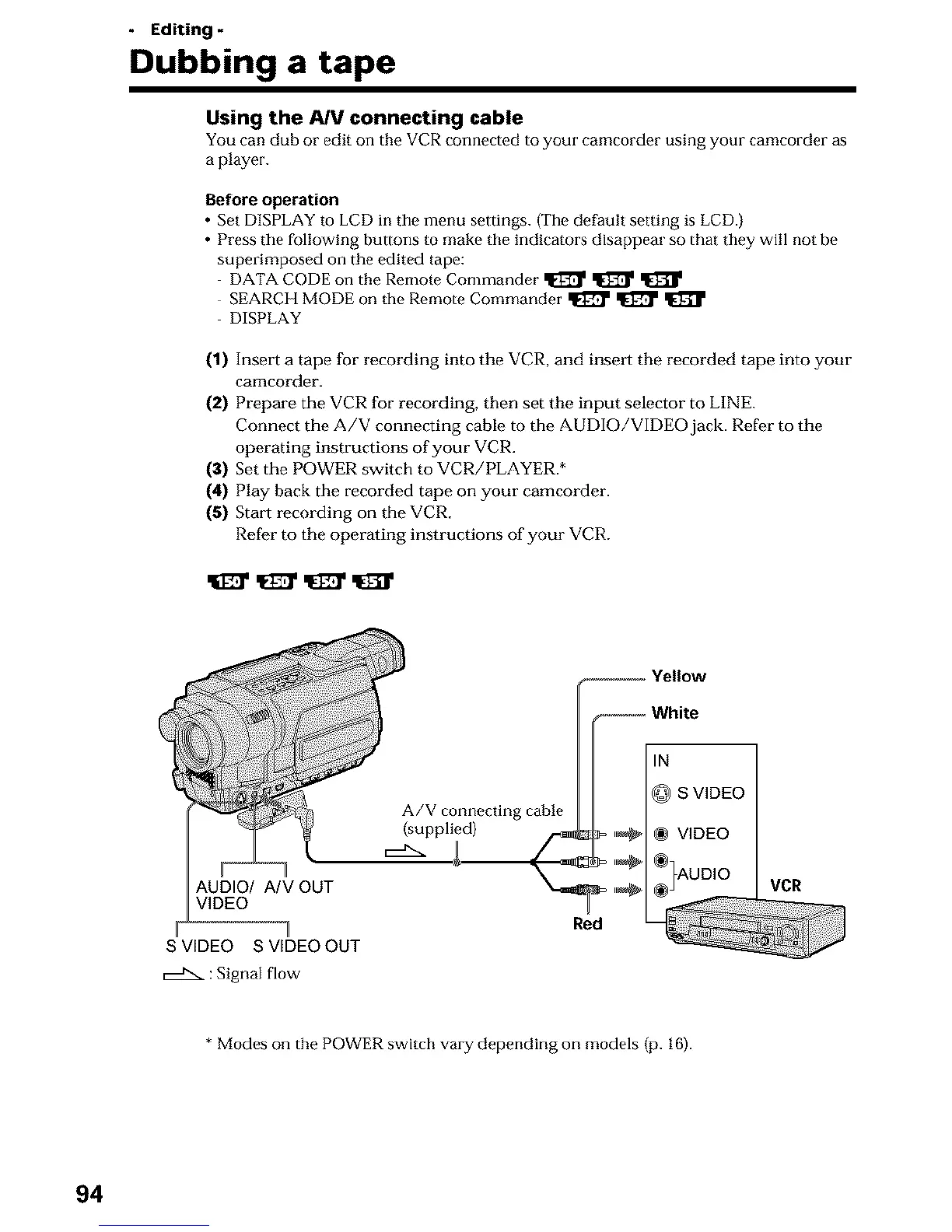
(1) Insert a tape for recording into the VCR, and inse_t the recorded tape into your
camcorder.
(2) Prepare the VCR for recording, then set the input selector to LINE.
Connect the A/V connecting cable to the AUDIO/VIDEO jack. Refer to the
operating instructions of your VCR.
(3) Set the POWER switch to VCR/PLAYER.*
(4) Play back the recorded tape on your camcorder.
(5) Start recording on the VCR,
Refer to the operating instructions of your VCR.
A/V connecting cable
(supplied)
AUDIO/ A/V OUT VCR
VIDEO
S VIDEO S VIDEO OUT
: Signal flow
* Modes on the POWER switch vary depending on models (p. 16).
94












 To Next Page