Maintenance information and precautions
Cleaning the video heads
To ensure normal recording and clear pictures, clean the video heads.
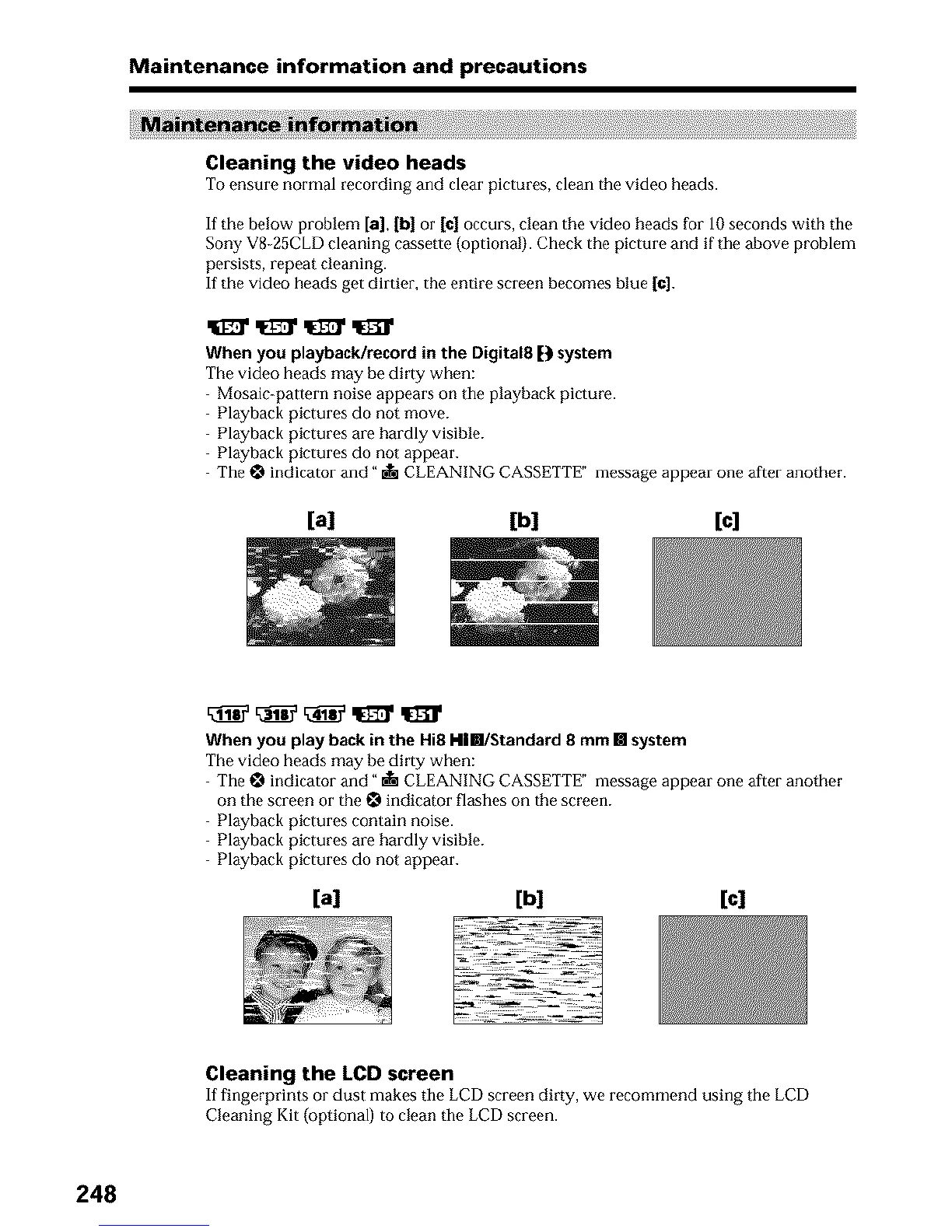
If the below problem [a], [b] or [¢1 occurs, clean the video heads for 10 seconds with the
Sony V8 25CLD cleaning cassette (optional). Check the picture and if the above problem
persists, repeat cleaning.
If the video heads get dirtier, the entire screen becomes blue 1¢].
When you playbacklrecord in the Digital8 D system
The video heads may be dirty when:
Mosaic_pattern noise appears on tile playback picture.
Playback pictures do not move.
Playback pictures are hardly visible.
Playback pictures do not appear.
The _ indicator and" _ CLEANING CASSETTE" message appear one after another.
[a] [b] [c]
When you play back in the Hi8 kll[]/Standard 8 mm [] system
The video heads may be dirty when:
The _ indicator and" • CLEANING CASSETTE" message appear one after another
on the screen or the _ indicator flashes on the screen.
Playback pictures contain noise.
Playback pictures are hardly visible.
Playback pictures do not appear.
[a] [b] [c]
Cleaning the LCD screen
If fingerprints or dust makes tile LCD screen dirty, we recommend using tile LCD
Cleaning Kit (optional) to clean the LCD screen.
248












 To Next Page