Dubbing a tape easily - Easy Dubbing
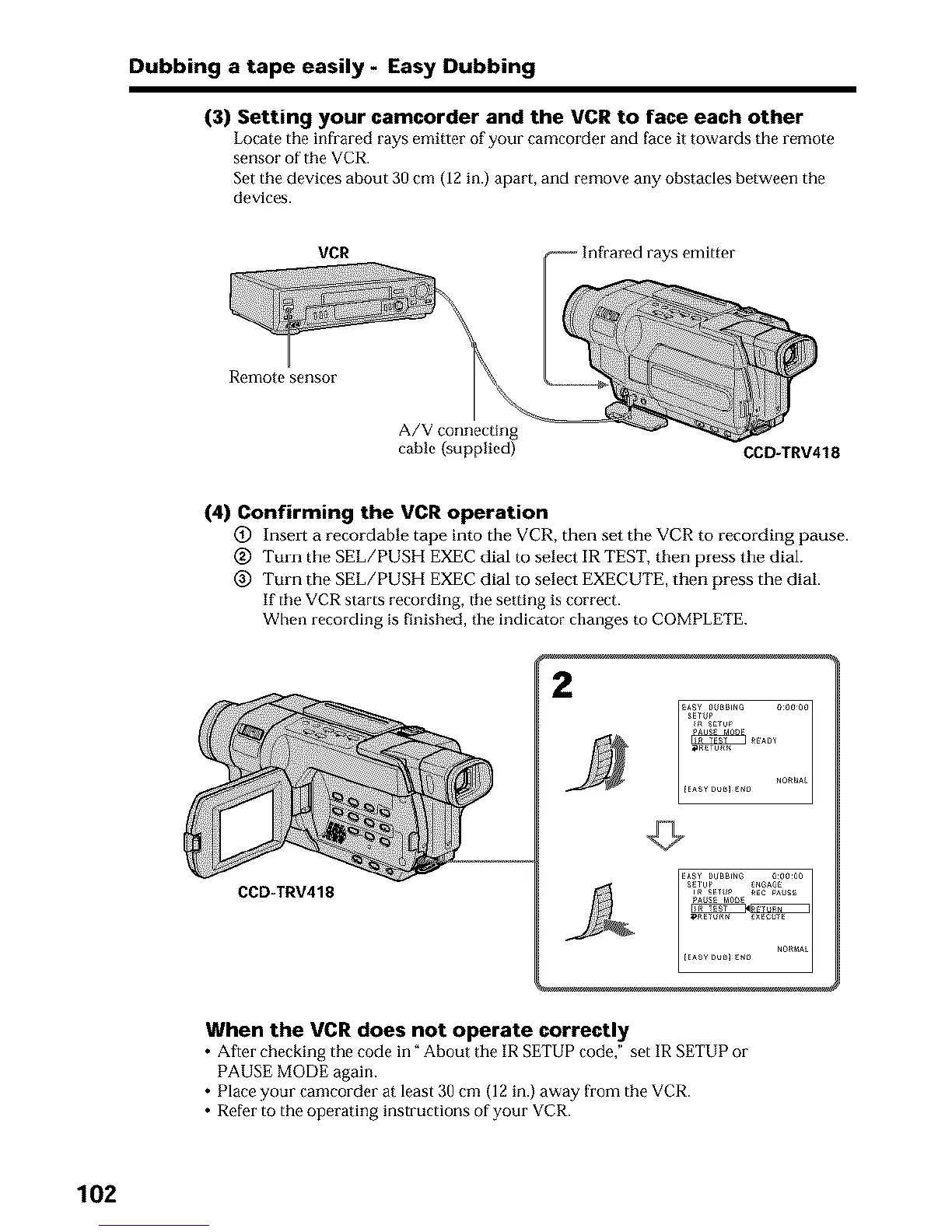
(3) Setting your camcorder and the VCR to face each other
Locate the infrared rays emitter of your camcorder and face it towards the remote
sensor of the VCR.
Set the devices about 30 cm (12 in.) apart, and remove any obstacles between the
devices.
VCR s emitter
Remote sensor
A/V connecting
cable {supplied) CCD-TRV418
(4) Confirming the VCR operation
(_) Insert a recordable tape into the VCR, then set the VCR to recording pause.
@ Turn the SEL/PUSH EXEC dial to select IR TEST, then press the dial.
@ Turn the SEL/PUSH EXEC dial to select EXECUTE, then press the dial.
If the VCR starts recording, the setting is correct.
When recording is finished, the indicator changes to COMPLETE.
2
CCD-TRV418
When the VCR does not operate correctly
• After checking the code in" About tile IR SETUP code," set IR SETUP 01-
PAUSE MODE again.
• Place your camcorder at least 30 cm (12 in.) away from the VCR.
• Refer to the operating instructions of your VCR.
102





 To Next Page