Setting up a folder
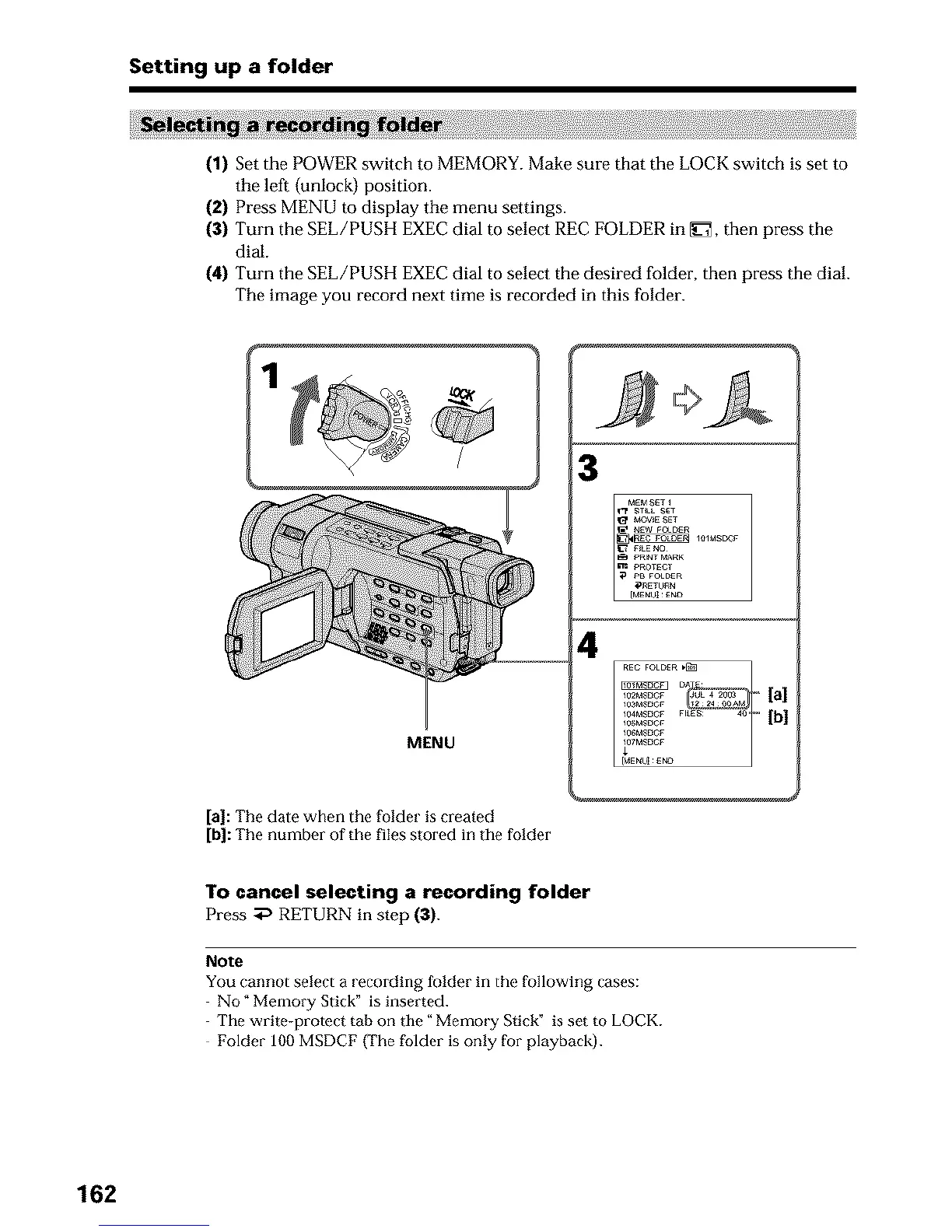
(1) Set the POWER switch to MEMORY. Make sure that the LOCK switch is set to
the left {unlock) position.
(2) Press MENU to display the menu settings.
(3) Turn the SEL/PUSH EXEC dial to select REC FOLDER in _], then press the
dial.
(4) Turn the SEL/PUSH EXEC dial to select the desired folder, then press the dial.
The image you record next time is recorded in this folder.
3
MENU
[a]: The date when the folder is created
[b]: The number of the files stored in the folder
4
To cancel selecting a recording folder
Press _ RETURN in step (3).
Note
You cannot select a recording folder in the following cases:
No" MemobY Stick" is inserted.
The write-protect tab on the" Memo_ T Stick" is set to LOCK.
Folder 100 MSDCF (The folder is only for playback).
162












 To Next Page