Deleting images - DELETE
You can delete all unprotected images in a" Memory Stick."
Before operation
Insert a" Memory Stick" into your camcorder.
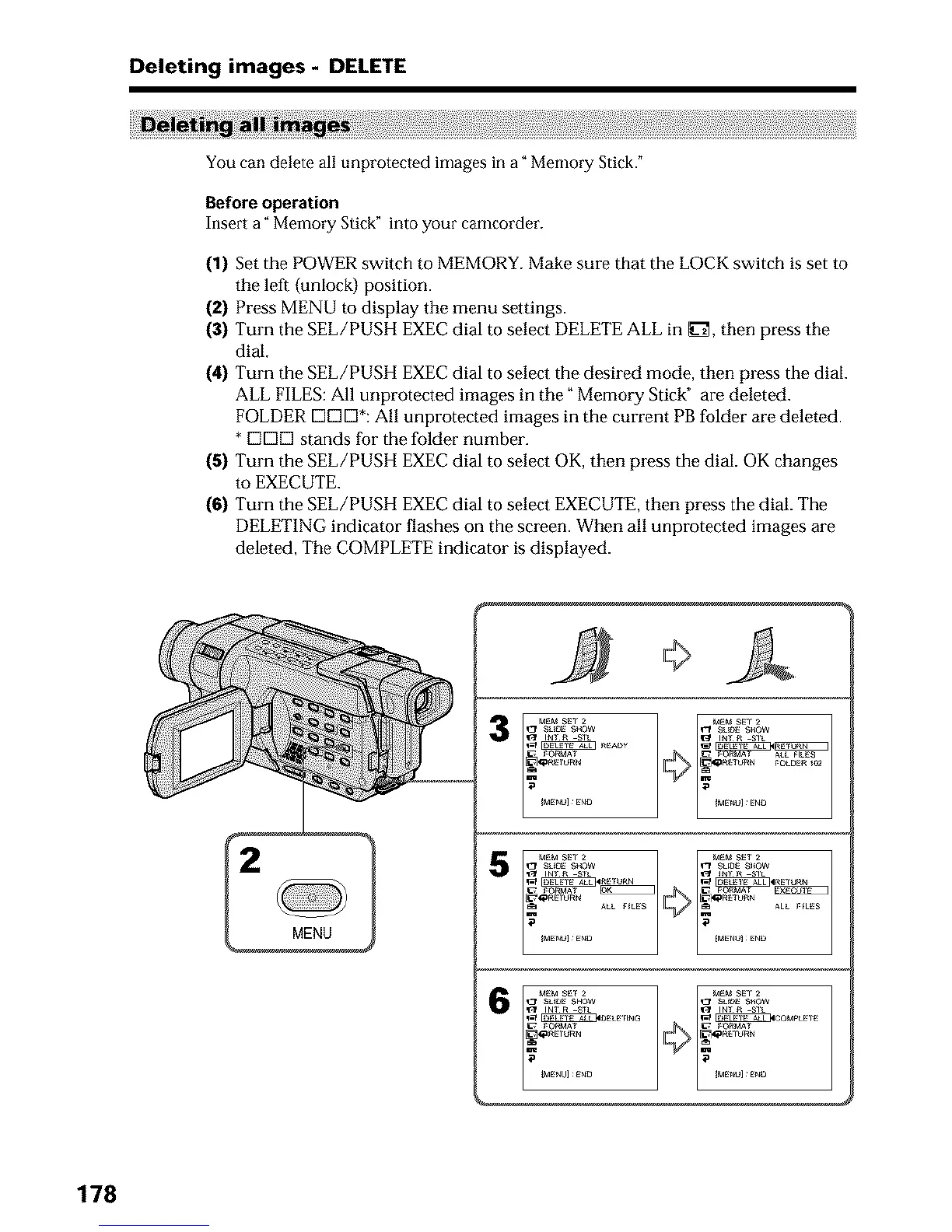
(1) Set the POWER switch to MEMORY. Make sure that the LOCK switch is set to
the left (unlock) position.
(2) Press MENU to display the menu settings.
(3) Turn the SEE/PUSH EXEC dial to select DELETE ALL in _3_, then press the
dial,
(4) Turn the SEE/PUSH EXEC dial to select the desired mode, then press the dial.
ALL FILES: All unprotected images in the" Memory Stick" are deleted.
FOLDER DC]D*: All unprotected images in the current PB folder are deleted.
* [3[3[3 stands for the folder number.
(5) Turn the SEE/PUSH EXEC dial to select OK, then press the dial. OK changes
to EXECUTE.
(6) Turn the SEE/PUSH EXEC dial to select EXECUTE, then press the dial. The
DELETING indicator flashes on the screen. When all unprotected images are
deleted, The COMPLETE indicator is displayed.
MENU
3
6
178












 To Next Page