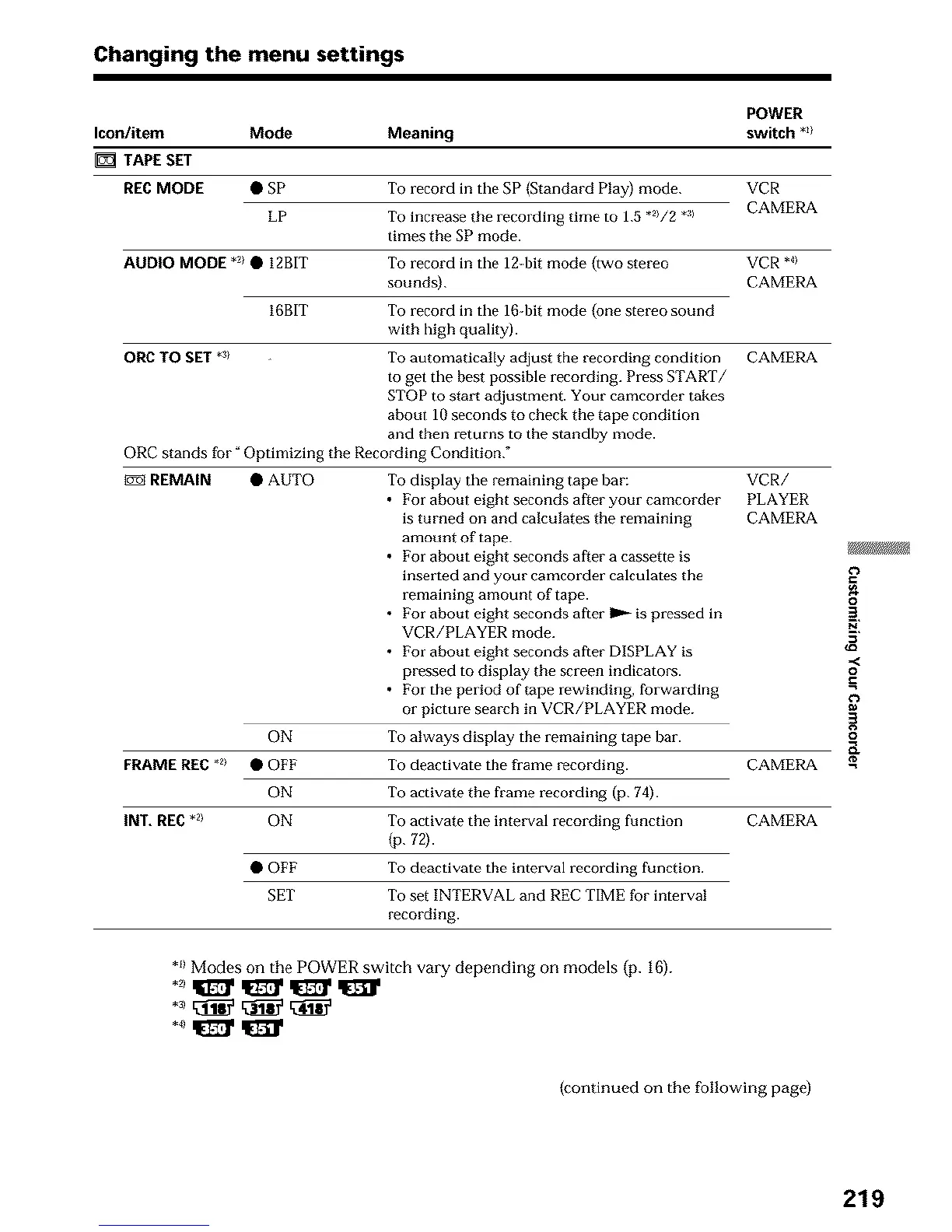
Changing the menu settings
POWER
Icon/item Mode Meaning switch *z/
TAPE SET
REC MODE • SP To record ill the SP (Standard Play) mode. VCR
LP To increase the recording time to 1.5 "2//2 *:_1 CAMERA
times the SP mode.
AUDIO MODE *_/• 12BIT
To record in the 12-bit mode {two stereo VCR *_/
sounds). CAMERA
16BIT To record in the 16-bit mode {one stereo sound
with high quality).
ORC TO SET .5/ To automatically adjust the recording condition
to get the best possible recto-cling. Press START/
STOP to start adjustment. Your camcorder takes
about 10 seconds to check the tape condition
and then returns to the standby mode.
ORC stands for _Optimizing the Recording Condition."
t_l REMAIN • AUTO To display the remaining tape bar:
• For about eight seconds after your camcorder
is turned on and calculates the remaining
amount of tape.
• l_or about eight seconds after a cassette is
inserted and your camcorder calculates the
remaining amount of tape.
• For about eight seconds after I_ _ is pressed in
VCR/PLAYER mode.
• For about eight seconds after DISPLAY is
pressed to display the screen indicator's.
• For the period of tape rewinding, forwarding
or picture search in VCR/PLAYER mode.
ON
To always display the remaining tape bar.
FRAME RE€ *2> • OFF
ON
To deactivate the fi'ame recording.
To activate the frame recording (p. 74).
INT. REC.2) ON To activate the interval recording function
{p. 72).
• OFF To deactivate the interval recording function.
SET To set INTERVAL and REC TIME for interval
recording.
CAMERA
VCR/
PLAYER
CAMERA
CAMERA
CAMERA
o
2.
,,<
o
.=
*_1Modes on the POWER switch vary depending on models (p. 16).
(continued on the following page)
219





 To Next Page