Changing the menu settings
POWER
Icon/item Mode Meaning switch *_/
OTHERS
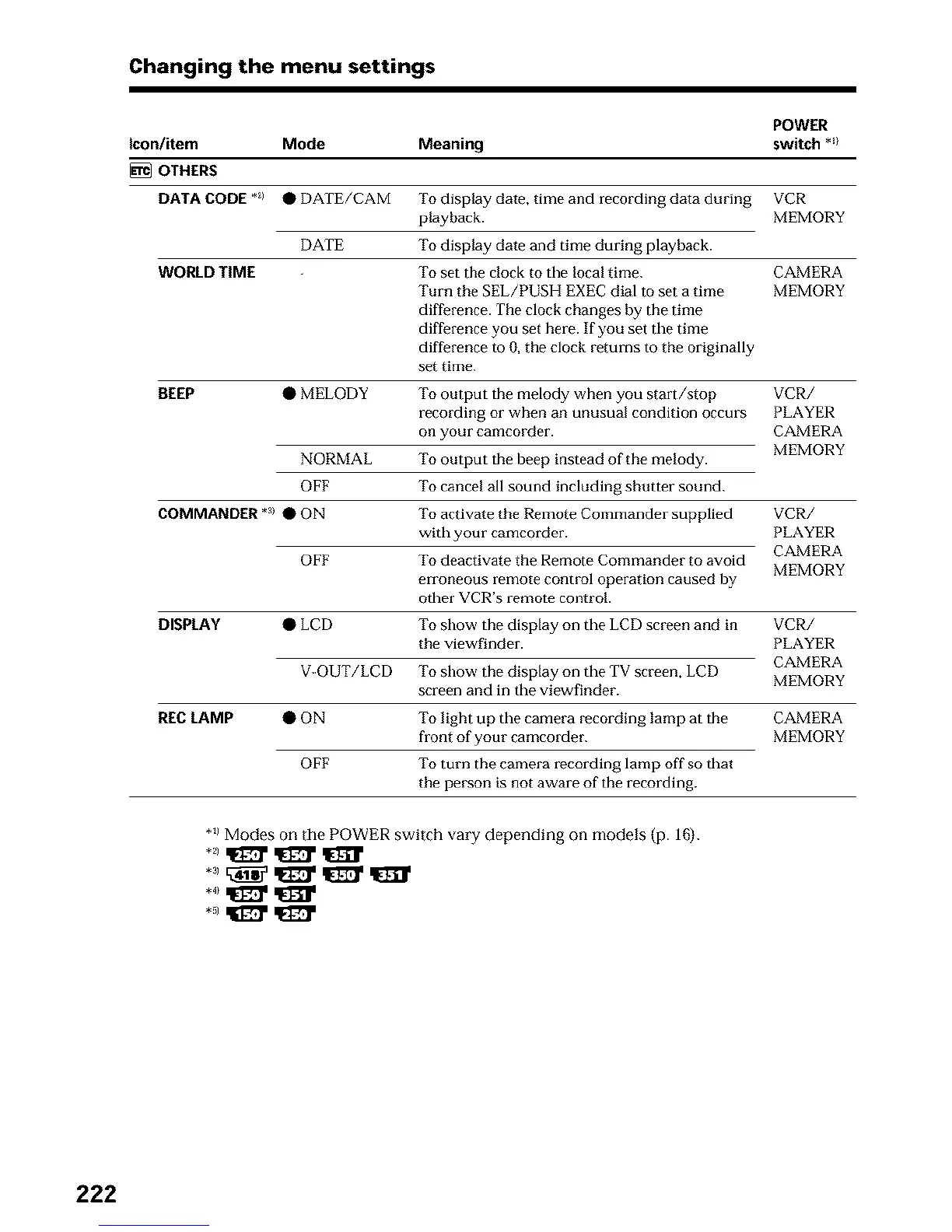
DATA CODE *_) • DATE/CAM To display date, time and recording data during VCR
playback. MEMORY
DATE
To display date and time during playback.
WORLD TIME To set the clock to the local time. CAMERA
Turn the SEL/PUSH EXEC dial to set a time MEMORY
difference. The clock changes by the time
difference you set here. If you set the time
difference to 0, the clock returns to the originally
set time.
BEEP • MELODY
To output the melody when you start/stop VCR/
recording or when an unusual condition occurs PLAYER
on your camcorder. CAMERA
MEMORY
NORMAL To output the beep instead of the melody.
OFF To cancel all sound including shutter sound.
COMMANDER *a>• ON
To activate the Remote Commander supplied
with your camcorder.
OFF To deactivate the Remote Commander to avoid
erroneous remote control operation caused by
other VCR's remote control.
DISPLAY • LCD
To show the display on the LCD screen and in
the viewfinder.
V-OUT/LCD To show the display on the TV screen, LCD
screen and in the viewfinder.
REC LAMP • ON
VCR/
PLAYER
CAMERA
MEMORY
OFF
VCR/
PLAYER
CAMERA
MEMORY
To light up the camera recording lamp at the CAMERA
front of your camcorder. MEMORY
To turn the camera recording lamp off so that
the pe_'son is not aware of the recording.
*_1Modes on the POWER switch vary depending on models (p. 1G).
*,1qIl_' qEl_'
222












 To Next Page