l P~ selects the cycle counter to change. Use any of the
values detailed in the following table.
Cycle Counter P~
M30 A 0
M30 B 1
M99 A 2
M99 B 3
l Q~ specifies the value to set the cycle counter. If Q~ is
omitted, the cycle counter is incremented by 1.
For example, if you program G10 L99 P2, the M99 A
cycle counter increments by 1.
7.6 SYSTEM FILE MANAGEMENT
To keep the files on your system backed up and organized, use
the following controls:
7.6.1 Manage System Files 170
7.6.2 Create Backup Files 170
7.6.3 Restore Backup Files 171
7.6.4 Import and Export the Tool Table 172
7.6.1 Manage System Files
Use the File tab to manage system files on the PathPilot
controller. For information, see "About System Files" (below).
To manage system files:
From the PathPilot interface, on the File tab, do any of
the following from the Controller Files window:
o
Select a file, and then select New Folder, Rename, or
Delete.
o
Select a file, and go to the Options menu. Then,
select Copy, Cut, or Paste.
To navigate through the system files:
Select Back or Home.
About System Files
Figure 7-110: File tab.
PathPilot doesn't run G-code program files from a USBdrive.
You must first transfer files to the PathPilot controller. For
information on transferring files, see "Transfer Files to and
From the Controller" (page124).
7.6.2 Create Backup Files
1. Insert a blank, formatted USB drive into the PathPilot
controller.
Note: To prevent errors when backing up and
restoring files, only use a blank, formatted USB
drive.
2. From the PathPilot interface, on the Main tab, in the
MDI Line DROfield, type ADMIN SETTINGS BACKUP.
Then select the Enter key.
PathPilot generates a backup .zip file, and the Admin
Settings Backup dialog box displays.
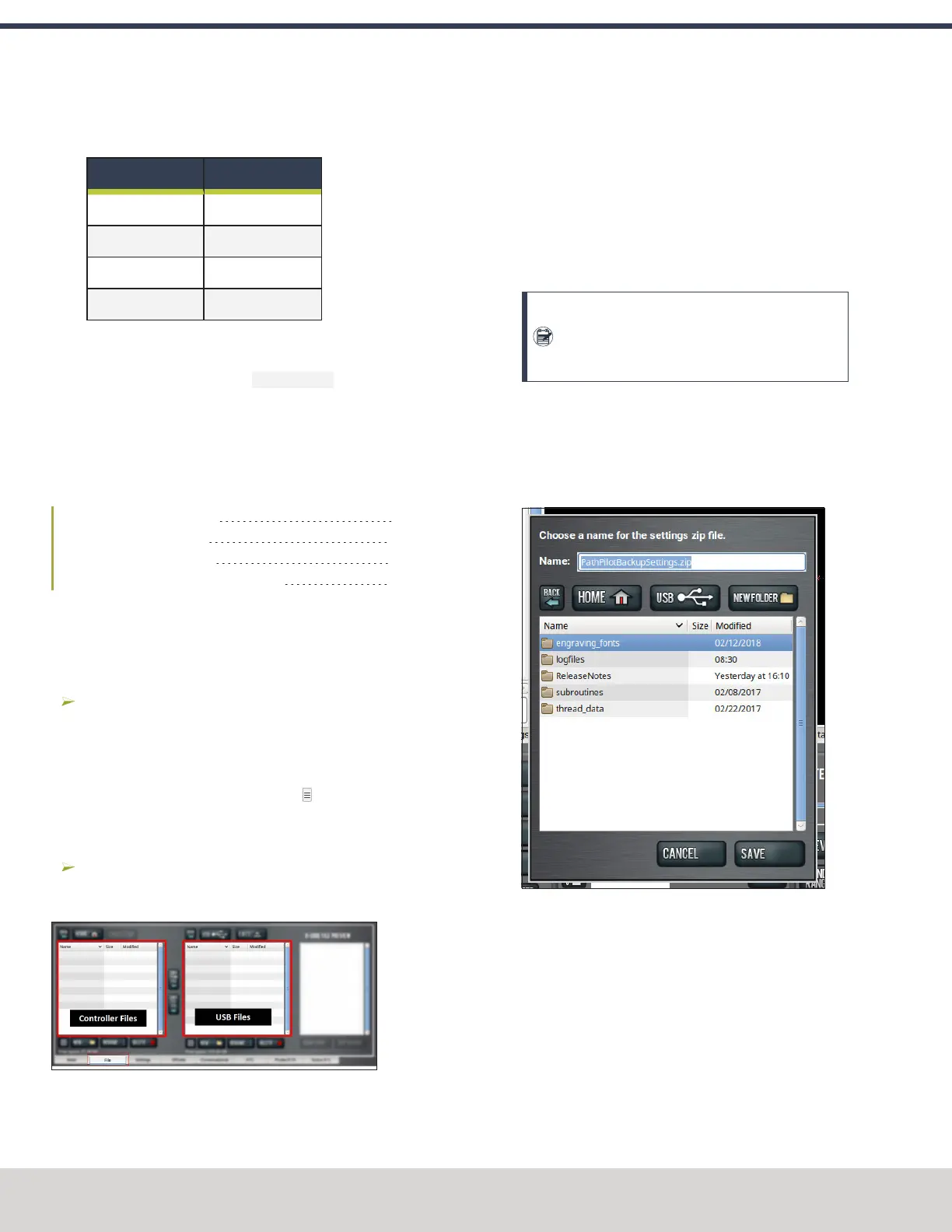
Figure 7-111: Admin Settings Backup dialog box.
3. From the Admin Settings Backup dialog box, specify
where (on the PathPilot controller or on a USBdrive) to
save the backup .zip file.
4. Select Save.
The backup .zip file is saved in the location you specified
in Step 3.
©Tormach® 2023
Specifications subject to change without notice.
Page 170 Tormach 1100M® Operator's Manual (Version 1223A)
For the most recent version, see tormach.com/support
7: PATHPILOT TOOLS AND FEATURES



 To Next Page