5. Route the loose end of the power cable to the back of
the electrical cabinet, and connect it to any of the
Accessory power outlets on the side of the electrical
cabinet.
Install the PathPilot Controller
The PathPilot controller attaches to the top of the PathPilot
Controller VESA Mount and behind the monitor.
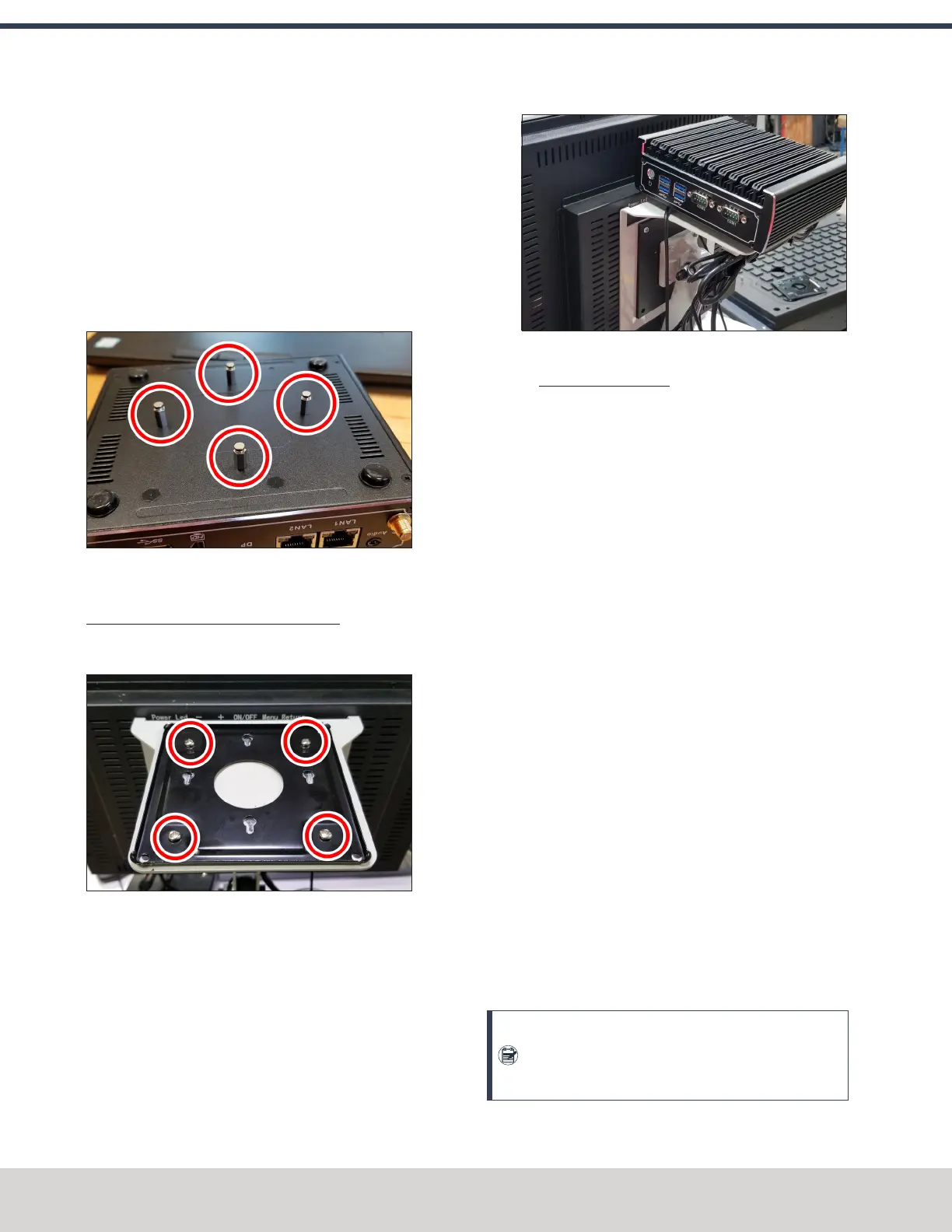
1. Put four standoffs into the controller and tighten them
by hand.
2. Find the four M4 screws and the VESA plate included
with the controller. Then, mount the VESA plate to the
PathPilot Controller VESA Mount (PN 50382). Make sure
to put it flat side down with the keyholes toward the
monitor.
3. Attach the controller to its mount by sliding the
standoffs through the key slots.
4. Connect all USB accessories to the controller:
l Jog Shuttle (PN 30616) (Optional)
l Keyboard
l Mouse
l Monitor
5. Connect the monitor's video cable to the controller.
6. Route the loose end of the video cable toward the
monitor, and then connect it to the monitor.
7. Connect the power supply to the controller.
8. Connect the loose end of the power supply to one of the
Controller/Monitor cables provided.
9. Route the power cables to the electrical cabinet.
10. Connect the power supply for the controller to any of the
Accessory power outlets on the back of the electrical
cabinet.
11. Find the Ethernet cable, and then connect it to the
Controller Communications outlet on the side of the
electrical cabinet.
12. Route the loose end of the Ethernet cable toward the
controller and then connect it.
13. Secure the wire loom, Ethernet cable, and power supply
cables to the Controller Arm with six wire tie mounts
and six cable ties.
Set Up the PathPilot Operator Console
To verify the installation of the base machine, you must use
the PathPilot controller. We recommend that you temporarily
set up the PathPilot operator console now.
Note: Wait to complete the full assembly of the
console until after you've installed all other major
accessories.
©Tormach® 2023
Specifications subject to change without notice.
Page 50 Tormach 1100M® Operator's Manual (Version 1223A)
For the most recent version, see tormach.com/support
4: INSTALLATION



 To Next Page