4: INSTALLATION
8. If the tool's shank isn't aligned, do the following:
l
Adjust the Alignment of the Tool in the Y
Direction (toward or away from the Z column)
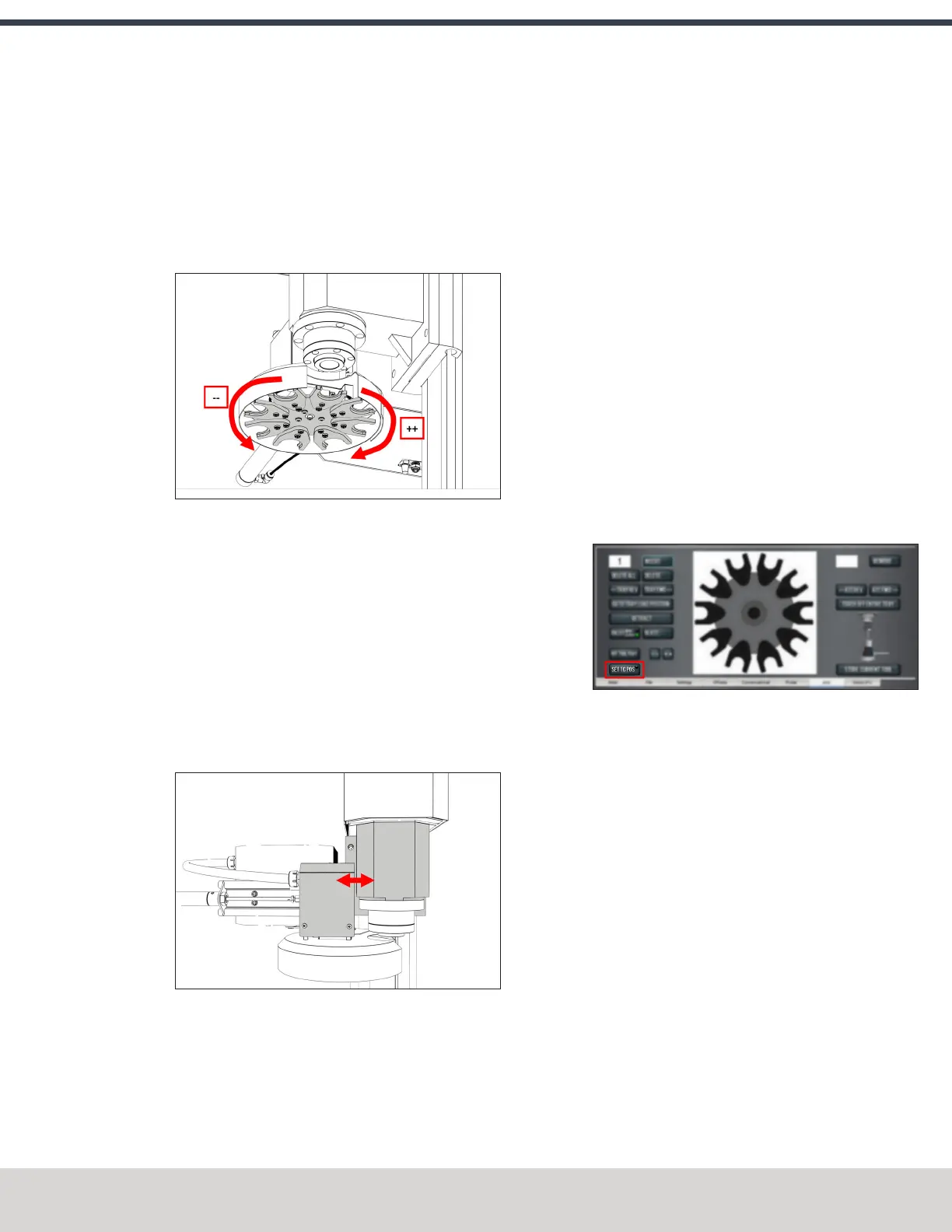
Determine if the tray must move clockwise or
counterclockwise. From the PathPilot interface, in the
ATC tab, either select -- to step the tool tray
counterclockwise or ++ to step the tool tray clockwise.
Figure 4-99: Moving the tool tray clockwise or
counterclockwise.
l
Adjust the Alignment of the Tool in the X
Direction (left or right) Determine if the tray must
move left or right. Use two wrenches to loosen the
jam nut on the end of the cylinder rod, making sure
that you don't spin the rod end when adjusting the
jam nut. Then, either turn the rod end one-half turn
further on to the cylinder rod to move the tool tray to
the left, or turn it one-half turn off of the cylinder rod
to move the tool tray to the right. Once finished,
tighten the jam nut.
Figure 4-100: Moving the tool tray left or right.
Repeat adjustments until the tool's shank is concentric
with the collet in the spindle.
9. From the PathPilot interface, on the ATC tab, select
Retract.
Verify the Alignment
1. From the PathPilot interface, select Go to Tray Load
Position.
2. Slowly jog the Z-axis down (-Z) over the tool’s shank.
3. Verify that the tool’s shank moves freely into the collet.
4. Depending on the tool's shank movement, do one of the
following:
l
Moves Freely Go to "Set the Tool Change Height"
(below).
l
Doesn't Move Freely This indicates that the ATC is
misaligned and you must realign it. Go to "Adjust the
Tool Tray Load Position" (on the previous page).
Set the Tool Change Height
1. From the PathPilot interface, slowly jog the Z-axis down
(-Z) over the tool. Stop jogging when the spindle nose
just makes contact with the shoulder of the tool holder.
2. On the ATC tab, select Set TC POS.
Figure 4-101: Set TCPOS button on the ATC tab.
The tool change position is set.
Adjust for Rotational Play
There's a small amount of rotational play built into the
Automatic Tool Changer (ATC) carousel. This play allows for
some misalignment during tool changes, and you must adjust
for it in both directions. The taper on the tool shank also helps
align the tool during a tool change.
To adjust for rotational play:
1. From the PathPilot interface, on the ATC tab, select Tray
Fwd to rotate the tray clockwise (forward) one full tool
slot.
©Tormach® 2023
Specifications subject to change without notice.
Page 77 Tormach 1100M® Operator's Manual (Version 1223A)
For the most recent version, see tormach.com/support



 To Next Page