Chapter 6 How to Operate Sampling Scope
6-30
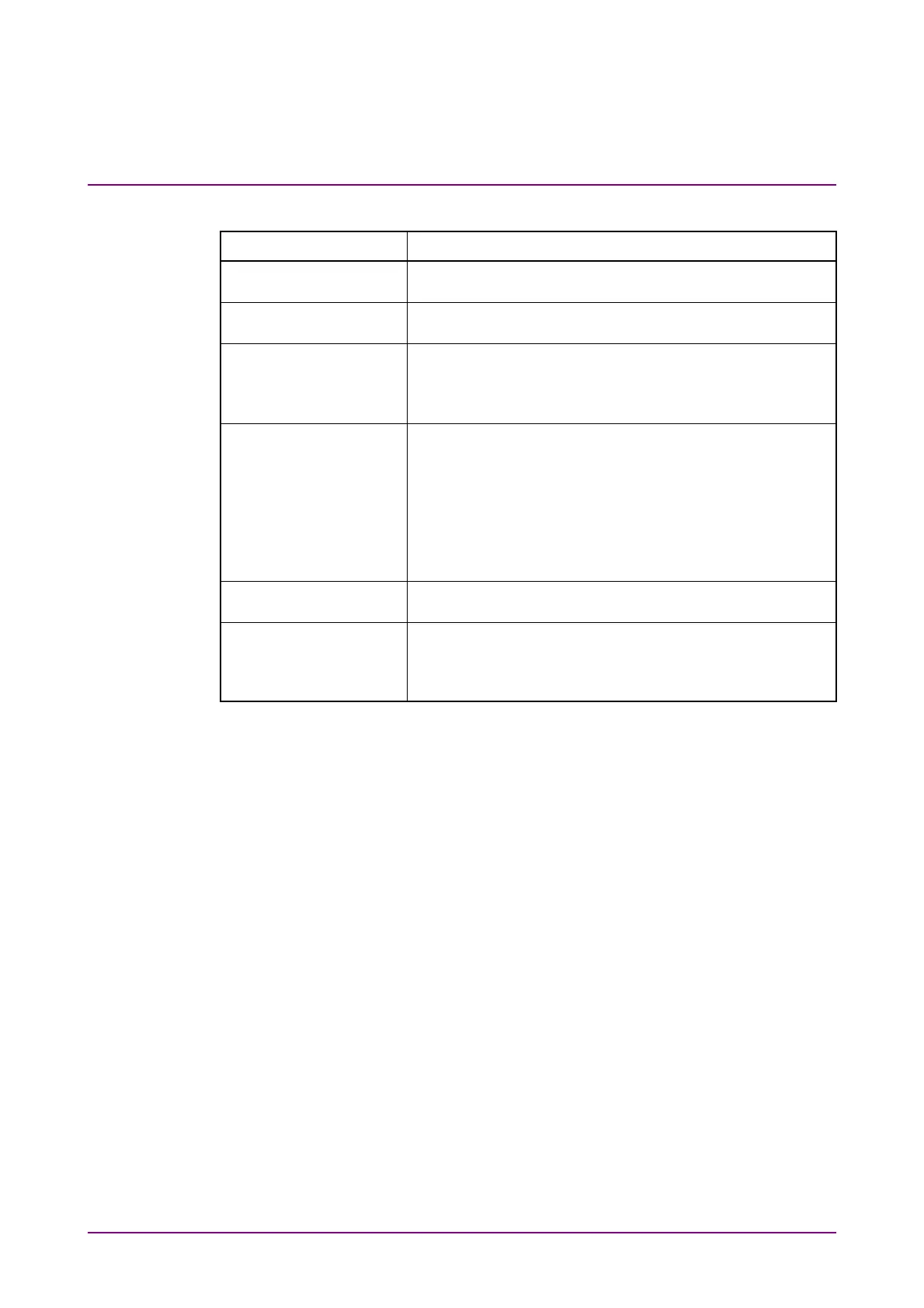
Table 6.2.3-3 Items of Setup Dialog Box (Save tab)
Item Description
EYE/Pulse Shot Clicking Capture saves the screen file in the result
window.
Inverse Background
Color
Sets the color of the save screen at EYE/Pulse Shot.
Waveforms Only On: Saves only the waveform displayed in the Result
window to a file. The jitter graph is not saved.
Off: Saves the whole Result window to a file. The jitter
graph is not saved.
Pattern Capture Clicking Capture captures amplitude data of one cycle of
test pattern in the waveform being displayed and save it
in a test file. This function is available when Sampling
Mode is Coherent Eye and Test Pattern is other than
Variable.
The text file is saved to the following folder.
C:\Users\Public\Documents\Anritsu\MX210000A
\UserData\Result\TXT
Samples / UI Sets the number of times that the amplitude is measured
per UI by Pattern Capture (number of samples).
Support Information Clicking Save saves “BERTWaveSupportInformation.zip”
on the desk top. This file includes information that could
be useful for solving a problem. Attach the file when you
inquire us about the MP2110A behavior.














 To Next Page