Chapter 6 How to Operate Sampling Scope
6-34
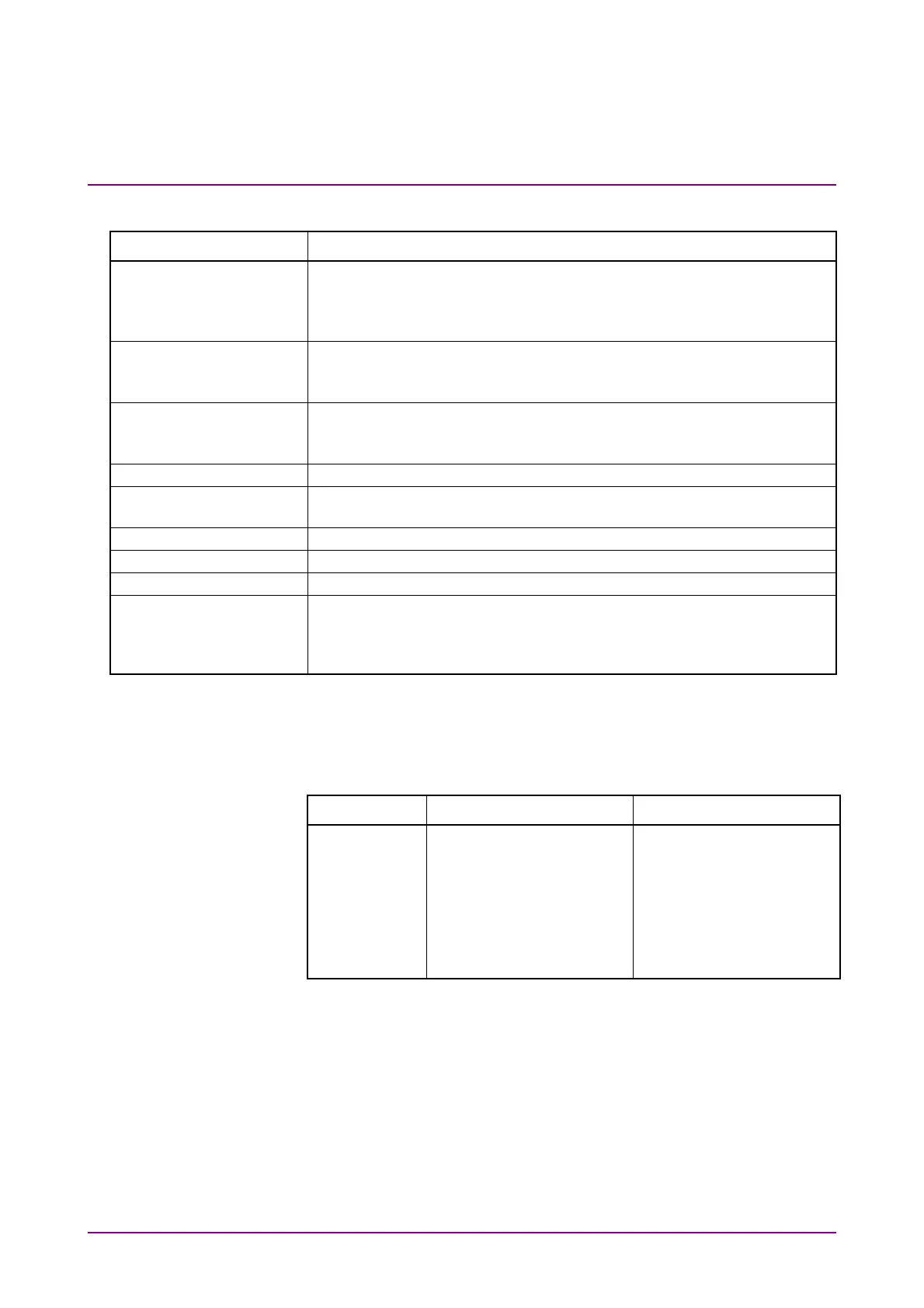
Table 6.2.4-1 Items of Amplitude/Time Tab
Item Description
Display On: Displays the Amplitude/Time measurement results in the Result
window.
Off: Does not display the Amplitude/Time measurement results in the
Result window.
Item Selection Select measurement items.
When MP2110A-095 or MP2110A-096 is installed, a button to switch
the display of measurement items is displayed.
Item To select an item or items you want to add or delete, click on the right
column. Click on the selected item to deselect it.
Multiple cells can be selected by dragging the mouse.
All Delete Deletes all items.
All Delete Channel
Item
Deletes all items for the selected channel.
Delete Deletes the item(s) selected in the Item list for the selected channel.
All Add Select Items Adds the item(s) selected in the Item list to all channels.
Add Adds the item(s) to the Item list for the selected channel.
Measure Setup Click the button to display the dialog box for setting the measurement
condition.
PAM 4 is displayed when MP2110A-095 is installed.
Jitter is displayed when MP2110A-096 is installed.
Depending on options, the settings are restricted as follows:
MP2110A-021
At Amplitude/Time in the Measurement dialog box, the following
measurement results are invalid values.
Signal Type NRZ PAM4
Measurement
Item
Average Power (dBm),
Average Power (mW),
Extinction Ratio, OMA
(mW), OMA (dBm), OMA
at Crossing, TDEC, VECP,
RIN OMA
TDECQ, Outer OMA
(dBm), Outer OMA (µW),
Outer ExR, Ceq,
Partial TDECQ,
Over/Under-shoot,
P -P Power, Transition
Time (Rise/Fall),
Transition Time (Slow)
MP2110A-095
When the MP2110A-095 is installed, the RIN OMA can be measured.














 To Next Page