1.2.2 Connectors
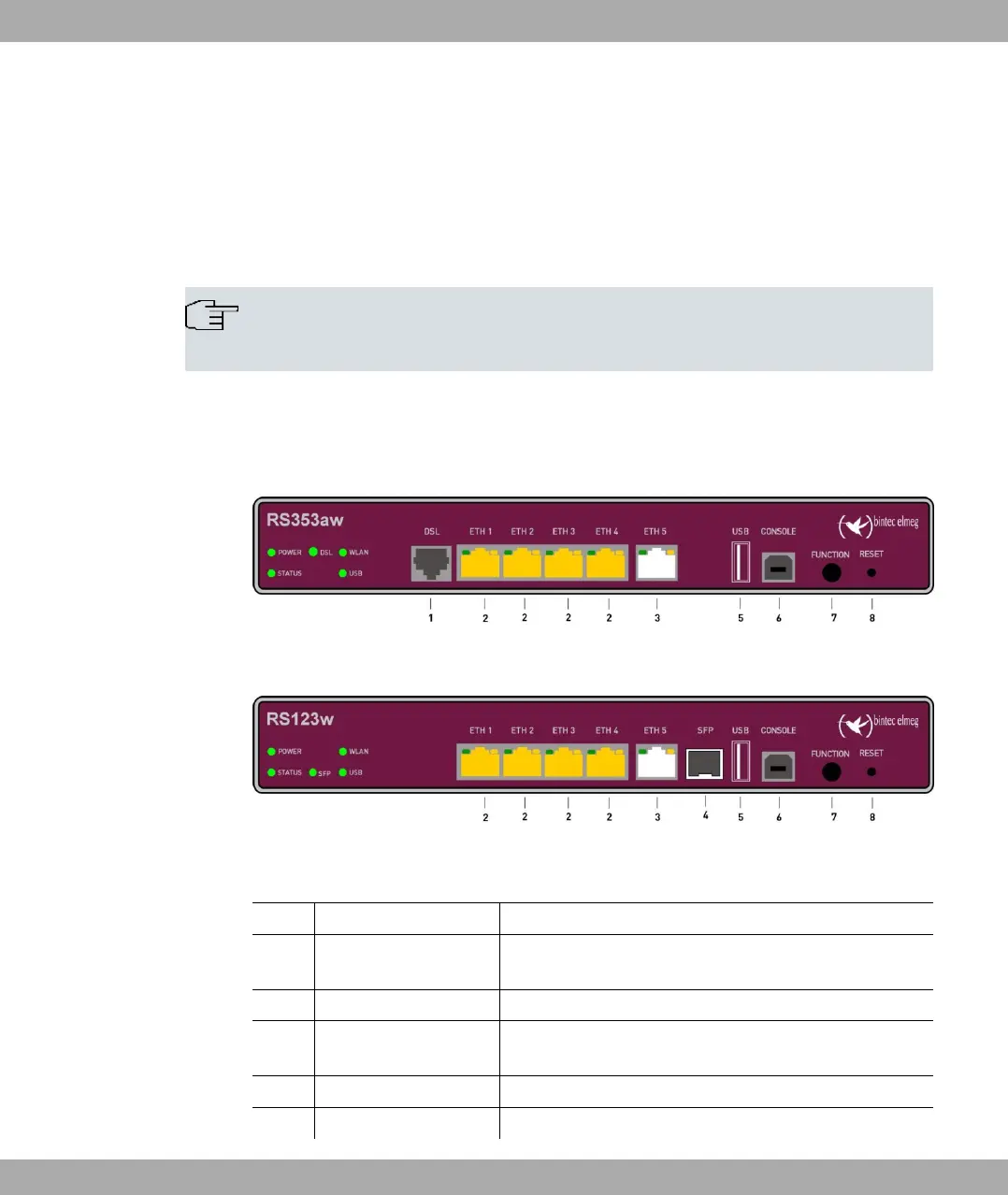
The devices provides five Gigabit Ethernet ports which can be independently configured for
use in a LAN, WAN, or DMZ, a USB port (type A), as well as a USB console port (type B).
Furthermore, the devices bintec RS123 and bintec RS123w have a SFP slot for optical
fiber expansion modules.
Note
Note that the switch port ETH5 is deactivated if a SFP module is equipped.
The devices bintec RS353a and bintec RS353aw also feature a DSL connection.
The connections are arranged as follows:
Fig. 6: bintec RS353aw front panel
Fig. 7: bintec RS123w front panel
Front panel connections
1 DSL (gray) VDSL interface (RS353a, RS353aw)
2 ETH1 / ETH2 / ETH3 /
ETH4 (yellow)
10/100/1000 Base-T Ethernet interfaces
3 ETH5 (white) 10/100/1000 Base-T Ethernet interfaces
4 SFP SFP Slot for 1000 Mbit/s Ethernet SFP module (RS123
and RS123w)
5 USB USB connection type A
6 USB CONSOLE USB console type B
bintec elmeg GmbH
1 Installation
bintec RS Series 13



 To Next Page