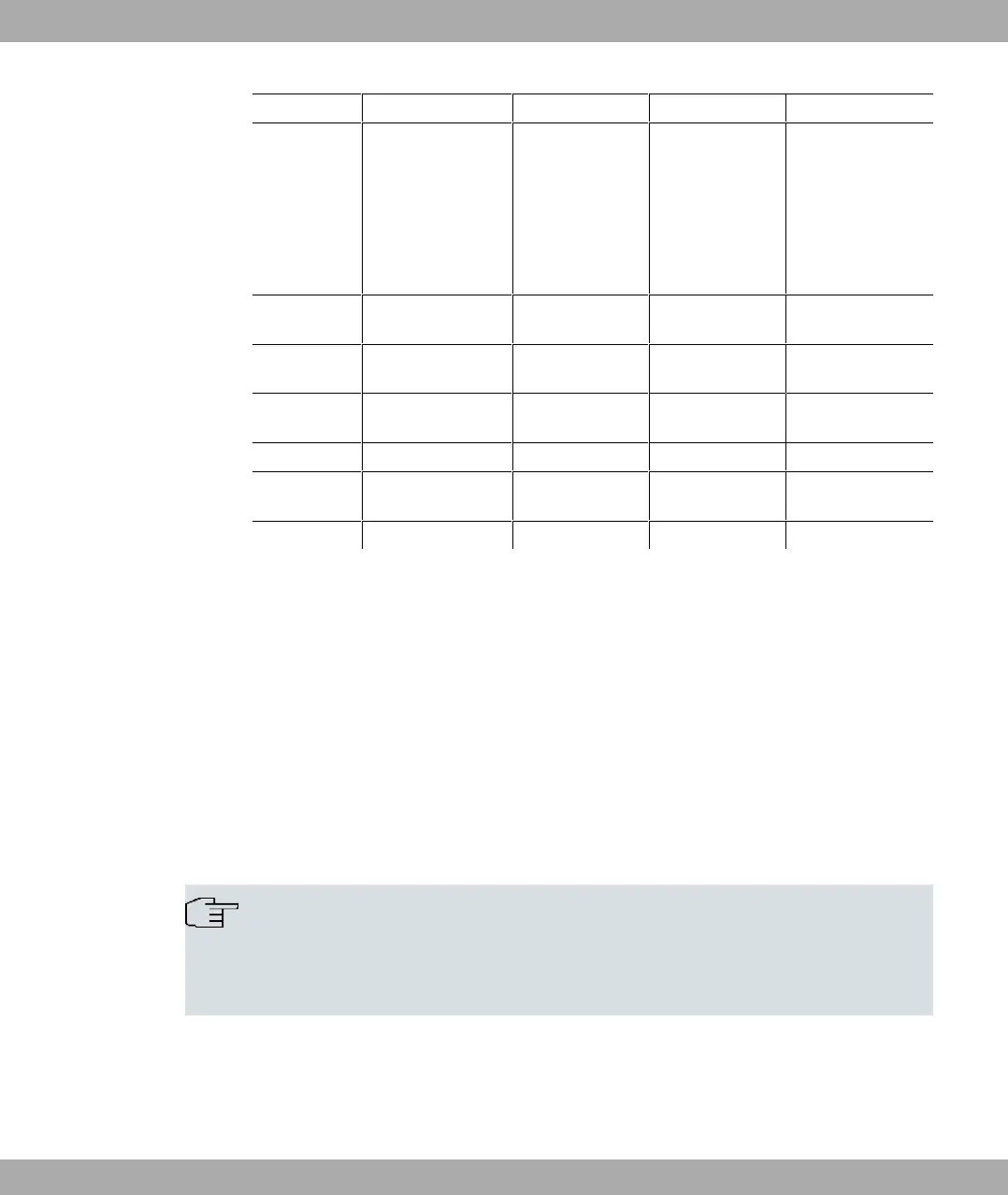
Property bintec RS123 bintec RS123w bintec RS353a bintec RS353aw
(antennas)
and 5 GHz;
2 TX, 2 RX (2x2)
Channel level (2.4
GHz / 5GHz)
RSMA socket
and 5 GHz;
2 TX, 2 RX (2x2)
Channel level (2.4
GHz / 5GHz)
RSMA socket
Available sock-
ets:
Ethernet inter-
face
RJ45 socket (yellow) RJ45 socket
(yellow)
RJ45 socket
(yellow)
RJ45 socket (yellow)
Ethernet inter-
face
RJ45 socket (white) RJ45 socket
(white)
RJ45 socket
(white)
RJ45 socket (white)
DSL - - RJ45 socket (gray) RJ45 socket (gray)
USB USB-Anschluss type
A
USB-Anschluss
type A
USB-Anschluss
type A
USB-Anschluss type
A
USB Console USB socket type B USB socket type B USB socket type B USB socket type B
1.2.6 Reset
If the configuration is incorrect or if your device cannot be accessed, you can reset the
device to the ex works standard settings using the Reset button on the back of the device.
All the existing data will be deleted if you do this.
Proceed as follows:
(1) Switch off your device.
(2) Press the Reset button on your device.
(3) Keep the Reset button on your device pressed down and switch the device back on.
(4) After the LED has flashed five times, release the Reset button.
Note
If you delete the boot configuration via the GUI (menu Maintenance->Software
&Configuration) all passwords are also reset and the current boot configuration is de-
leted. The next time, the device will boot with the standard ex works settings.
You can now configure your device again as described from Basic configuration on page 25
.
bintec elmeg GmbH
1 Installation
bintec RS Series 19



 To Next Page