Before Configuring Failover
Use the same LAN ports for transferring data and configure both TeraStations with static IP addresses for the
purposes of failover.
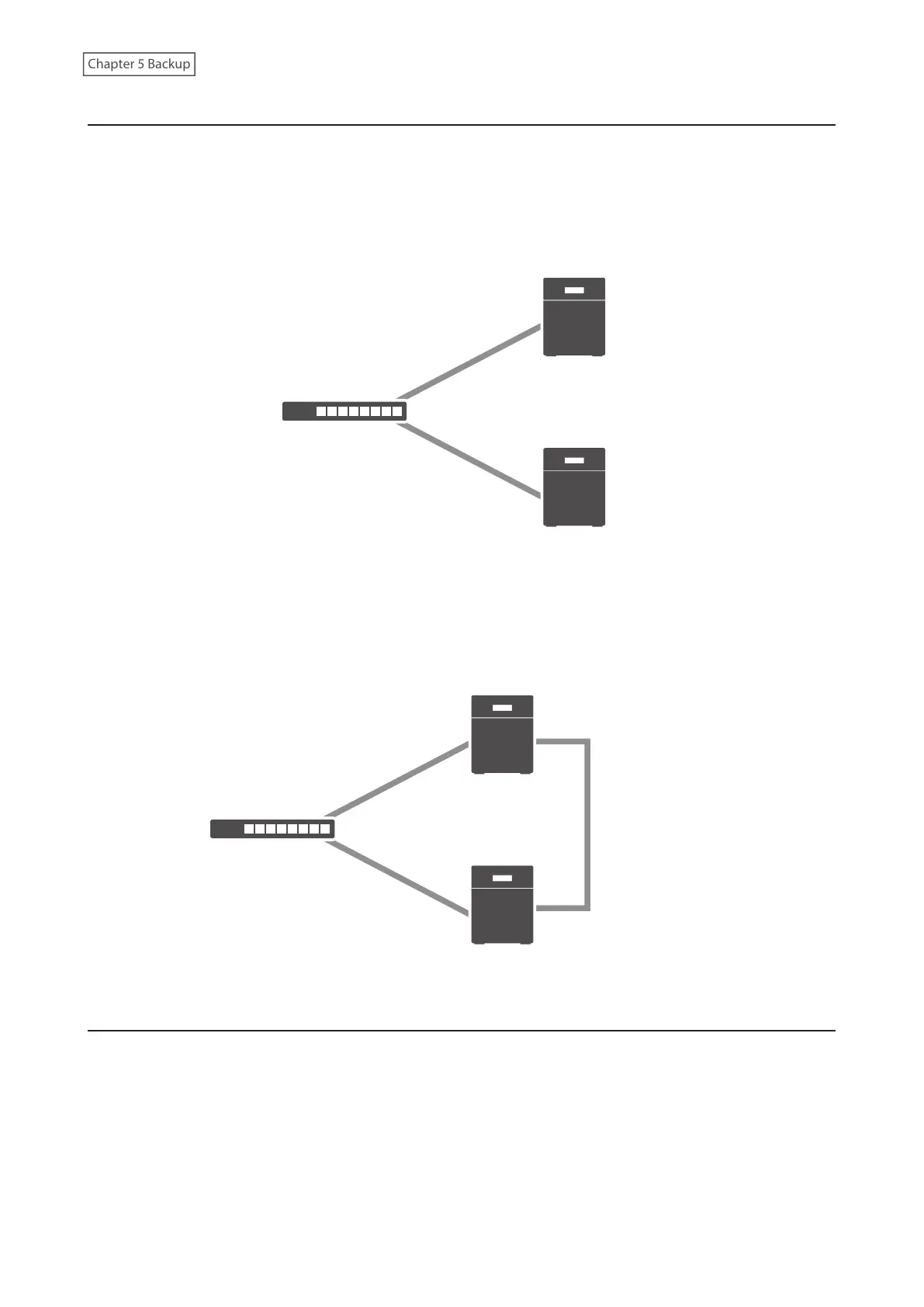
Using the Same LAN Port for Both File Sharing and Failover
Using this setup, if the main TeraStation fails, the backup TeraStation will replace it completely. The backup
TeraStation will be updated over normal network traffic.
Main
Backup
Network
LAN port 1
(Static IP)
LAN port 1
(Static IP)
Using Different LAN Ports Between File Sharing and Failover
With this setup, the backup TeraStation and main TeraStation are connected by a second Ethernet cable connecting
their LAN port 2. Updating is done over this dedicated network path, so updates are quicker and don’t interfere with
normal network traffic.
LAN port 2
(Static IP)
LAN port 2
(Static IP)
Main
Backup
Network
LAN port 1
(Static IP)
LAN port 1
(Static IP)
Usage Restrictions
Functional Restrictions
Failover is not available when any of the following functions are enabled:
Replication, sleep mode, LVM, iSCSI, port trunking, Amazon S3, Dropbox Sync, Microsoft Azure Storage Sync,
Microsoft OneDrive Sync
Failover is not available when the I52 message appears, or any of the following settings remain or have been
configured:
114















 To Next Page