1/1/2016 1/1/2017 1/1/2018 1/1/2021
Antivirus
software
updates
activated
Extension
(9/1/2016)
License period
before extension
License period
after extension
Up to five years
(The license period cannot be
extended beyond five years)
Note: It’s not possible to register a serial number that would extend the total license period beyond five years, such
as a second three-year license after three years.
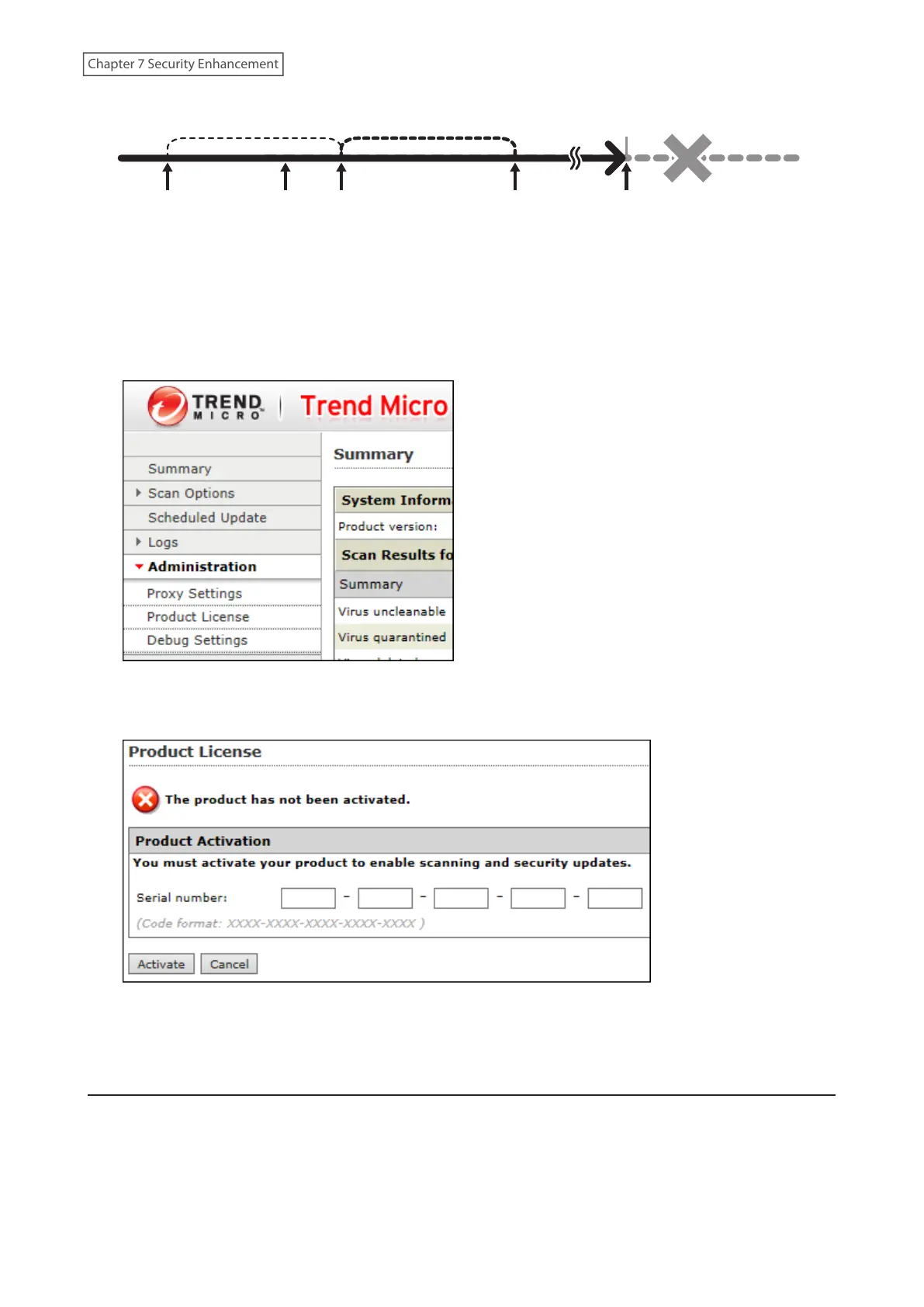
1 From the left-side menu of the Trend Micro NAS Security settings page, click Administration> Product License.
2 Enter the serial number from the “Trend Micro NAS Security License Pack Guide”, included in your package.
Click Activate.
The new license is now registered.
To check the status of the current license, open the Trend Micro NAS Security settings page and navigate to
Administration> Product License on the left-side menu.
Connecting Through a Proxy Server
If you must pass through a proxy server to connect to the Internet in your network environment, follow this
procedure to set the IP address of the proxy server and other settings.
198
Chapter 7 Security Enhancement















 To Next Page