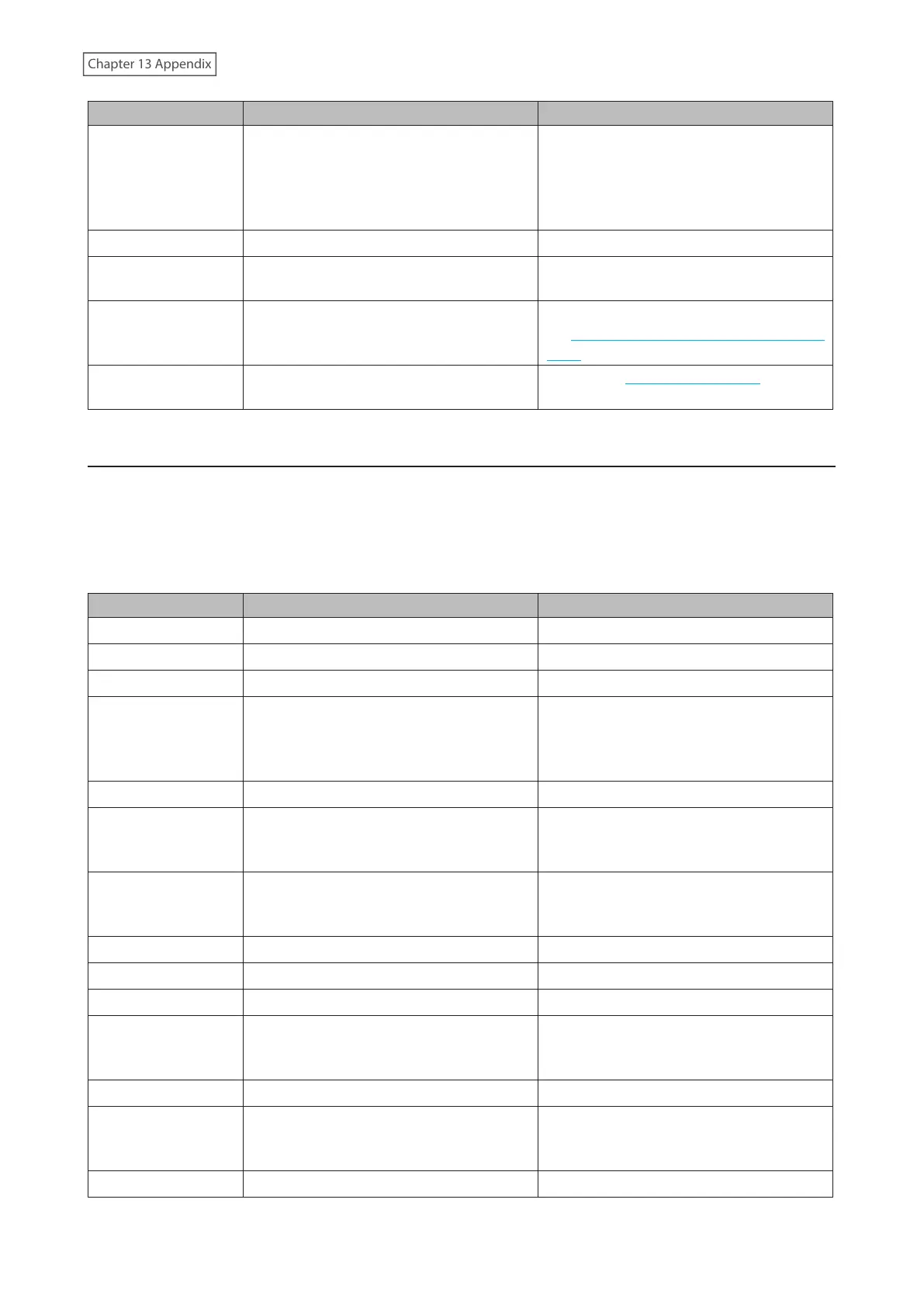
Code Description Corrective Action
I64
Connecting to the cloud storage service
failed.
Open Settings and check the status of
the job that failed for the cloud service.
Refer to the error log on the job list of the
specific cloud storage service and check
the cause of the error.
I66
The free space has decreased to 1% or less. Increase the free space.
I70
There is not enough space to save file
access logs.
Delete file access logs to free up space.
I72
The target folder for saving logs has been
changed to the system area.
Reconfigure the settings by referring to
the “Changing Archive Rules for File Access
Logs” section in chapter 10.
I75
Some items could not be migrated.
Refer to the NAS migration guide for the
detailed corrective actions.
Information Events
After you change any settings, the info LED will glow amber. Confirm the current status from the Dashboard
in Settings or by using NAS Navigator2. If NAS Navigator2 displays the status as an unknown error, check the
Dashboard in Settings for the status details.
If there is a corresponding corrective action described below for the code, try it first. If the code is still displayed after
trying the corrective action, contact Buffalo technical support for assistance.
You can click the “Clear” button to delete messages from the Dashboard.
Code Description Corrective Action
I01
Checking the system area. -
I13
Formatting the RAID array. -
I14
Checking the RAID array. -
I15
Examining the error status of the RAID
array.
Note: Transfer speeds are slower during
the examination process.
-
I16
Creating the RAID array. -
I17
Resynchronizing the RAID array.
Note: Transfer speeds are slower during
resynchronization.
-
I18
Recovering the RAID array.
Note: Transfer speeds are slower during
the rebuilding process.
-
I19
Rewriting drives in the TeraStation with 0s. -
I20
Formatting the drive. -
I21
Checking the drive. -
I23
The initialization process has been started
by using the init button and settings are
being initialized.
-
I25
Updating the TeraStation firmware. Do not turn off the TeraStation’s power.
I26
The initialization process has been started
by using Settings and all settings are being
initialized.
-
I27
Checking the USB drive. -
267















 To Next Page