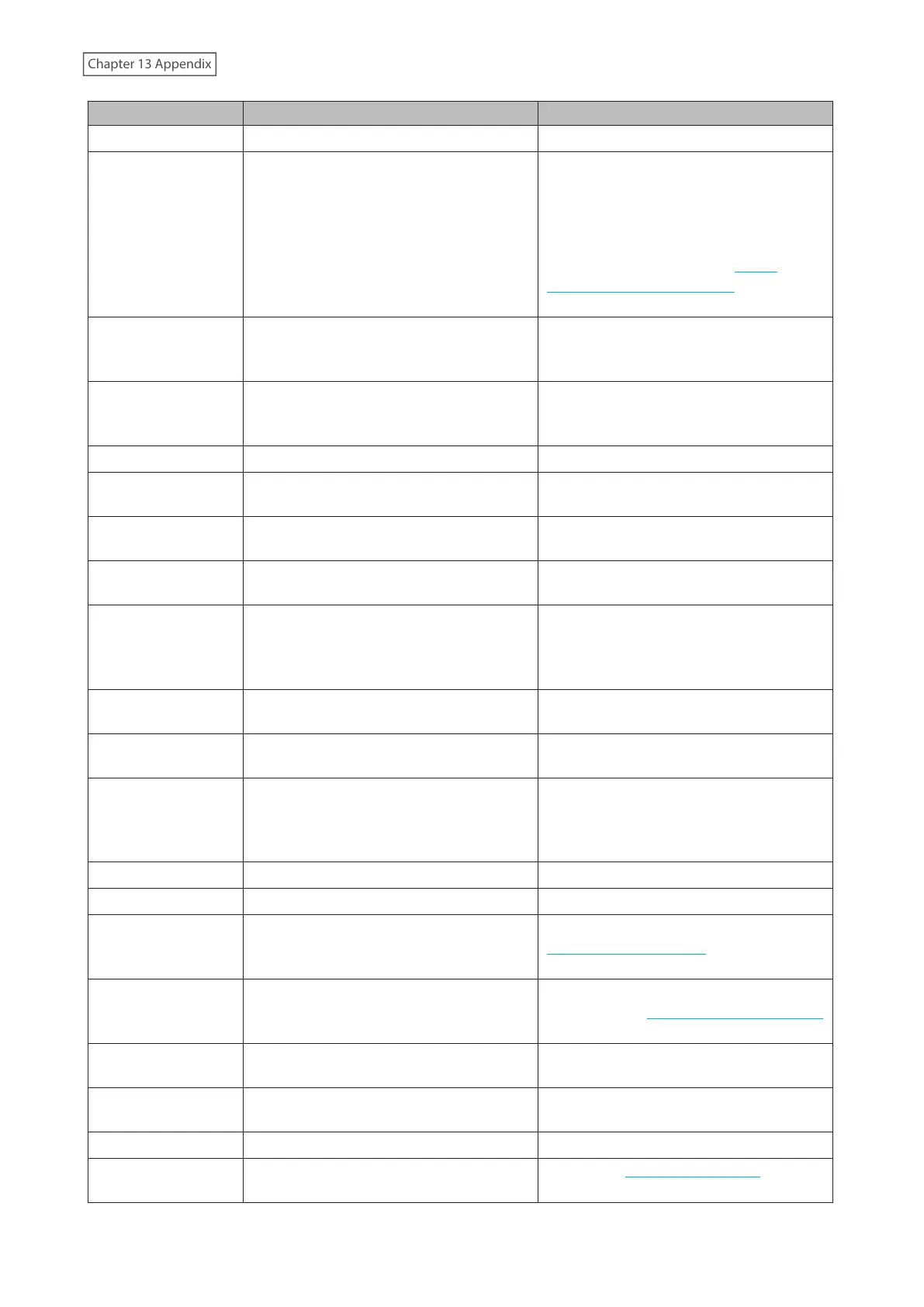
Code Description Corrective Action
I28
Formatting the USB drive. -
I31
Appears before the function button is
pressed in order to use a newly-inserted
drive.
Press the function button. If the RAID array
enters degraded mode, the array will be
rebuilt using the new drive. Otherwise, the
new drive will be set as a hot spare.
To use a drive as normal instead of
a hot spare drive, refer to the “Drive
Replacement for a Hot Spare” section in
chapter 11.
I32
Appears after replacing the drive when the
RAID array needs to be rebuilt in Settings
or formatting is necessary.
From Settings, either recover the RAID
array or format the drive.
I37
The initialization process has been started
by using the USB initialization drive and
settings are being initialized.
-
I38
Settings initialization is finished. -
I40
Beginning settings initialization. All data
on the drive in slot 1 will be deleted.
-
I41
Press the function button to start the
settings initialization process.
-
I42
Preparing to start the settings initialization
process.
-
I43
The TeraStation was started from the USB
initialization drive, but the settings cannot
be initialized from this USB initialization
drive.
-
I46
Data migration or conversion (RAID
migration) is in progress.
Do not turn off the TeraStation’s power.
I47
Data migration or conversion (RAID
migration) is in progress.
Do not turn off the TeraStation’s power.
I48
This TeraStation is ready to become
the failover backup device for the main
TeraStation.
Press and hold down the function button
of the failover backup TeraStation until it
stops beeping to accept failover backup
status.
I50
Failover maintenance is in progress. Do not turn off the TeraStation’s power.
I51
Initializing the failover configuration. Do not turn off the TeraStation’s power.
I52
A new firmware version has been released.
Update the firmware by referring to the
“Updating the Firmware” section in chapter
10.
I61
The unit is in drive setup mode.
Recover from drive setup mode by
referring to the “Power LED Keeps Blinking”
section in chapter 11.
I65
The free space has decreased past the
configured threshold percentage.
Increase the free space or change the
threshold to a lower value.
I71
The space is occupied so older logs were
removed.
Delete file access logs to free up space.
I73
Data or settings migration is in progress. -
I74
Data or settings migration has finished.
Refer to the NAS migration guide for the
detailed corrective actions.
268















 To Next Page