Chapter 13 Appendix
Info and Error LEDs
Errors
If a critical error occurs, the error LED will glow red. Confirm the current status from the Dashboard in Settings or by
using NAS Navigator2. If NAS Navigator2 displays the error as an unknown error, check the Dashboard in Settings for
the error details.
If there is a corresponding corrective action described below for the code, try it first. If the code is still displayed after
trying the corrective action, contact Buffalo technical support for assistance.
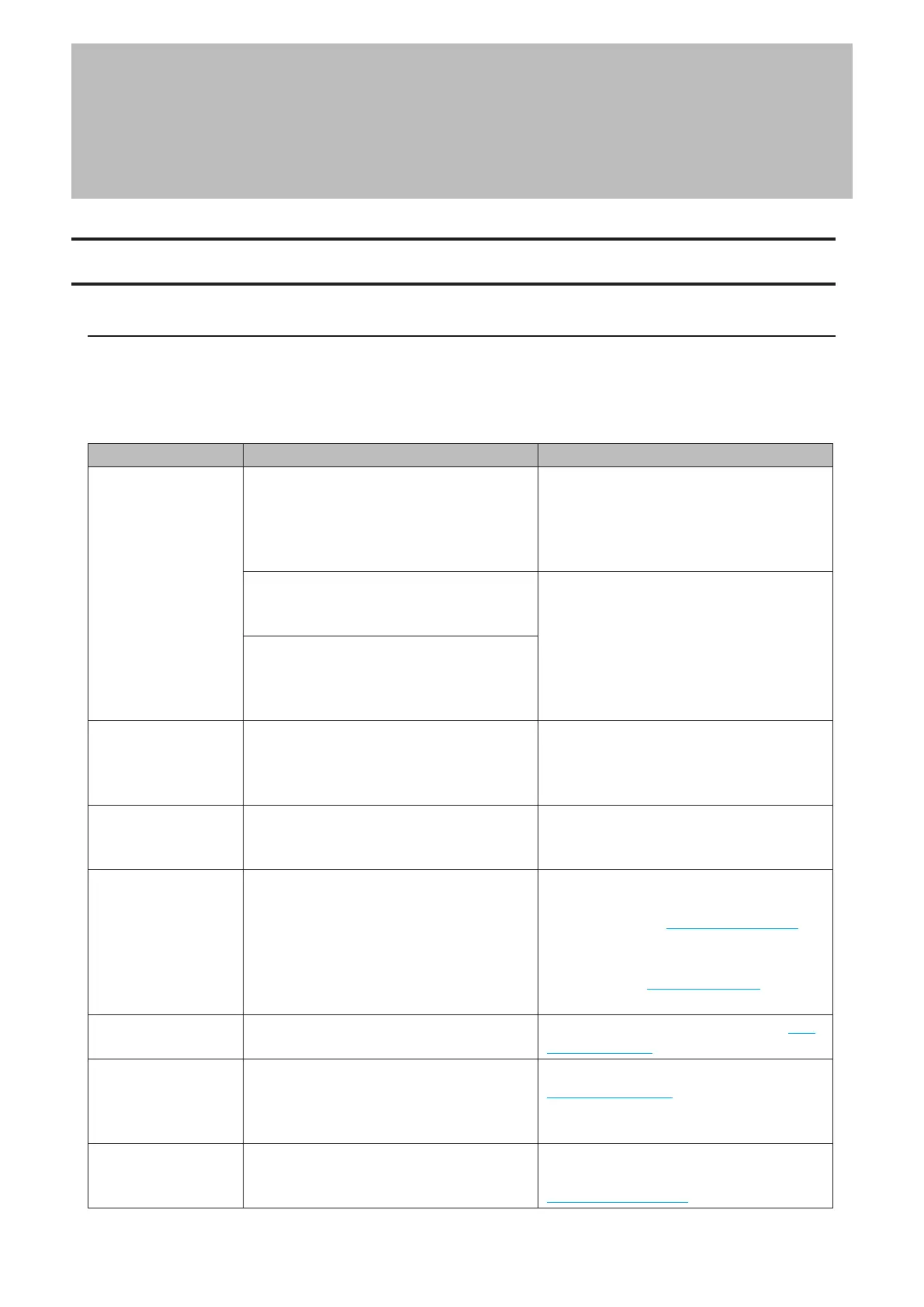
Code Description Corrective Action
E10
The TeraStation is running on the UPS
battery due to a power outage.
Shut down the TeraStation safely and wait
until the power outage ends. If certain
settings are configured, the TeraStation
may shut down automatically when the
error is detected.
If the setting to use the UPS connected to
this TeraStation has been configured, the
UPS cable may be disconnected.
Verify that the UPS cable or Ethernet cable
is connected properly.
If the setting to use the UPS connected to
another TeraStation on the same network
has been configured, the Ethernet cable of
this TeraStation may be disconnected.
E11
An error occurred in the fan speed.
Check that no foreign objects or dust are
clogging the fan. If any foreign objects or
dust are found, use a pair of tweezers, an
air duster, or other tools to remove them.
E12
A rise in the system temperature may have
exceeded the allowable safety value.
Move the TeraStation to a cool location. Do
not place objects in the area around the
TeraStation.
E14
The RAID array cannot be mounted.
If the message appears after initial bootup,
make sure drives are inserted properly
by referring to the “Re-Inserting Drives”
section in chapter 11. For all other cases,
run a drive check on the RAID array by
referring to the “Checking Drives” section
in chapter 4.
E16
Unable to find the drive.
Re-insert the drive by referring to the “Re-
Inserting Drives” section in chapter 11.
E22
Unable to mount the drive.
Format the drive by referring to the
“Formatting Drives” section in chapter 4.
After formatting, if the error still appears
after rebooting, replace the drive.
E27
Unable to find the failover backup
TeraStation.
Reconfigure the failover backup
TeraStation for failover by referring to the
“Configuring Failover” section in chapter 5.
265















 To Next Page