12 The process is complete once you close the confirmation window that appears.
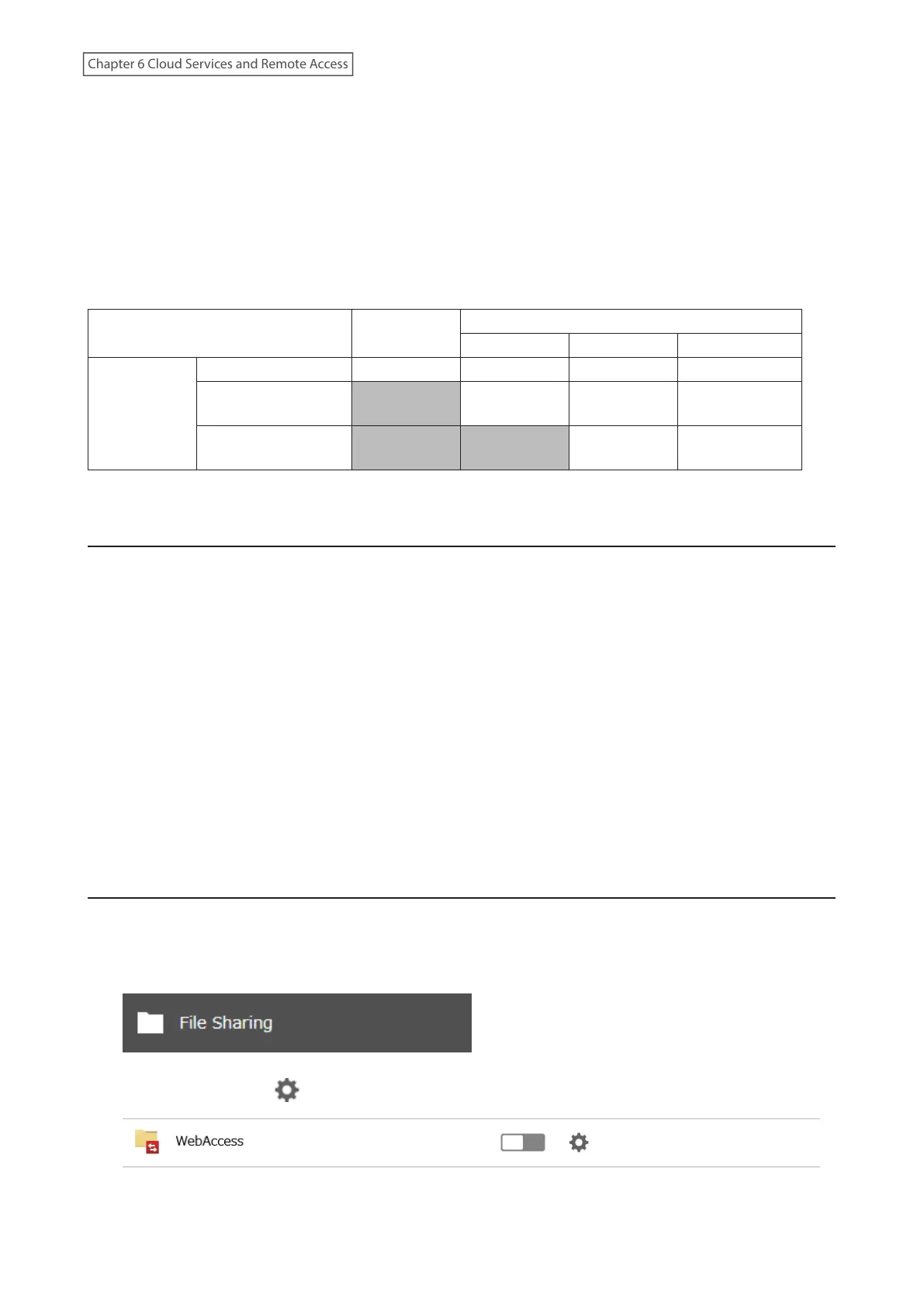
Note: Whether a user or group can access a folder through WebAccess depends on a combination of WebAccess
settings and the shared folder’s settings.
Allow anonymous: Anyone can access (view) shared folders. (Access restrictions configured for shared folders will
not work.)
Allow all groups and users: All groups and users registered on the Buffalo NAS device can use WebAccess. (Access
restrictions configured for shared folders will not work.)
Use inherited folder permissions: Users and groups have the same access permissions with WebAccess that they
do locally. If access restrictions are not set for the shared folder, then this option will not be shown.
Not logged in
Access restrictions for the logged-in users
No access Read-only Read and write
WebAccess
permissions
Allow anonymous R R/W R/W R/W
Allow all groups and
users
- R/W R/W R/W
Use inherited folder
permissions
- - R R/W
R/W: Read and write, R: Read-only, -: No access
Accessing via WebAccess
There are many ways to access WebAccess folders depending on your device:
For iOS or iPadOS Devices
To access from an iOS or iPadOS device, install the “WebAccess i” app for an iOS device or the “WebAccess i HD” app
for an iPadOS device from the App Store. Refer to the help guide for the app for more detailed information.
For Android Devices
To access from an Android device, install the “WebAccess A” app from Google Play. Refer to the help guide for the
app for more detailed information.
For Computers
Use a web browser on a computer; supported browsers include Microsoft Edge, Firefox, Google Chrome, Internet
Explorer 9 or later, Safari 9 or later. Refer to the help guide at the BuffaloNAS.com website after connecting with your
BuffaloNAS.com name for more detailed information.
Unable to Create a BuffaloNAS.com Name
If UPnP is disabled on your router, creating the BuffaloNAS.com name may fail. If this occurs, try the following
procedure.
1 From Settings, click File Sharing.
2 Click the settings icon ( ) to the right of “WebAccess”.
3 Click Edit.
181
Chapter 6 Cloud Services and Remote Access















 To Next Page