Conditions Trap Name
Backup fails. nasBackupStatus
The RAID array is in degraded mode. nasDiskStatus
An error occurs and an error code is displayed. nasErrorOccur
An event occurs and an event code is displayed. nasInformationOccur
Proxy Server
If you place the TeraStation on a network that passes through a proxy server, configuring the proxy server settings is
recommended. Unless you configure the proxy settings, firmware updates in Settings will not work. To configure the
settings, follow the procedure below.
1 From Settings, click Network.
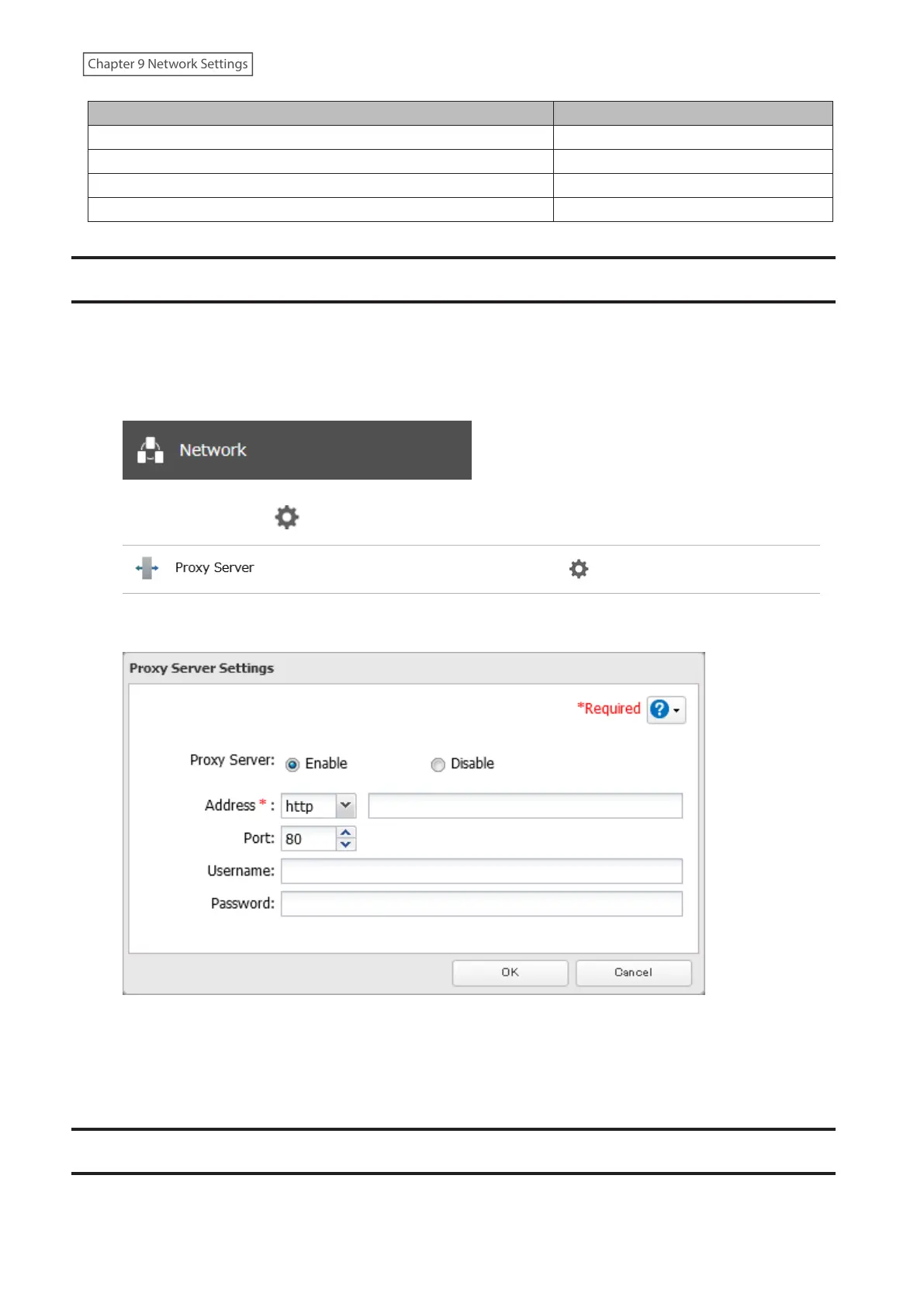
2 Click the settings icon ( ) to the right of “Proxy Server”.
3 Enable “Proxy Server”.
4 Enter the proxy server IP address or hostname, port number, username and password, then click OK.
Once you configure the proxy server settings, you may use the settings for features that will link with cloud storage
services by selecting the “Configured settings” option on each settings page.
Jumbo Frames
If your other network devices support jumbo frames, you may be able to improve network performance.
225
Chapter 9 Network Settings















 To Next Page