SECTION 31 - IMPLEMENT POWER TAKE-OFF (PTO) - CHAPTER 2
31-3
WARNING
Disengage the PTO, turn off the tractor engine
and remove the key. Wait for all movement to
stop before leaving operator’s position. Never
adjust, lubricate, clean or unplug machine with
the engine running. Failure to comply could
result in death or serious injury.
Slip Clutch - Removal
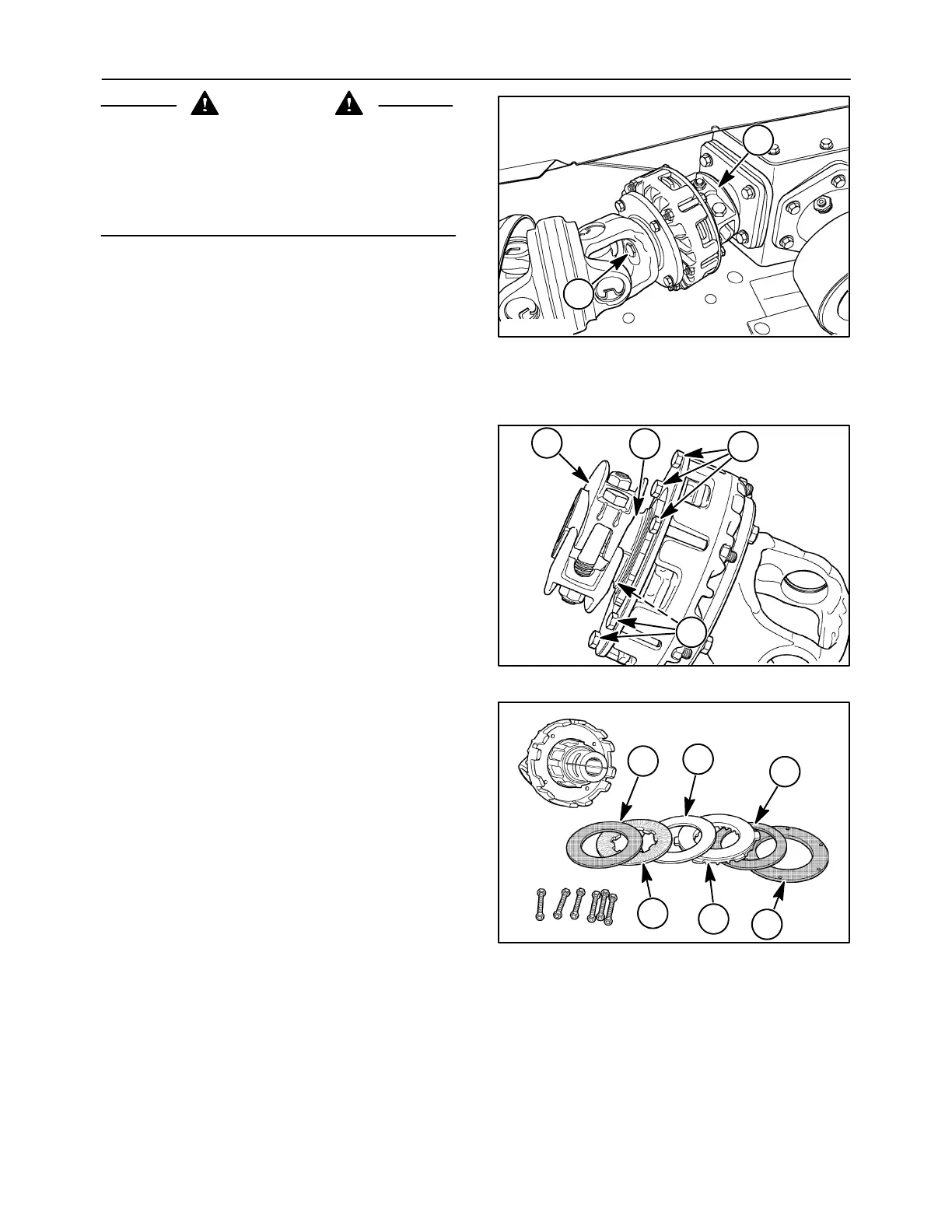
1. Loosen and remove clamp, 1, from the hub of the
overrunning clutch.
2. Turn out the center bolt, 2, and slide the clutch
from the gearbox input shaft.
3. Slide the two drive shaft halves apart.
2
1
50012123
2
Slip Clutch - Disassembly
1. Remove the clamp, 1, from the hub of the
overrunning clutch, 2. Loosen the six cap screws,
3, around the clutch housing, one half turn at a
time until all six cap screws are loose. Carefully
remove the six cap screws and nuts from the
clutch, and discard them.
2
1
50006842
3
3
3
2. Remove the internal components one at a time
from the clutch housing.
The clutch contains a compression plate, 1, disc
spring, 2, ribbed pressure plate, 3, friction disc,
4, separator plate, 5, and friction disc, 6.
Discard friction discs, 4 and 6.
2
4
50006843
3
1
6
5
4






 To Next Page