CDM-840 Remote Router MN-CDM840
Ethernet-based Remote Product Management Revision 3
6–47
Assign a value to limit the flow to this maximum utilized bandwidth; otherwise, you may
select the default of no bandwidth restriction.
Use the drop-down list to Disable or Enable Weighted Random Early Detection.
QoS allows flows to be ‘filtered’ on a per-rule basis so that traffic that you do not want to
forward over a satellite link is discarded. Use the drop-down list to Disable or Enable
• Delete a group – Enter the Rule Index to Delete in the text box, and then click [Delete
Rule]. Upon deletion, the table index automatically decrements to the next available
number.
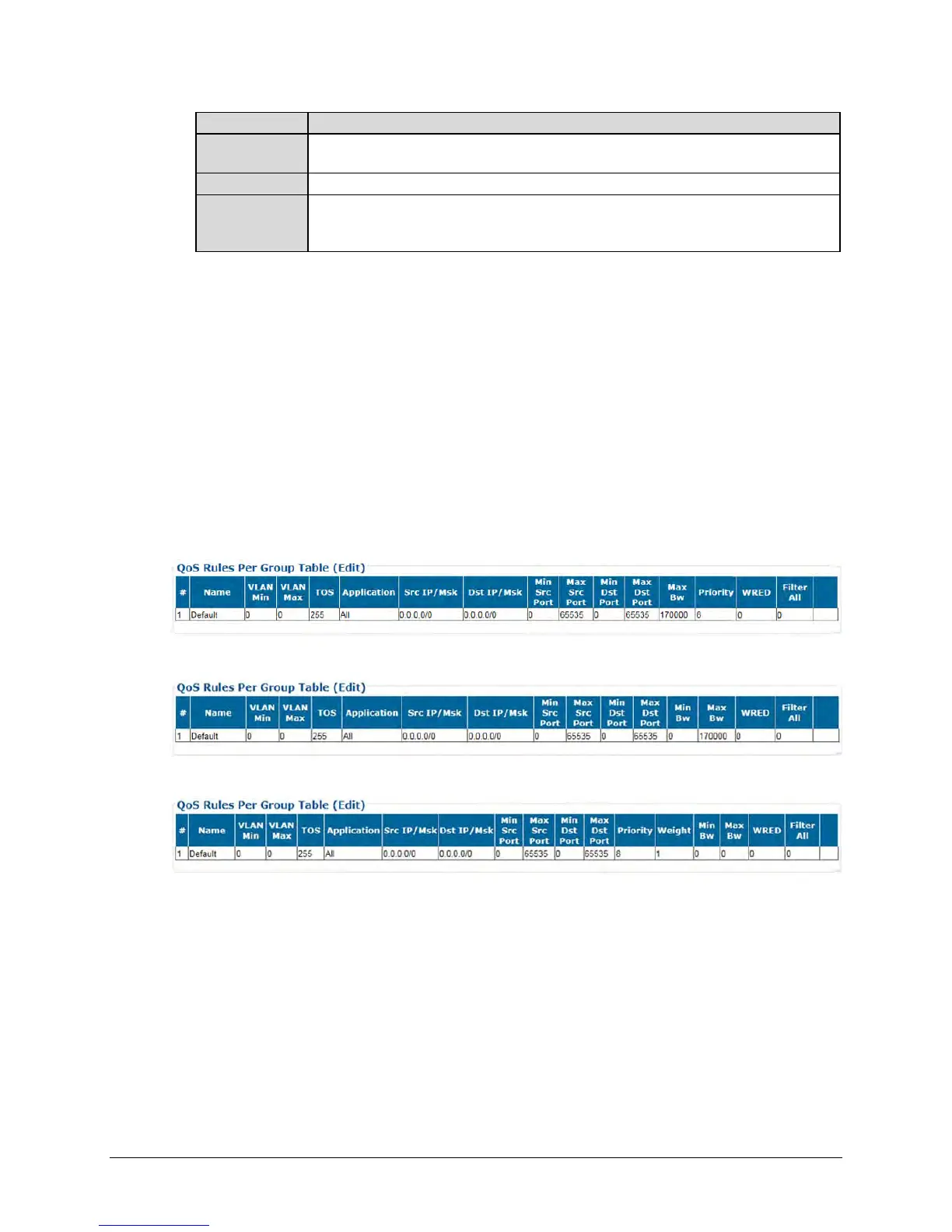
QoS Rules Per Group Table (Edit)
This read-only table displays all existing QoS Rules. As each rule is added or deleted, the QoS
Rules Per Group Table (Edit) Index Number (#) automatically increments or decrements to the
next available number.
The appearance of this table varies depending on your active QoS Control Mode. Examples are
as follows:
When QoS Control Mode = Max/Pri:
When QoS Control Mode = Min/Max:
When QoS Control Mode = Pri-Weighted:
See “Add/Delete Per Group QoS Rule” for detailed descriptions for each column.



 To Next Page