CDM-840 Remote Router MN-CDM840
Ethernet-based Remote Product Management Revision 3
6–46
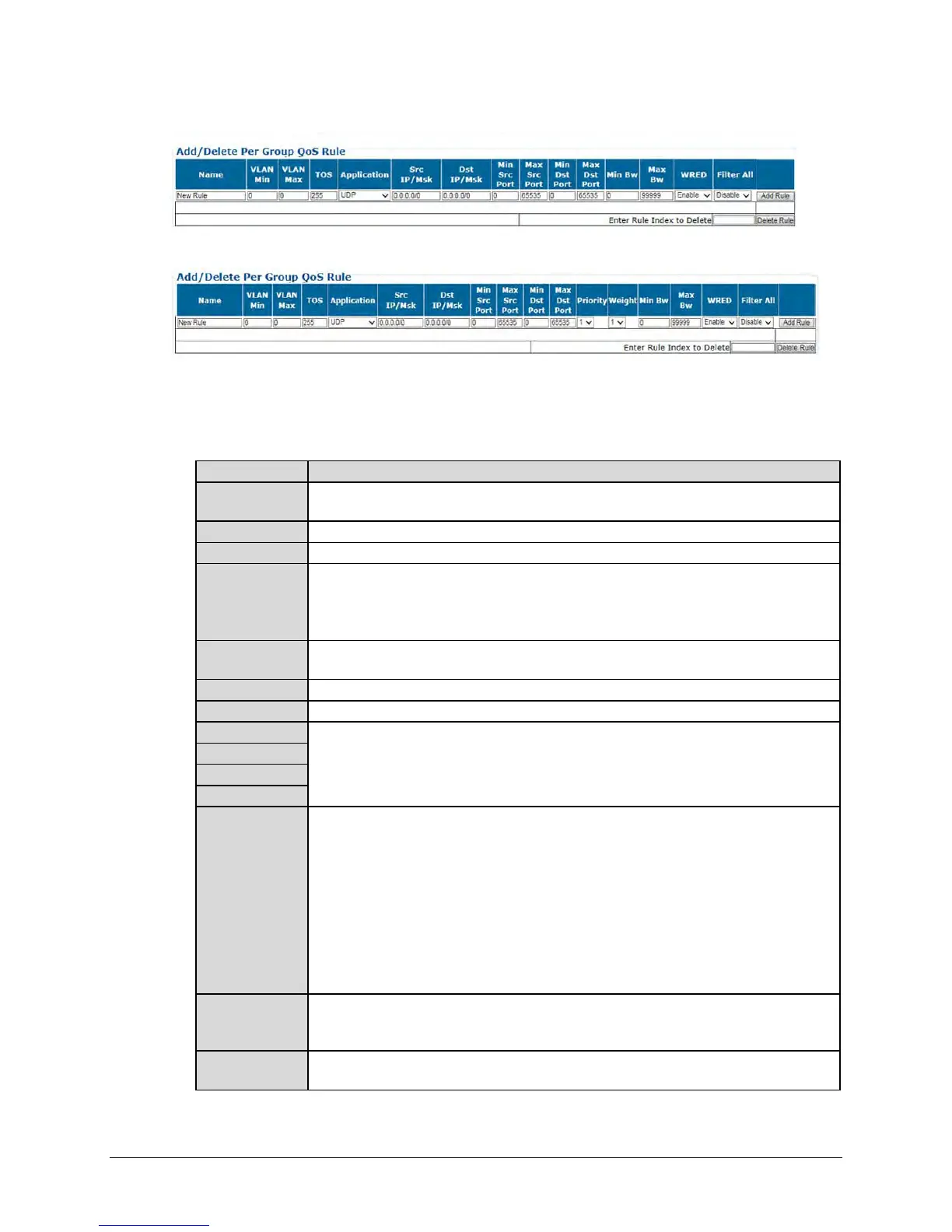
When QoS Control Mode = Min/Max:
When QoS Control Mode = Pri-Weighted:
• Add a Rule – Enter your desired parameters as needed, and click [Add Rule] to add the rule
to the Per Group QoS Rule table. Upon entry, the table index automatically increments to
the next available number. Note the following (from left to right):
This is the name assigned to the group rule. The name you create must be 20 characters
or less, and it must be unique across all groups.
Enter a single VLAN ID as the minimum filter value. .
Enter a single VLAN ID as the maximum filter value.
Type Of Service bits include a six-bit Differentiated Services Code Point (DSCP) and a
two-bit Explicit Congestion Notification (ECN) field:
• Enter an explicit Code Point match.
•
Enter the wildcard entry of 255 so that all values trigger true.
Use the drop-down list to select the application as UDP, TCP, ICMP, RTP, RTP-VOICE,
RTP-VIDEO, RTPS, FTP, HTTP, TELNET, SMTP, SNMP, or All-IP.
Enter a Source IP Address/Mask in the form XXX.XXX.XXX.XXX/YY.
Enter a Destination IP Address/Mask in the form XXX.XXX.XXX.XXX/YY.
You should specify the Min / Max Source / Destination Ports only if you are aware of
the port usage of the desired protocol or application. There are well-known ports for
various protocols, but often only the ‘command’ messaging is transacted on these ports
and the ‘data’ is transferred through a negotiated port.
(Max/Pri and Pri-Weighted modes only) Use the drop-down list to assign a Priority Level
from 1 to 8 for each flow:
• The IP Module classifies each packet that is to be forwarded over the satellite; the
packet then has a Priority assigned according to the defined QoS Rules;
• Any latency critical traffic such as VoIP/RTP should always be assigned Priority 1;
• Priority 1 packets are forwarded immediately; Priority 2 packets are forwarded as soon
as there are no Priority 1 packets in the Queue; and so on;
• Any packet that does not meet a QoS Rule is assigned to the Default Rule and is
assigned a Priority of 9.
(Pri-Weighted mode only) Enter a weight from 1 to 9. Weighting is used to drain traffic
having the same Priority Level (“Max/Pri” mode) after the minimum bandwidth is met (“Min
BW”). The larger the number, the higher the weight.
(Min/Max and Pri-Weighted modes only) Assign a value to limit the flow to this minimum
utilized bandwidth; otherwise, you may select the default of no bandwidth restriction.



 To Next Page