CDM-840 Remote Router MN-CDM840
Updating Firmware Revision 3
4–5
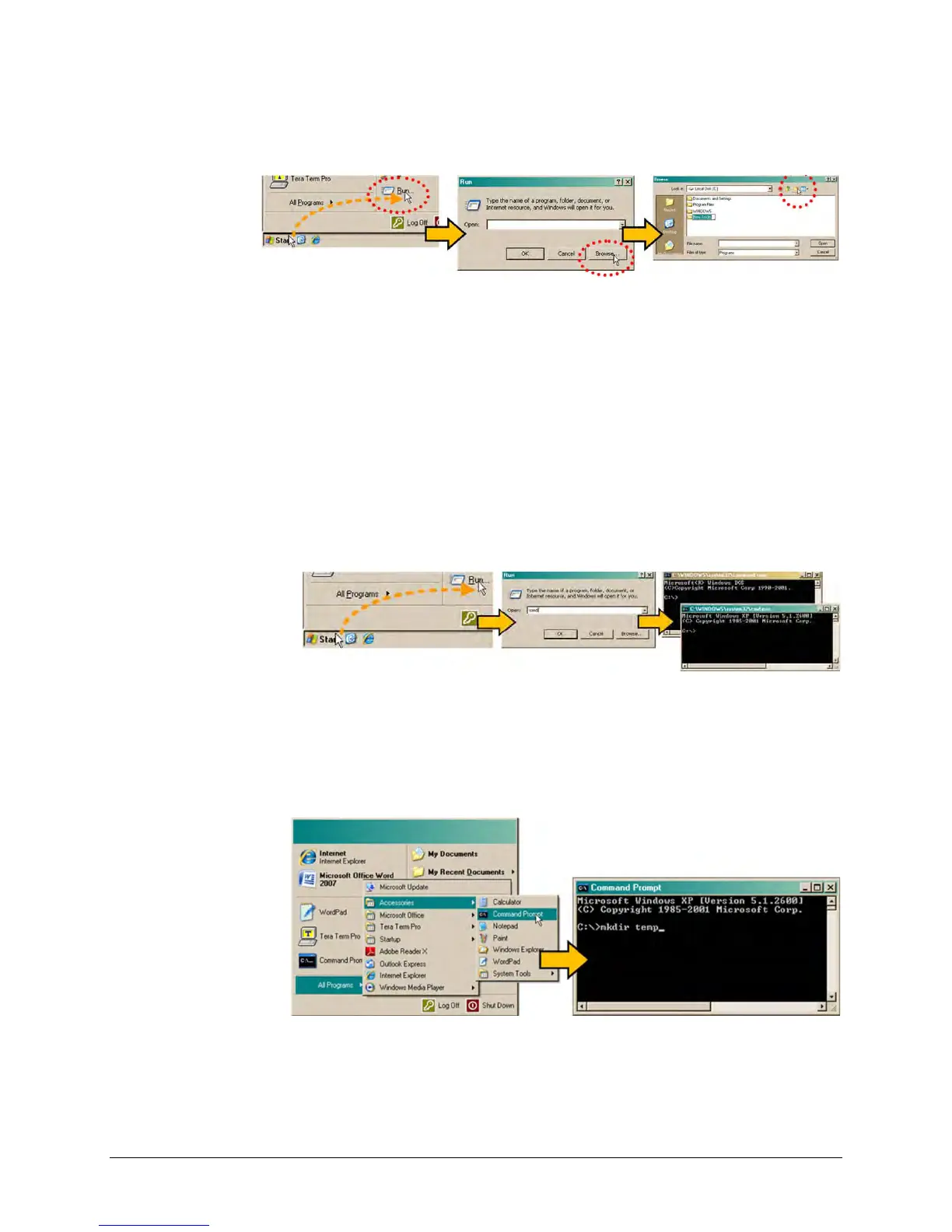
• Right-click the “New Folder” folder name, and then rename this folder to “temp” or
some other convenient, unused name.
d) Use Windows Command-line to create the temporary folder.
• First, click [Start] on the Windows taskbar, and then click the ‘Run...’ icon (or,
depending on Windows OS versions prior to Windows 95, click the ‘MS-DOS
Prompt’ icon from the Main Menu).
• Next, open a Command-line window…
o For Windows 95 or Windows 98 – Type “command”.
o For any Windows OS versions later than Windows 98 – Type “cmd” or
“command”.
o Alternately, from [Start], select All Programs > Accessories > Command
Prompt.
• Finally, from the Command-line ‘c:\>’ prompt, type “mkdir temp” or “md temp”
(mkdir and md stand for make directory), and then click [OK].
There should now be a "temp" folder created and available for placement of the firmware file
download.



 To Next Page