CDM-840 Remote Router MN-CDM840
Updating Firmware Revision 3
4–4
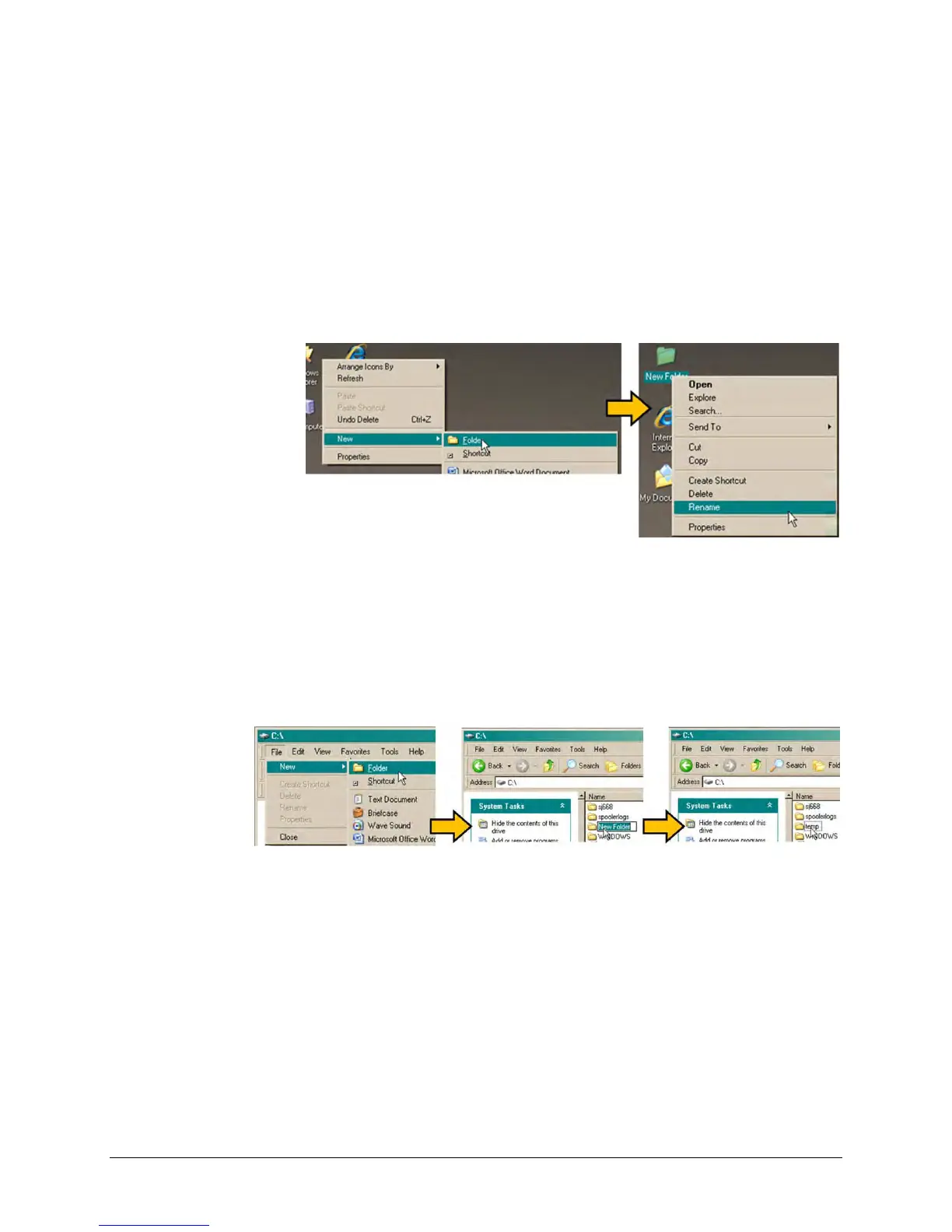
There are several ways you may use create a temporary folder on a Windows-based PC:
a) Use the Windows Desktop to create and rename the temporary folder.
• Right-click anywhere on the desktop to open the popup submenu, and then select
New > Folder to create the temporary folder. The new folder will be created on the
desktop.
• Right-click on the new folder and then select “Rename” from the popup submenu.
Rename this folder to "temp" or some other convenient, unused name.
b) Use Windows Explorer to create and rename the temporary folder.
• Select File > New > Folder to create the temporary folder. The new folder will be
created in the active folder.
• Right-click the “New Folder” folder name, and then rename this folder to "temp" or
some other convenient, unused name.
c) Use the ‘Run’ and ‘Browse’ windows to create and rename the temporary folder.
• Select [Start] on the Windows taskbar, and then click the Run... icon. The ‘Run’
window will open.
• Click [Browse] in the ‘Run’ window. The ‘Browse’ window will open.
• Click the Create New Folder icon in the ‘Browse’ window. The new folder will be
created.



 To Next Page