CDM-570A/570AL Satellite Modem with Optional Packet Processor
Revision 5
Updating Firmware 4–7 MN-CDM570A
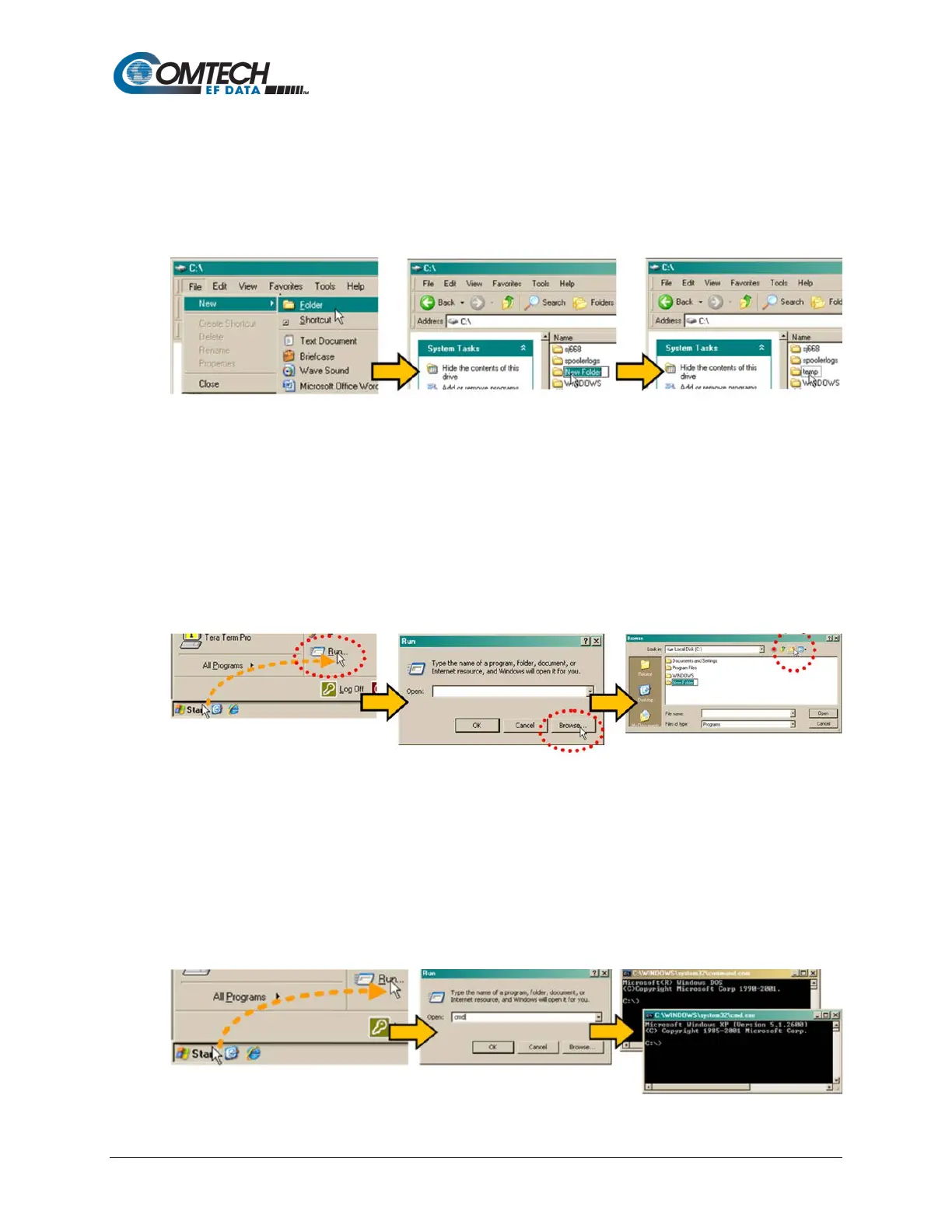
b. Use Windows Explorer to create and rename the temporary folder.
• Select File > New > Folder to create a temporary folder. This creates the
new folder in the active folder.
• Right-click the “New Folder” folder name, and then rename this folder to
"temp" or some other convenient, unused name:
c. Use the ‘Run’ and ‘Browse’ windows to create and rename the temporary folder.
• Select [Start] on the Windows taskbar, and then click the Run... icon. This
opens the ‘Run’ window.
• Click [Browse] in the ‘Run’ window. This opens the ’Browse’ window.
• Click the Create New Folder icon in the ‘Browse’ window. This creates the
new folder.
• Right-click the “New Folder” folder name, and then rename this folder to
“temp” or some other convenient, unused name:
d. Use Windows Command-line to create the temporary folder.
• First, click [Start] on the Windows taskbar, and then click the Run... icon (or,
depending on Windows OS versions prior to Windows 95, click the MS-DOS
Prompt icon from the Main Menu).
• Next, open a Command-line window…
o For Windows 95 or Windows 98, type “command” (or, for any Windows
OS versions later than Windows 98, type “cmd” or “command”):



 To Next Page