CDM-570A/570A Satellite Modem with Optional Packet Processor
Revision 5
Dedicated Management Port Feature Q–8 MN-CDM570A
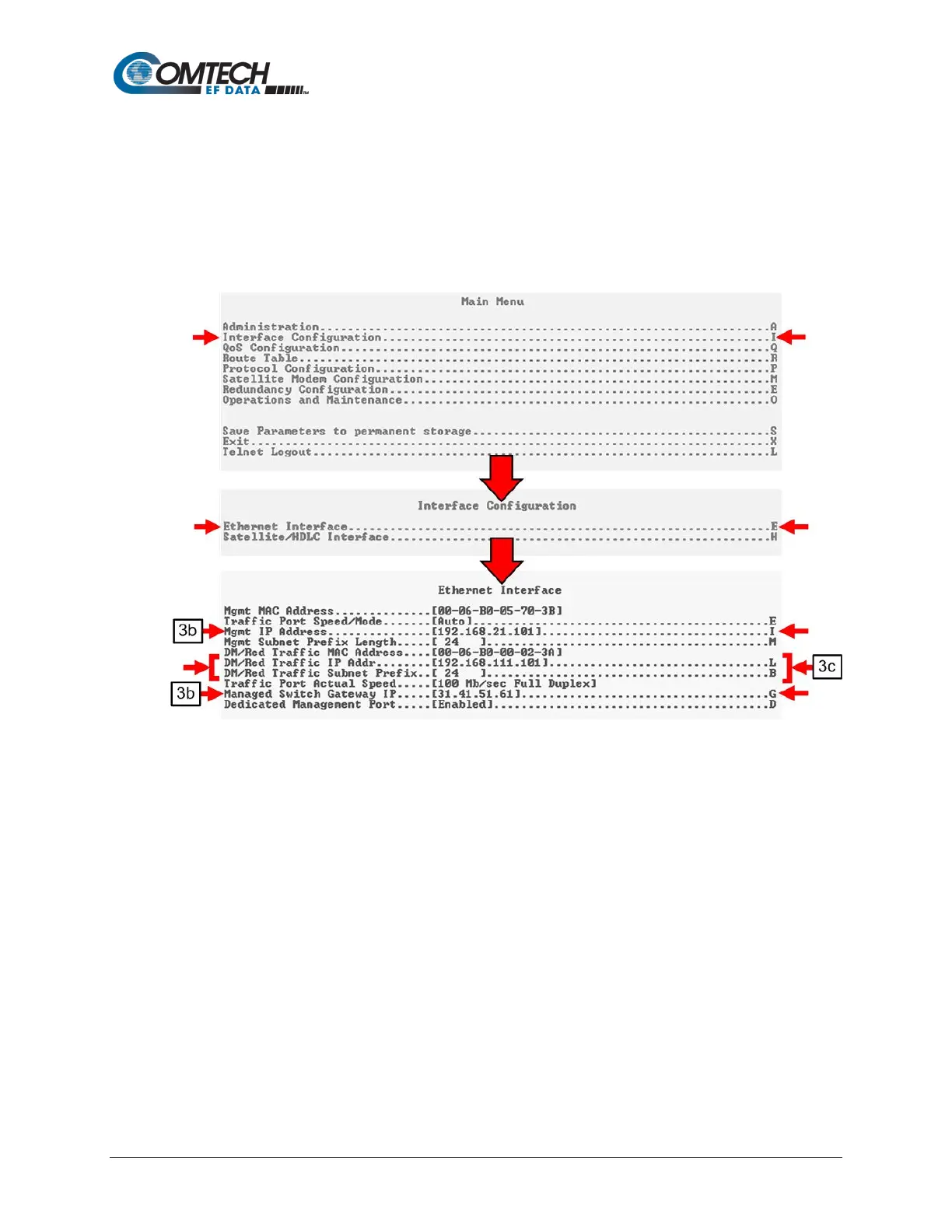
a. From the Serial CLI Main Menu, press ‘I’ to open the Interface Configuration menu.
Then, press ‘E’ to open the Ethernet Configuration menu.
b. On the Ethernet Configuration menu, press ‘I’ or ‘G’ to assign the Management and
Managed Switch Gateway IP Addresses, respectively.
c. On the Ethernet Configuration menu, press ‘L’ or ‘B’ to assign the IP Address and
the Subnet Prefix, respectively, for the ‘10/100 Ethernet | Traffic 100’ port. Make sure
the Management IP Address and Traffic IP Address are NOT in the same subnet.
Figure Q-8. CDM-570A/570AL Router Mode – Assign IP Addresses



 To Next Page