Ethernet Interface Operation Revision 4
CDM-760 Advanced High-Speed Trunking Modem MN-CDM760
7–36
Enter a weight from 1 to 100. Weighting is used either to drain traffic having the same
Priority Level (“Max/Priority” mode) or to drain after the minimum bandwidth is met
Appendix K. QUALITY
OF SERVICE (QoS)
Use the drop-down list to Disable or Enable WRED (Weighted Random Early Detection).
QoS allows flows to be ‘filtered’ on a per-rule basis so the Packet Processor discards traffic
that you do not want to forward over a satellite link. Use the drop-down list to Disable or
Enable filtering.
For either QoS Mode, click [Add Rule] to execute addition of the new rule to the QoS Rules
Table. Upon entry, the QoS Rules Table index automatically increments to the next available
number.
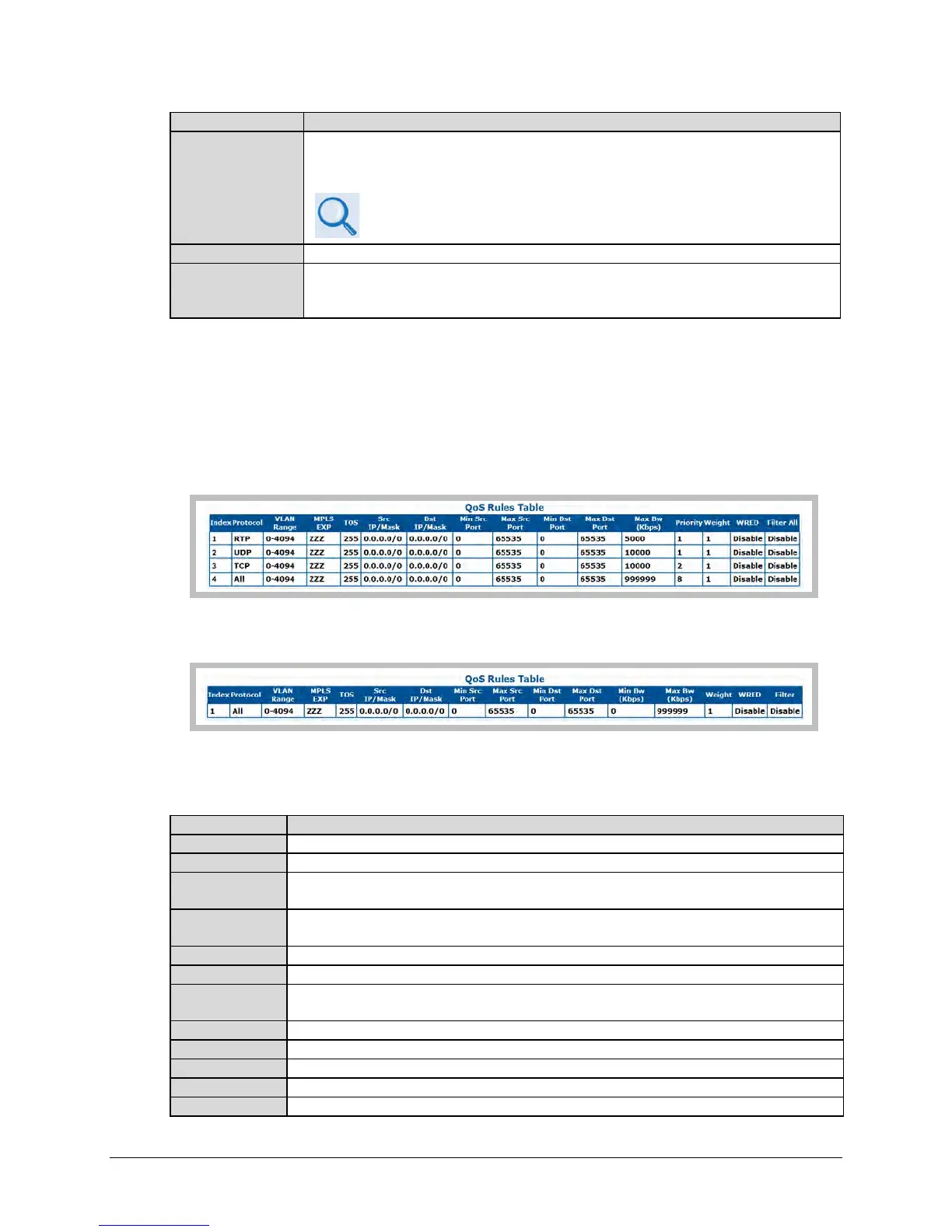
QoS Rules Table (read-only)
In ‘Max/Priority’ QoS Mode:
In ‘Min/Max’ QoS Mode:
This read-only table displays all existing QoS Rules. Typical for each rule (see “Add New QoS
Rule” for detailed descriptions for each item), from left to right:
This is the read-only, automatically assigned internal table index number.
Displays the assigned protocol for the rule.
VLAN Range
Displays the assigned VLAN ID – either a single VLAN ID (2012) or a range of VLAN IDs
(2000-2012).
MPLS EXP
Displays the assigned MPLS (Multi-Protocol Label Switching) experimental bit value (explicit or
wildcard).
Displays the assigned Type of Service bits.
Displays the assigned permitted Source IP Address/Mask in the form XXX.XXX.XXX.XXX/YY.
Dst IP/Mask
Displays the assigned permitted Destination IP Address/Mask in the form
XXX.XXX.XXX.XXX/YY.
Displays the assigned minimum permitted Source Port.
Displays the assigned maximum permitted Source Port.
Displays the assigned minimum permitted Destination Port.
Displays the assigned maximum permitted Destination Port.
(“Min/Max” mode only) Displays the assigned minimum permitted Bandwidth value.



 To Next Page