106 • SMP Gateway User Manual
optionally, the IP addresses of computers that will be granted access through the ports. Two
default rules are provided by default for the CoDeSys and Passthru rules.
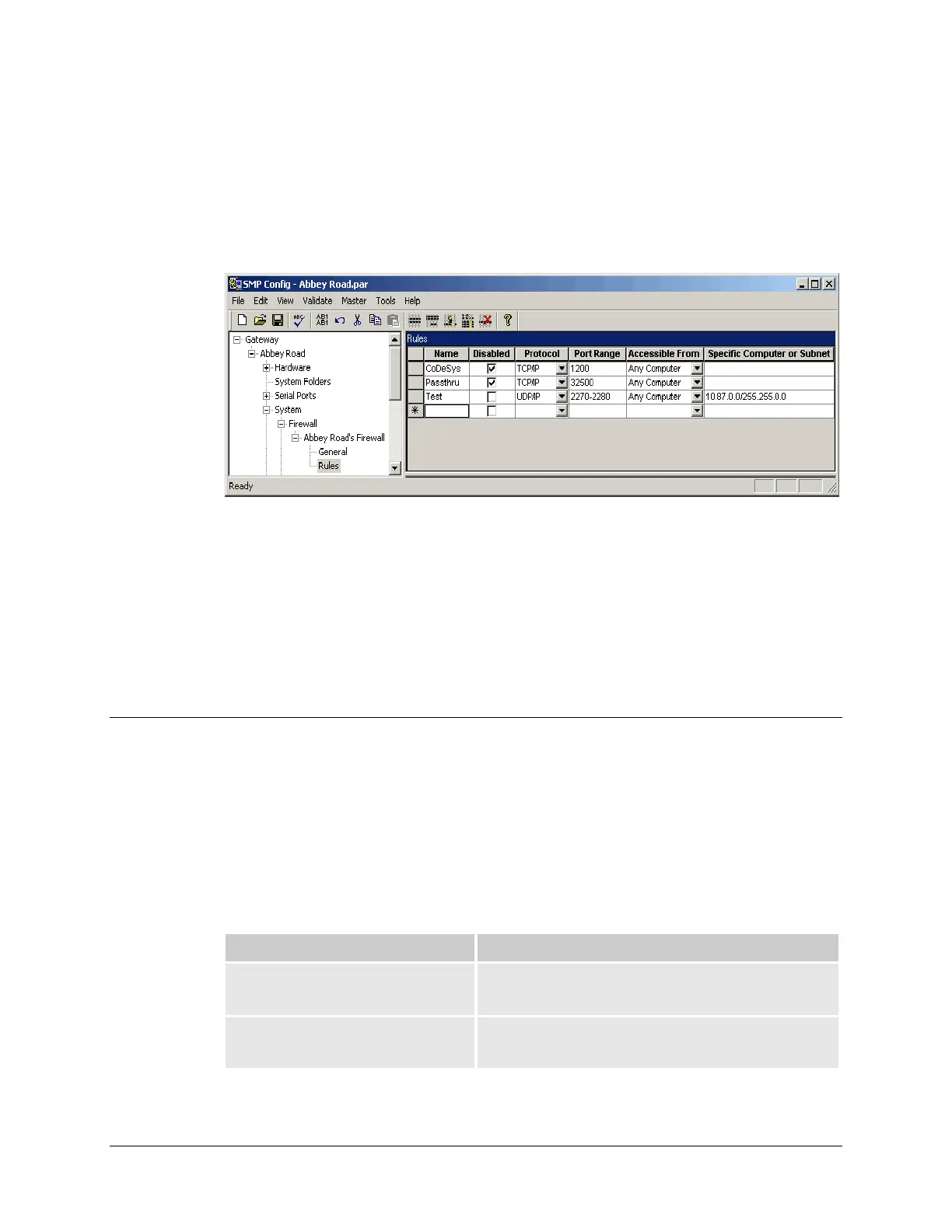
In the following illustration, the rule “Test” opens ports 2270 to 2280 to UDP messages. It is
specified that only computers with IP addresses beginning by 10.87.X.X can use these ports.
It is also in the Rules branch that you can activate Passthru and CoDeSys access, simply by
clearing the Disabled checkbox.
13.7.3.2 Deleting a rule
To delete a rule:
Click in the row. You will see an arrow on the left side of the right pane.
Click the arrow and press the Delete key.
13.8 Locking Incoming RAS and Passthrough
Connections
Incoming RAS dialup connections to the SMP Gateway, and passthrough connections between the
SMP Gateway and the devices, represent yet another possible security threat to the SMP Gateway.
The control center can lock all incoming RAS dialup connections, as well as individual
passthrough connections, using some of the SMP Gateway’s logical data points.
These data points, which you can view with the SMP Gateway’s web browser, are listed in the
table below.
Data Point Description
_smp___dialupEnable This binary output point is used to lock or unlock all
incoming RAS dialup connections to the SMP Gateway.
_smp___dialupEnabled This binary input point indicates if incoming RAS dialup
connections to the SMP Gateway are allowed or not..



 To Next Page