140 • SMP Gateway User Manual
Note: Data point information is always displayed in the System State page.
16.2.6 Creating a User-Defined Readings Page
Readings pages are used to display real-time values of some of the SMP Gateway’s data points,
and to perform control operations on its output points. With some work, a simplified diagram of
your substation can be made using up to 15 readings pages.
Like other display pages, readings pages are configured using SMP Config:
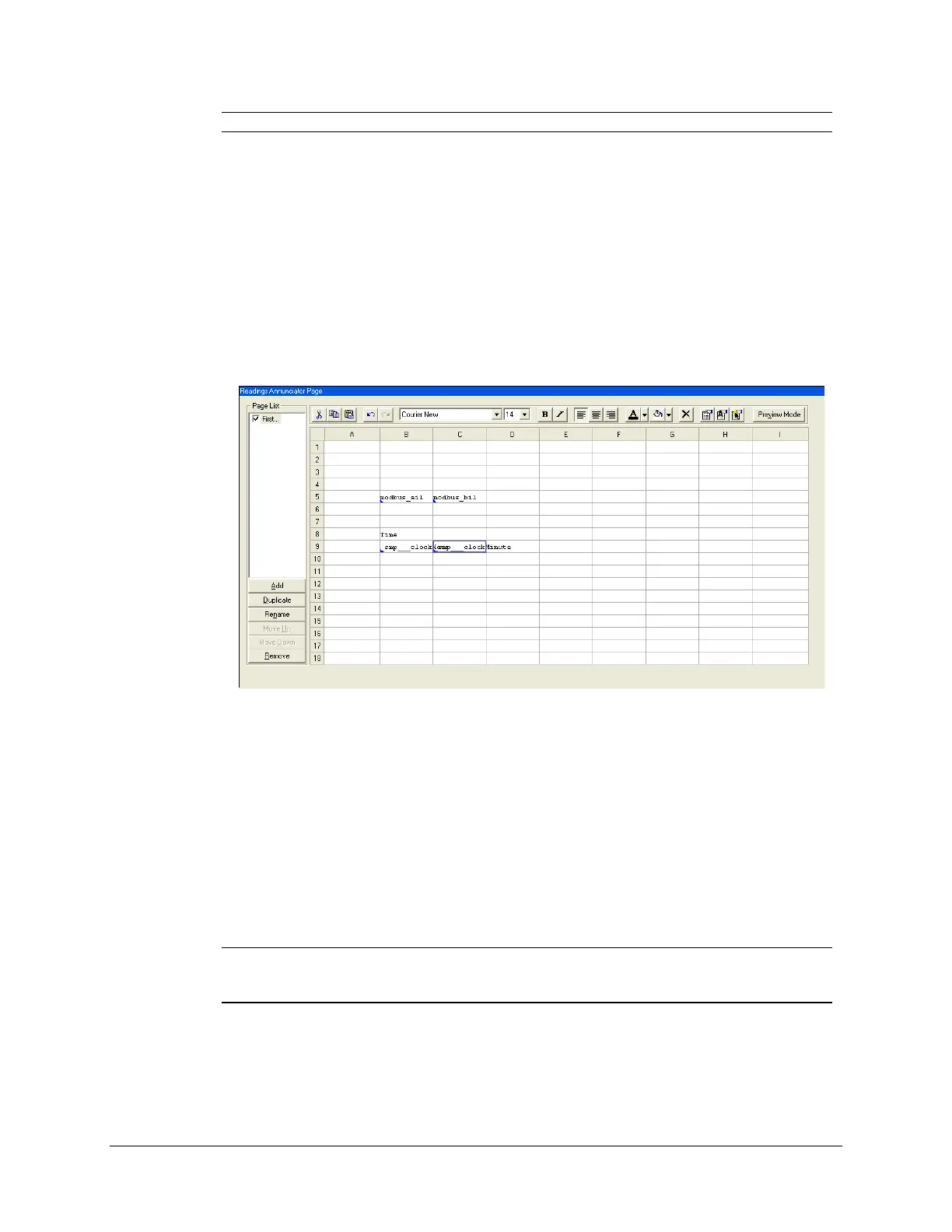
From the tree view, expand the Pages branch and select the Readings branch. The Readings
Annunciator Page pane appears on the right.
The readings page list is found on the left. The right part of the pane is occupied by a grid of 18
lines by 9 columns. Each cell is representing a small part of a readings page, and can be used to
display static text, or the current state or value of one of your SMP Gateway’s input points. A
“click action” can also be configured for the cell. Supported actions include switching the focus to
another readings page and controlling one of the SMP Gateway’s output points. Above the grid,
there is a toolbar giving access to all the design functions.
The following steps describe how to create and populate a readings page:
Under Page List, click Add. A new page called Page 1 was added to the list. Type a
significant name for the page, or leave the default name, and press Enter.
Note: You can create a clone of an existing page, by clicking Duplicate. Also, if you
want to change the name of the page later, just select the page from the list and
click Rename.
Cell(s) selection can be performed in many ways:
To select a single cell, click it.



 To Next Page