SMP Gateway User Manual • 131
If you wish to trigger the alarm upon a 0 instead of a 1, select the checkbox under Inverted.
If you want to temporarily disable alarm conditions for this data point, select the checkbox
under Disabled.
Under Description, you can type a description for alarms on this binary input. This
description will be displayed in the various Annunciator pages when such an alarm condition
is met, or when an operation (ex. acknowledge) is performed on such an alarm.
Repeat those procedures for every alarm inputs.
16.2.2 Setting Up the Alarms Page
Once alarm conditions are defined, you may set up the various display pages, starting with the
Alarms page.
The Alarms page is essentially where all alarms are displayed in a list, and handled by the
operator of the Annunciator using touch buttons. To learn how to manage alarms, see “Managing
Alarm
s”, page 152.
To c
onfigure the display settings of the Alarms page, proceed as follows:
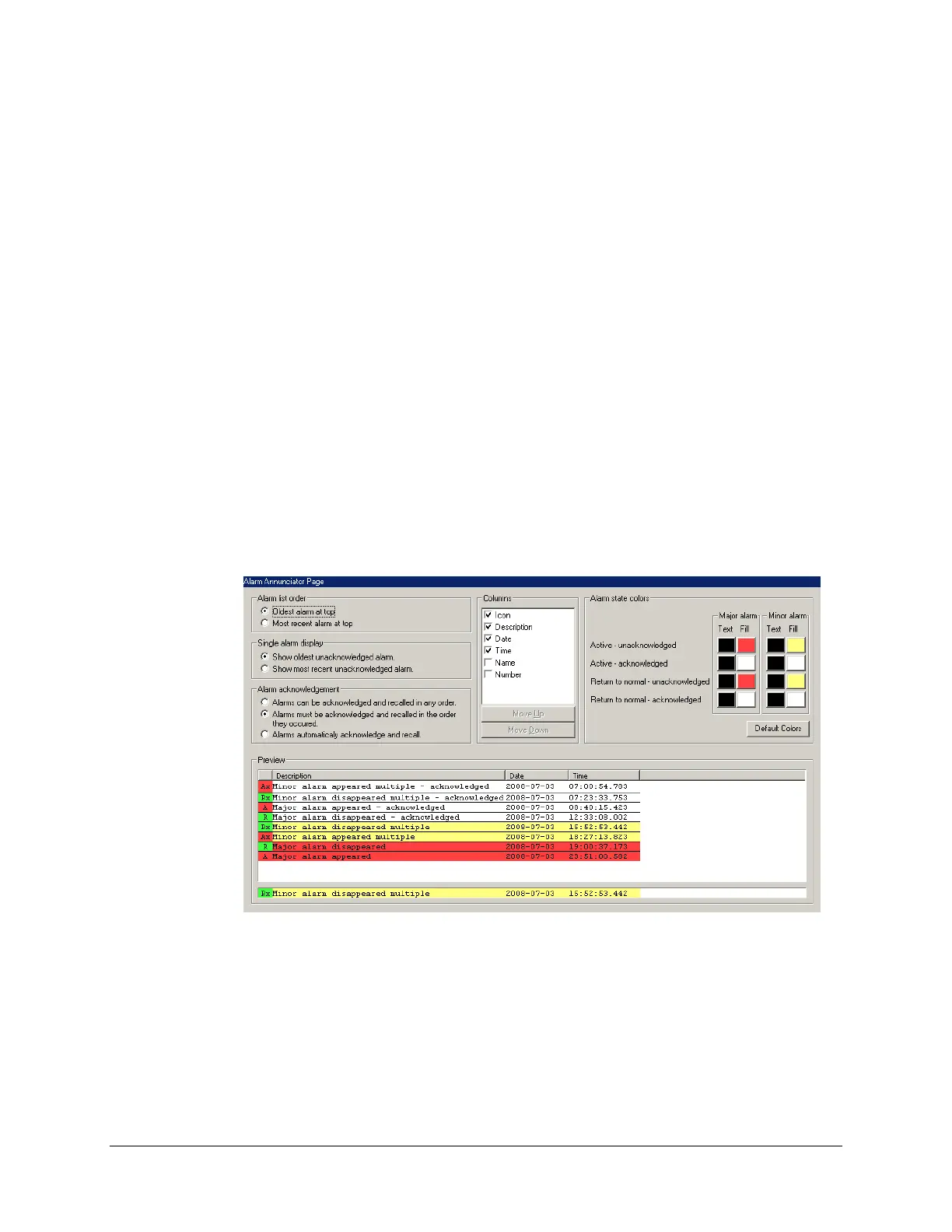
In SMP Config, from the tree view, expand the Pages branch and select the Alarms branch.
The resulting content of the right pane is presented in the next screenshot.
Anytime during the configuration process, you can preview, at the bottom of the pane, how the
alarm list will look like on the Annunciator’s display:



 To Next Page