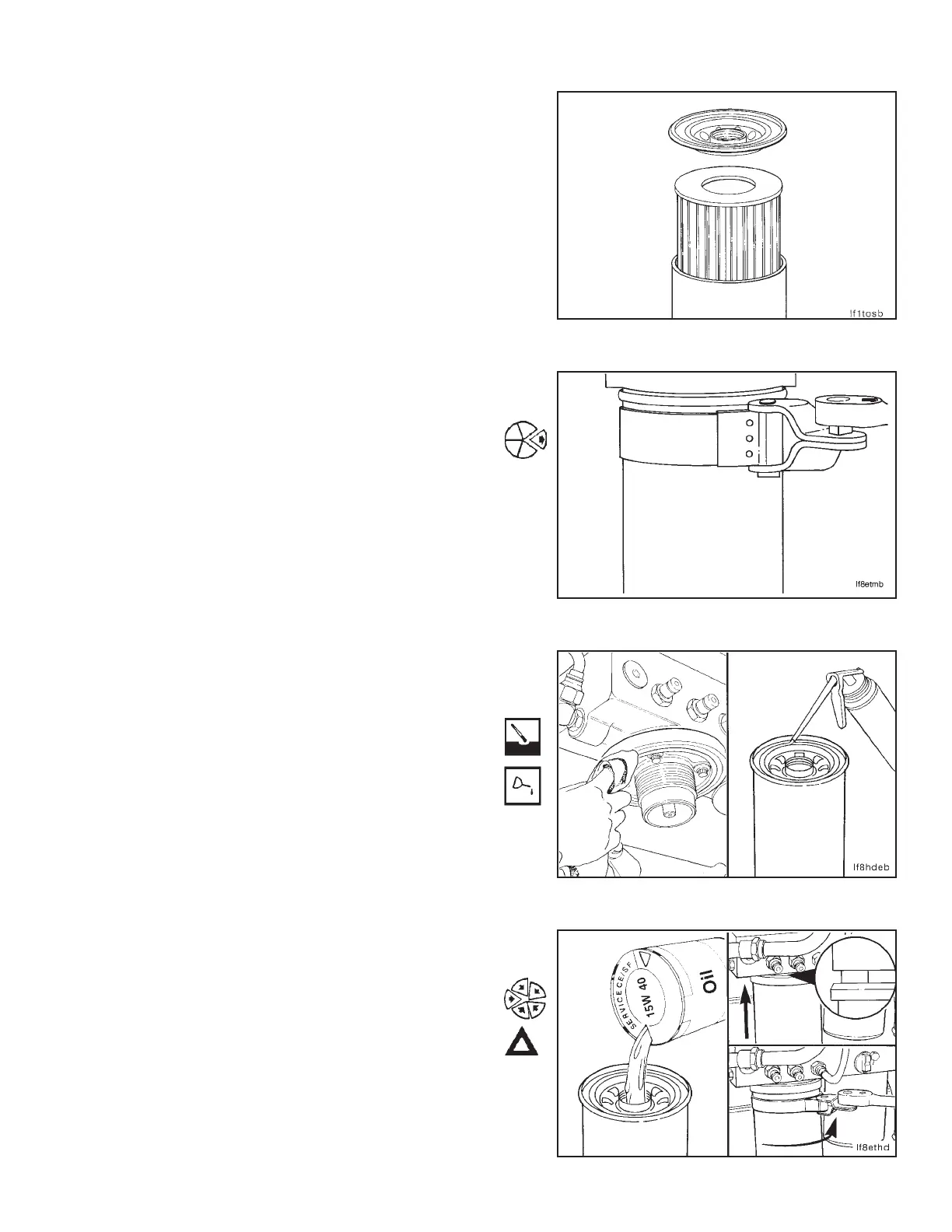
Inspect the filter element for evidence of moisture or
metal particles.
Metal Probable Source
Copper Bearings and Bushings
Chromium Piston Rings
Iron Cylinder Liners
Lead Bearing Overlay Material
Aluminum Piston Wear or Scuffing
Lubricating Oil Filter (2-03)
Removal
Use the oil filter wrench, Part No. 3375049, to remove the
filter.
Cleaning
NOTE: The o-ring can stick on the filter head. Make sure it
is removed before installing a new filter.
Clean the oil filter head surface.
Use clean vegetable oil to lubricate the gasket surface of
the filter.
Installation
Fill the filter with clean 15W-40 oil.
Install the filter on the oil filter head. Tighten the filter until
the gasket contacts the filter head surface.
Caution: Mechanical overtightening may distort the
threads or damage the filter element seal.
Use oil filter wrench, Part No. 3375049, to tighten the filter
an additional three-fourths to one (3/4 to 1) turn, or follow
the instructions supplied with the filter.
Section 2 - Lubricating System Lubricating Oil Filter (2-03)
N14 Page 2-19



 To Next Page