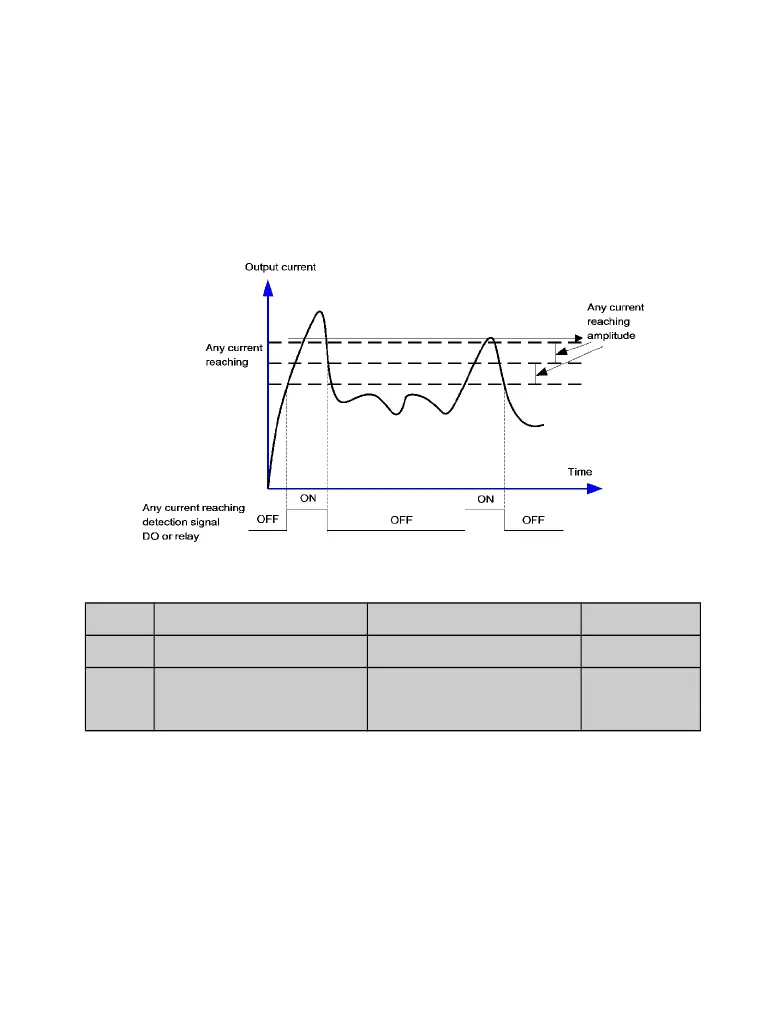
If the output current of the AC drive is within the positive and negative amplitudes of any
current reaching detection value, the corresponding DO becomes ON.
The DGI900 provides two groups of any current reaching detection parameters, including
current detection value and detection amplitudes, as shown in the following figure6-15.
Figure 6-15 Any current reaching detection
P2.40
Timing function
Setting Range:0~1 0
P2.41
Timing duration selection
Setting Range:0~3 2.0%
P2.42
Timing duration
Setting Range:
0.0Min~6500.0Min
0Min
These parameters are used to implement the AC drive timing function.
If P2.40 is set to 1, the AC drive starts to time at startup. When the set timing duration is
reached, the AC drive stops automatically and meanwhile the corresponding DO becomes
ON.
The AC drive starts timing from 0 each time it starts up and the remaining timing duration


 To Next Page