Figure 6-6 Principle of the jump frequencies and jump amplitu
de
P2.12
Forward/Reverse
rotation dead-zone time
Setting Range:0.0~
120.0s
0.0s
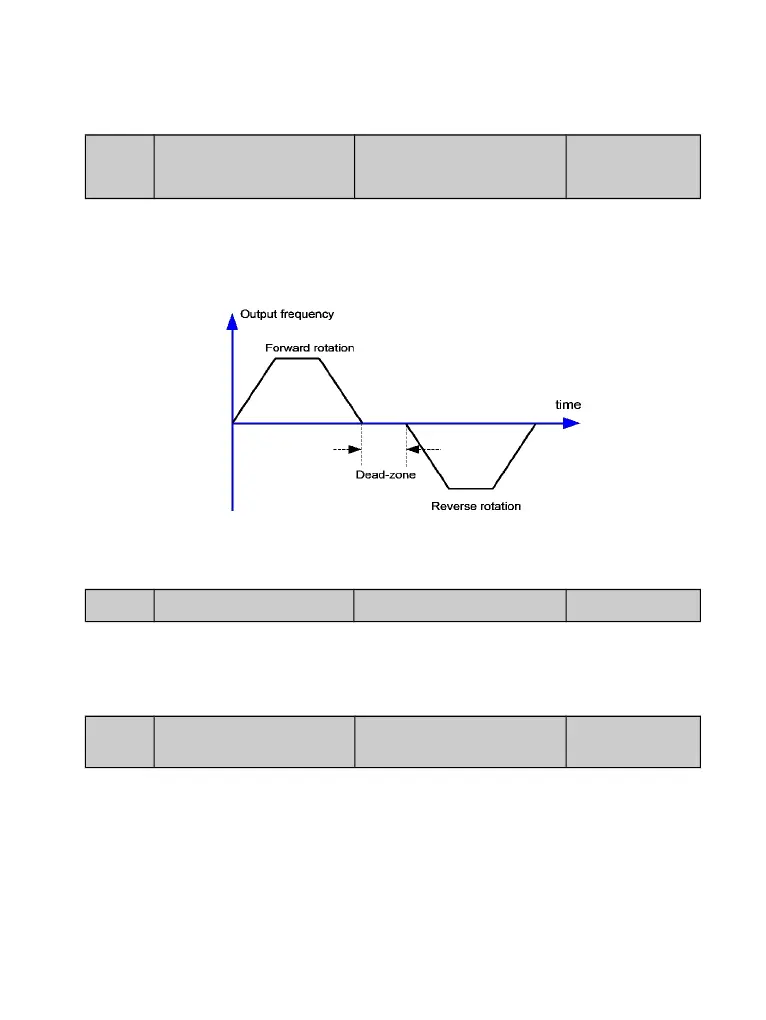
It is used to set the time when the output is 0 Hz at transition of the AC drive forward rotation
and reverse rotation, as t1 shown in the following figure 6-7. t1.
Figure 6-7 Forward/Reverse rotation dead-zone time
P2.13 Reverse control Setting Range:0~1 0
It is used to set whether the AC drive allows reverse rotation. In the applications
where reverse rotation is prohibited, set this parameter to 1.
P2.14
Running mode when set
frequency lower than
frequency lower limit
Setting Range:0~2 0
0:Run at frequency lower limit;1:Stop;2:Run at zero speed
It is used to set the AC drive running mode when the set frequency is lower than the
frequency lower l
imit. The DGI900 provides three running modes to
satisfy requirements of various applications


 To Next Page