inverter before clearing the fault for sure, otherwise
there is a danger of damage.
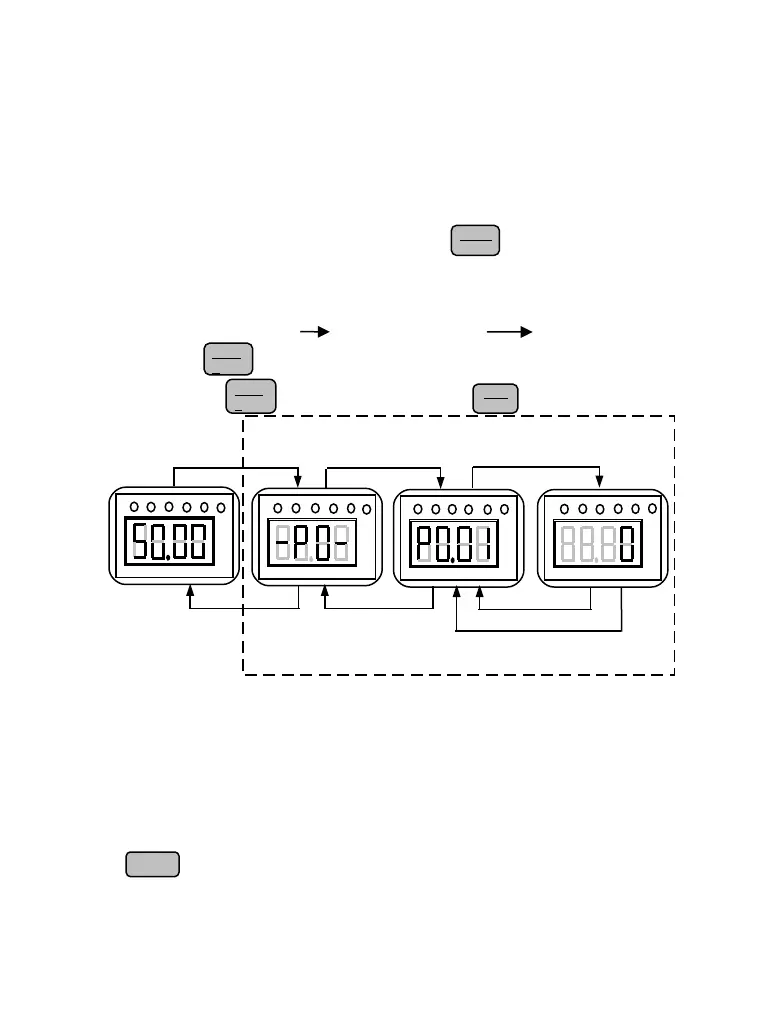
D、Function code programming state
In the state of stopping, running, and fault alarm, press key to enter programming state
(A password is required, If it has been set. Please refer to P0.00 description and Fig.4-10).
The programming state includes three level display menus shown as Fig.4-6 which in order
are function code group function code number function code parameter. Press
key to enter each menus. When in function code parameter display menu, press key to
save parameter, press key to go back to previous menu without parameter saving.
Fig. 4-6 Control panel programming state
4.2.5 Control Panel Operation
Through the operating panel of inverter for various operations, for example as follows:
A、Switching display of state monitoring parameter
Press key to display b group state monitoring parameter. It first displays the code of
monitoring parameter, after 1 second, it switches automatically to display the value of this
monitoring parameter shown as Fig.4-7.
Fig. 4-5 Fault alarm display state


 To Next Page