Chapter 12 Network Module AH10PFBM
12-55
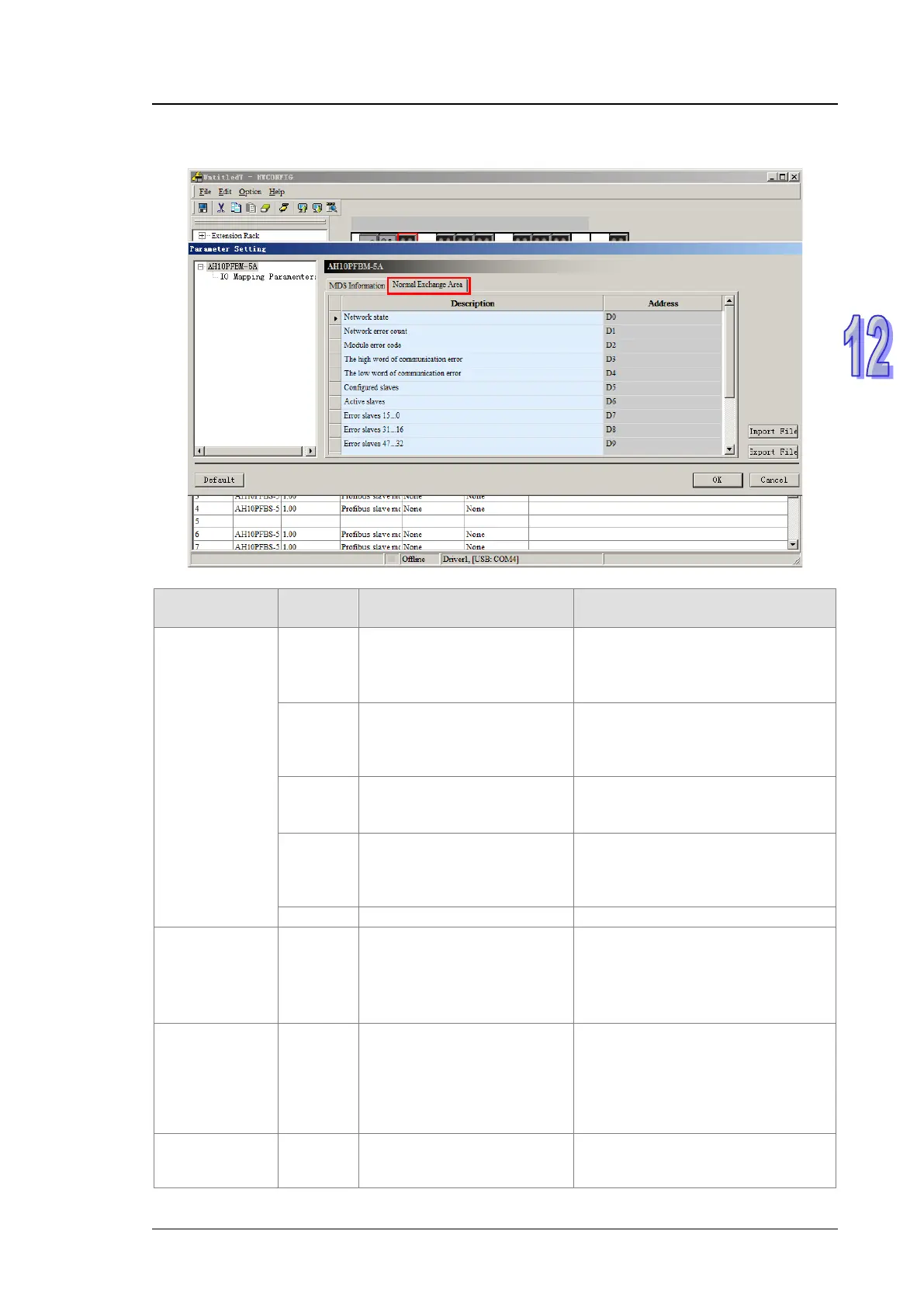
Double click the 10PFBM icon in the HWCONFIG window; the “Parameter Setting” dialog box
pops up and then click “Normal Exchange Area” tab as below.
Explanation of corresponding registers in the normal exchange area in AH10PFBM-5A.
Item
value
Description Treatment
Network state
0 Not found
Check if the hardware configuration
for AH PLC CPU has configured
the master. Refer to section 15.1
on PLC hardware configuration.
1
Offline
The master has not configured the
slave. Add the slave and then
down
load the configuration once
again.
2 STOP
Select “Start Communication” from
“Additional Functions” in the
software.
3
Idle (PLC CPU is in STOP
state)
Restore PLC to RUN or check if the
hardware configuration for PLC
CPU is consistent with the actual
configuration of the rack.
Network error
count
-
How many times for the
slave which is offline on the
network since the master is
powered on.
1. Check if the PROFIBUS DP bus
is connected correctly.
2. Check if either end of the
network is added with the terminal
resistor.
System error
code
-
PROFIBUS network error
codes in the PLC system log
that is read via ISPSoft. For
more details, refer to section
13.2.2.4.
-
of
- Reserved -



 To Next Page