114
ELECTRICAL AND IGNITION
TIMING ADJUSTMENTS
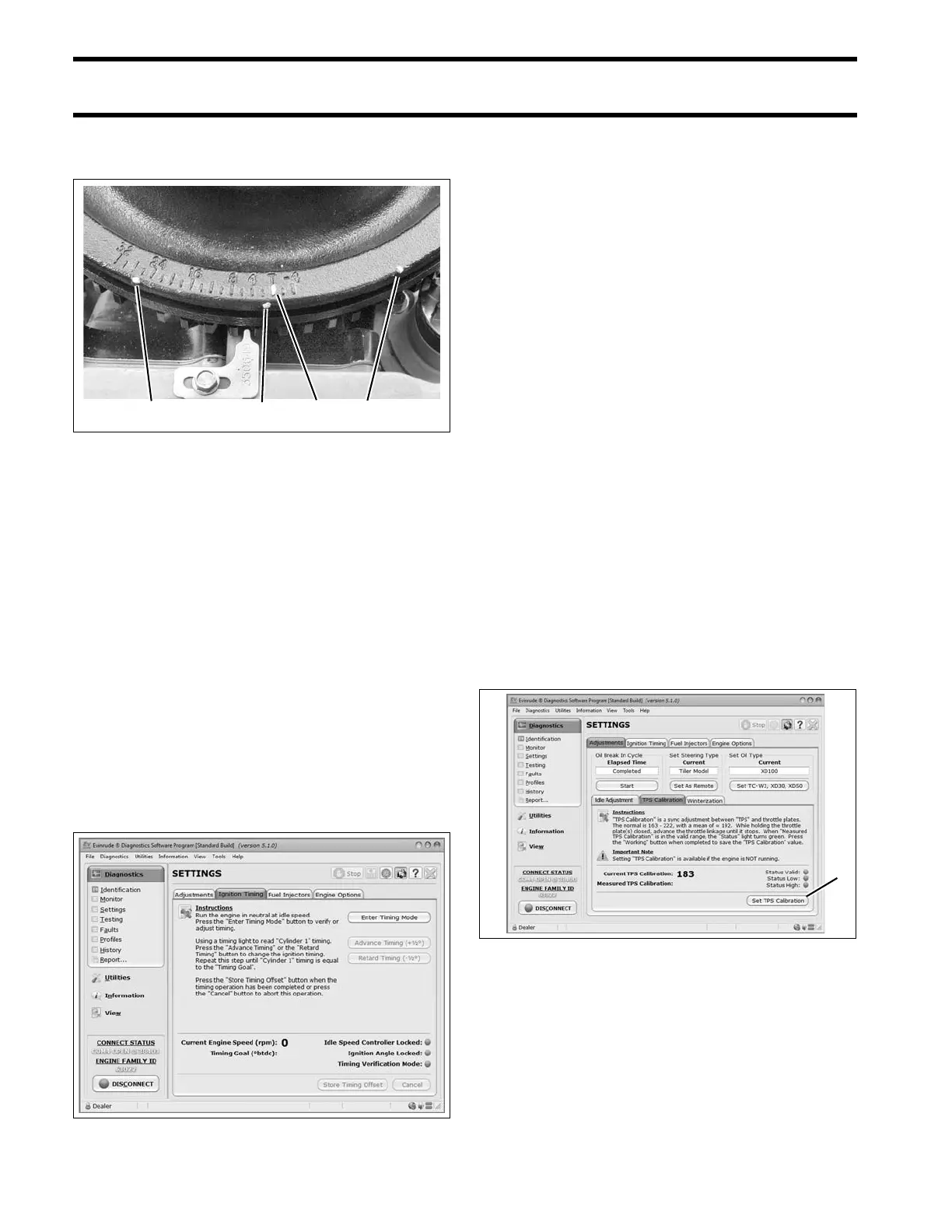
location to align with the cast-in TDC boss on the
flywheel. Tighten retaining screw.
Repeat the entire ad justment process to make
sure pointer is aligned correctly.
Install spark plugs. Refer to S park Plug Indexing
on p. 42.
Timing Verification
Use Evinrude Diagnostics software to synchronize
the mechanical timing of the outbo ard with the
electronic timing of the EMM.
Start the outboard.
Use t he Settings/Ignition Timing screen of the
diagnostics sof tware and follow the on-screen
instructions.
Check ignit ion timing a fter any of t he following
procedures:
• Powerhead replacement
• Crankshaft replacement
• Flywheel removal or replacement
• CPS replacement
• EMM replacement
• EMM software replacement (reprogramming)
IMPORTANT: Make sur e the timing pointer is
set and the outboard reaches operating tempera-
ture before making any timing adjustments.
TPS Calibration
Use Evinrude Diagnostics sof tware to te ll t he
EMM what throttle position sensor voltage is when
the throttle plates begin to open.
Set TPS Calibration af ter replacing or adju sting
any throttle body or throttle linkage parts.
Remove the lower engine covers and air silencer.
Do NOT start the outboard.
On t he Settings/Adjustments screen of the dia g-
nostics sof tware, click the “Set TPS Calibration”
button.
While holding the throt tle plates closed, advance
the throttle lin kage until it stop s. The Measured
TPS Calibration field on the screen will increase.
Click the Working butt on in the sof tware to cali-
brate the TPS.
Install the air silencer and lower engine covers.
1. Mark “A’”
2. Mark “B”
3. Mark “C”
4. TDC boss
002092
Ignition Timing Screen 008572
1. TPS Calibration button 008581




 To Next Page