23
ROUTINE SERVICE
OUTBOARD RIGGING CONNECTIONS
2
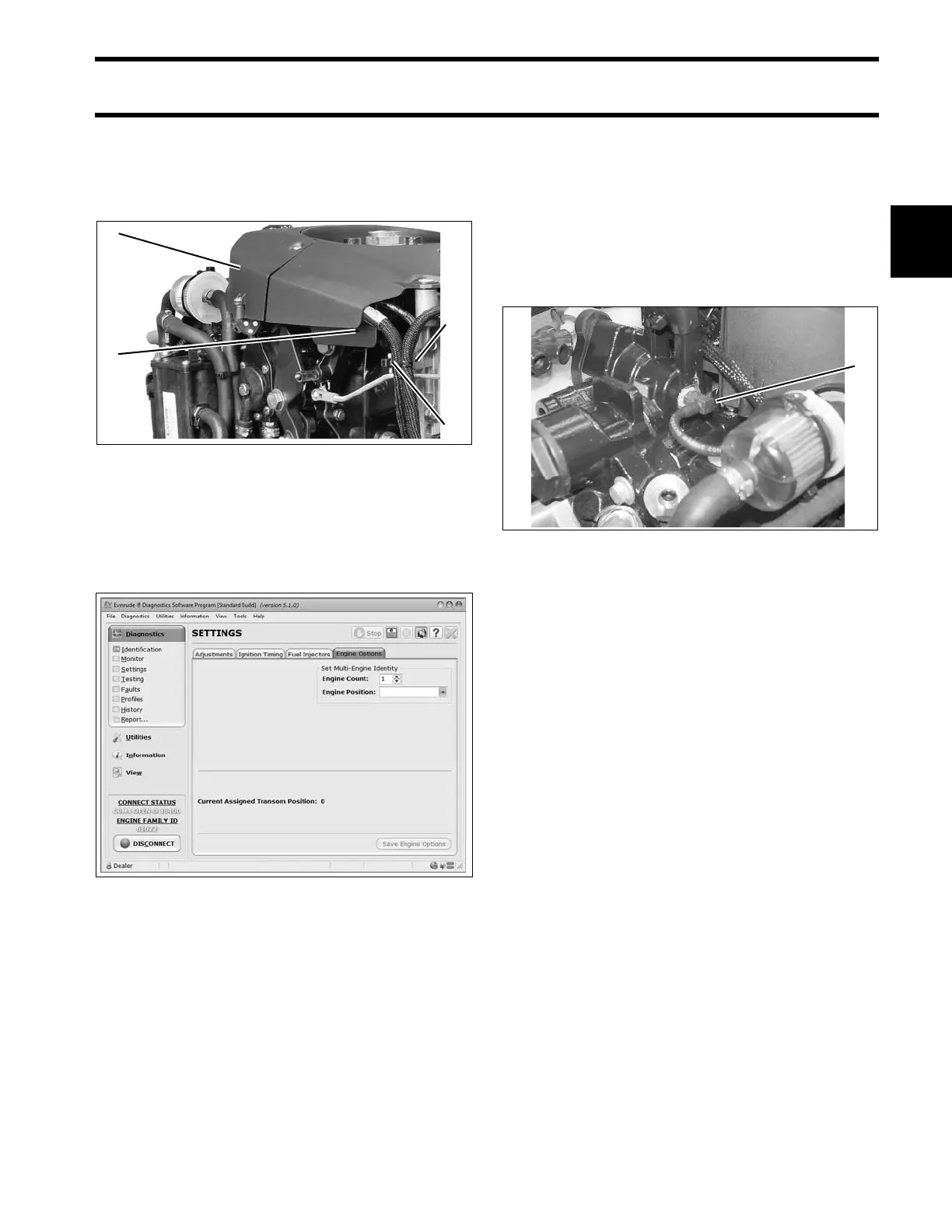
Route I-Command Ignit ion Harness throu gh wire
channel in flywheel cover . Install electrical cover.
Make sure bo th harnesses are in front o f the t ab
and tighten with tie strap.
Use Evinrude Diagnostics software to adjust net-
work settings in th e EMM. From the Settings
screen, select Engine Options.
Water Pressure Gauge
To display engine water pre ssure, install a wa ter
pressure hose fitting in th e cylind er block as
shown.
Use Pipe Sealant with Teflon on the threads of the
hose fitting. Re fer to inst allation instructions sup-
plied with gauge.
For an I-Command water pressure display , sev-
eral water p ressure senso r kit s are a vailable.
Refer to the Evinrude/Johnson Genuine Parts
and Accessories catalog.
1. Electrical cover
2. Wire channel
3. Tab
4. Tie strap
006737
Engine Options Screen 008563A
1. Water pressure hose fitting 002461



 To Next Page