Chapter 5: Console Operation
Input Channels: Selected Channel Control
132/ 526 2.0 Eclipse User Guide
Selected Channel Control
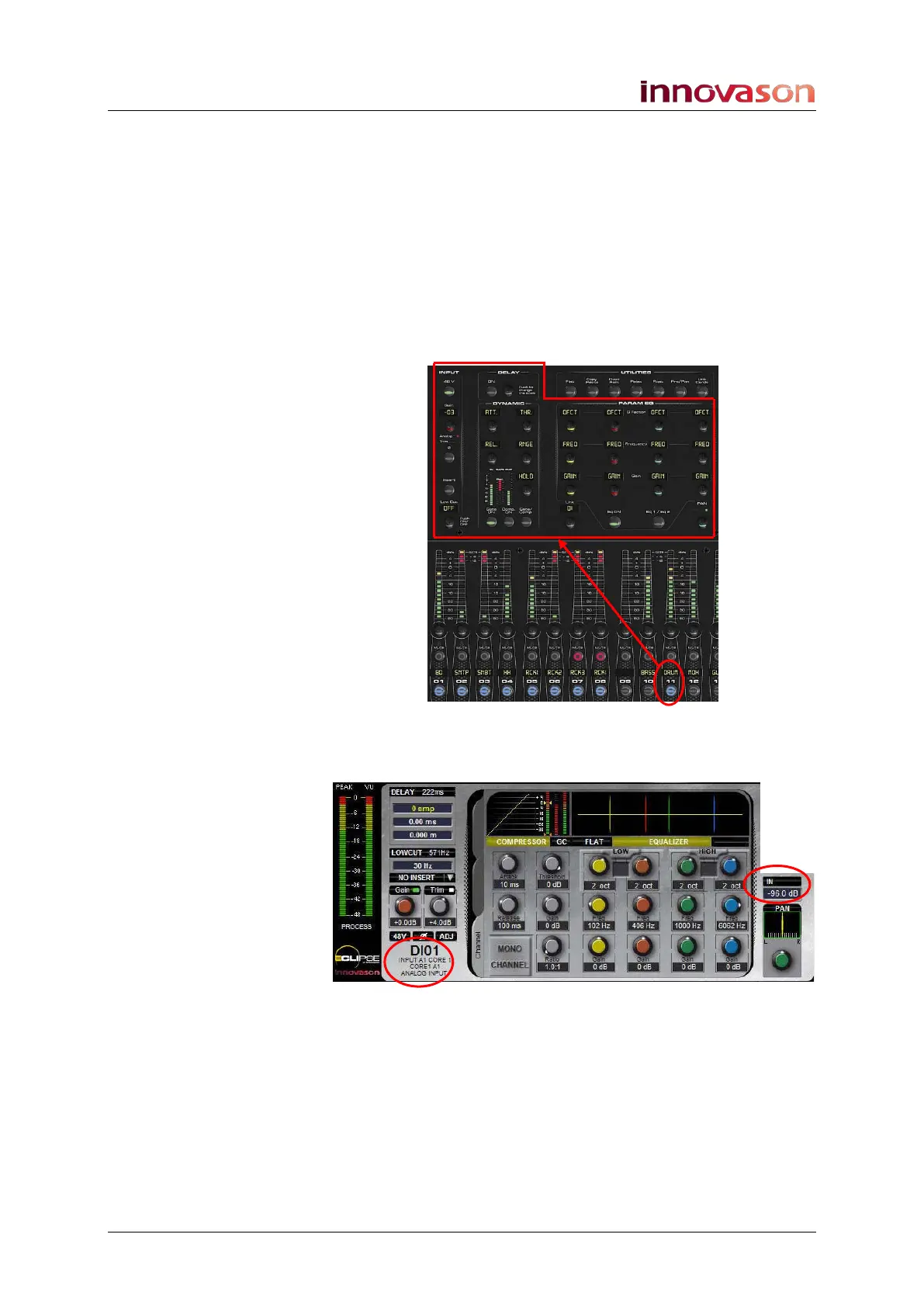
1. Press the SEL button on an input Fader or Smart Panel
control strip.
Make sure that this fader is directly controlling the input, and is
not a Smart VCA (Fader which controls a Smart Faders zone),
see Page 149 for details.
The SEL button and Label flash when active.
The INPUT, DELAY, DYNAMIC and PARAM EQ panels now
offer direct access to input parameters:
The controls work in conjunction with the Main Mix display:
2. Make sure that the Channel tab is selected:
Also keep an eye on the highlighted areas which confirm the
type of channel and where it is patched from:
• IN – confirms that this is a mono input channel with a
Main level of -96.0dB.
• DIO1 - this is the 4-character user Label for the source
(also displayed above the input fader).
For more details on Labels see Page 200. For more details on
the Main Mix display see Page 67.



 To Next Page