Chapter 5: Console Operation
Input Channels: DYNAMIC
138/ 526 2.0 Eclipse User Guide
DYNAMIC
On input channels there are two sections of dynamics
processing: a noise gate and a compressor.
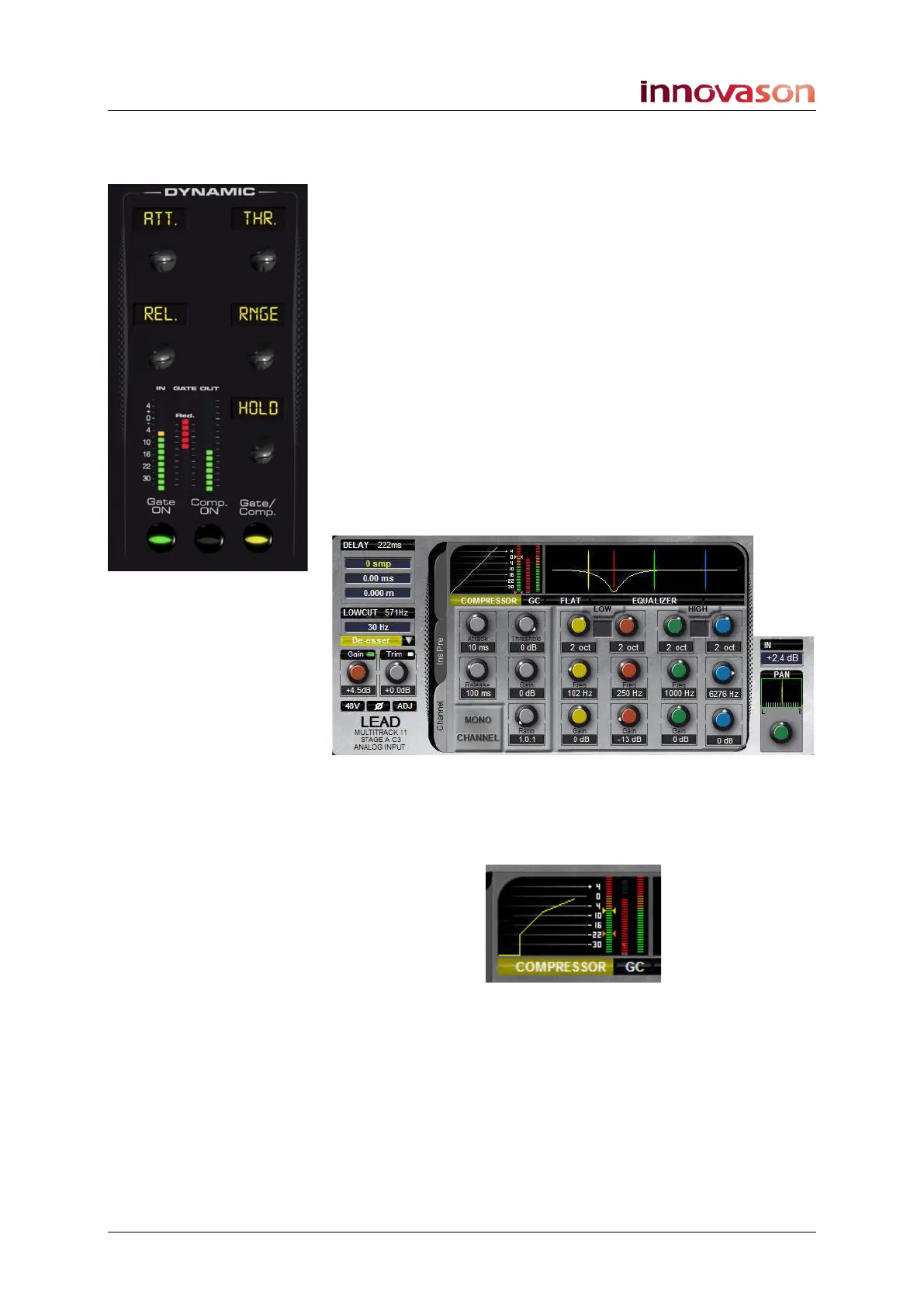
The DYNAMIC panel has 3 buttons and 5 rotary controls, which
may be switched between the gate and compressor sections
using the Gate/Comp. button. The front panel also includes
metering for:
• IN – input level to the dynamics.
• GATE – gate activity.
• Red. – gain reduction applied by the compressor.
• OUT – output level from the dynamics.
The front panel controls follow the on-screen layout shown on
the Main Mix display. So, for example, when adjusting the
compressor, the top controls adjust Attack time and
Threshold, the middle controls are Release time and make up
Gain, and the lower control sets the Ratio:
The Main Mix display includes the same IN, GATE, Red. and
OUT metering as the front panel. Note that the red and yellow
markers on the input level meter represent the gate and
compressor thresholds:
This area also includes a dynamics curve which shows the sum
of both sections of processing: Gating plus Compression.



 To Next Page