Chapter 5: Console Operation
Smart Faders (SFADs): Master SVCA Parameters
Eclipse User Guide 2.0 155/ 526
4. Turn the PAN control (either on the Fader strip pot or the
Selected Channel) and you can adjust the composite
pan position of the Smart Fader slaves.
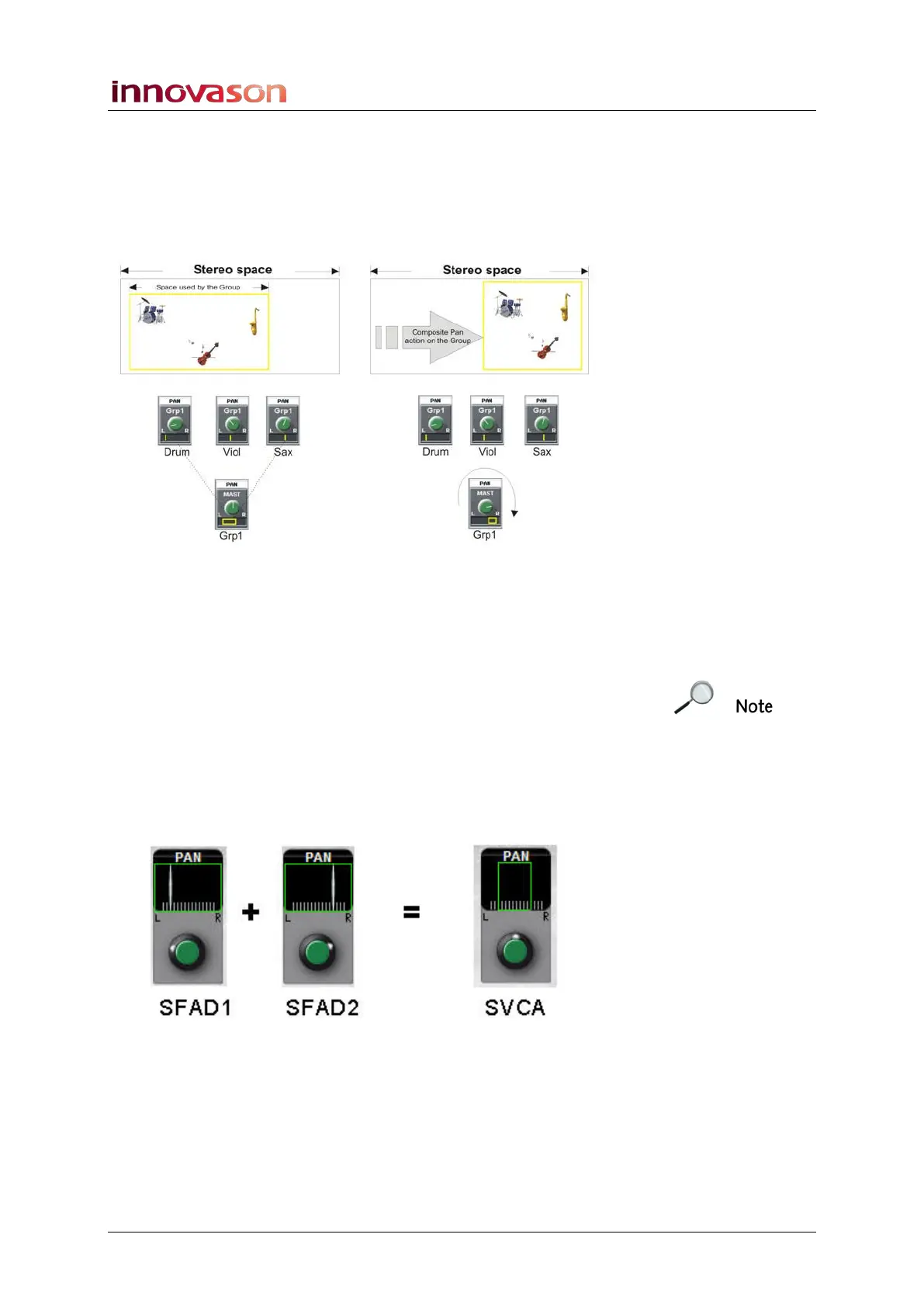
For example, let’s say you have created a Smart Fader VCA
named Grp1 which is controlling three slave channels: Drum,
Viol and Sax. The slave channels are panned as shown below:
• When the SVCA (Grp1) is panned centre, the stereo
image of the slave channels remains intact.
• Turn the PAN control on the SVCA to the right, and the
stereo image can be offset to the right.
Note that if you turn the SVCA PAN to full right (or full left) then
you will destroy the stereo imaging of the slave channels. So
reset the SVCA PAN to centre to restore your original slave pan
positions.
You can see the affect of any pan offsets on the Main Mix
display. The following diagram shows the PAN position for two
Smart Fader slaves (SFADs), and the resultant PAN display if
you select the SVCA master:



 To Next Page