Chapter 5: Console Operation
Smart Faders (SFADs): Controlling Slaves from the SVCA
156/ 526 2.0 Eclipse User Guide
Controlling Slaves from the SVCA
Notice that even though the SVCA is a VCA strip, it has
processing parameters available from the Selected Channel
controls (EQ, DYNAMIC, etc.) This is because the SVCA
provides automatic “remote” control over one of its slaves.
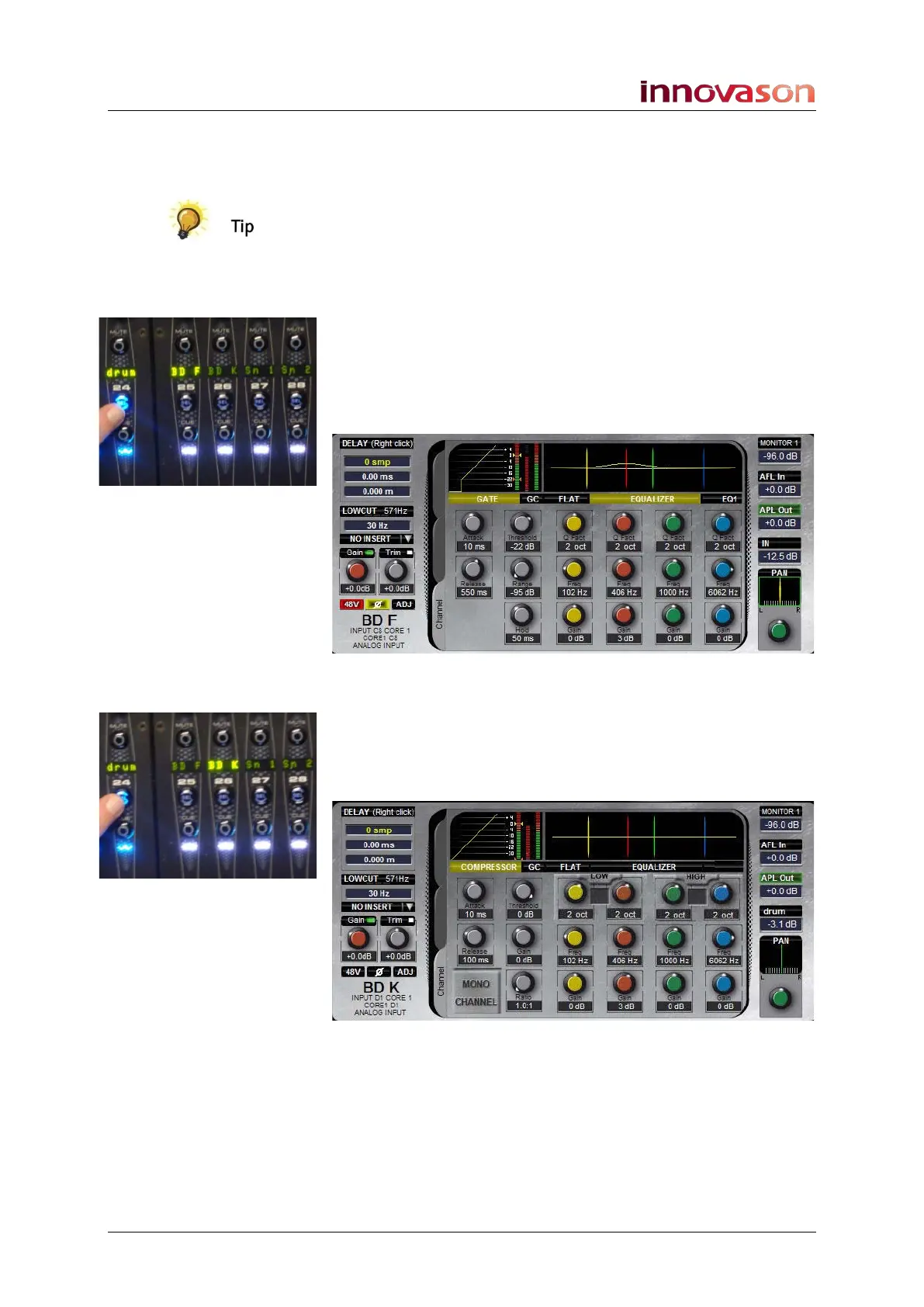
You can see how this works by using the console surface in
conjunction with the Main Mix display:
1. Press SEL on the SVCA channel – for example, drum.
The SVCA slaves are deployed into the Smart Fader Zone:
Notice how one of the SZONE Labels is fully lit – in our
example, BD F. This is the active input channel, as shown on
the Main Mix display:
2. So you can reach up to Selected Channel controls and
adjust the EQ, Dynamics, etc. of this input.
3. Now press SEL on the SVCA channel again.
The next SZONE slave is assigned to the Selected Channel; its
Label becomes fully lit and it is displayed on the Main Mix:
It is now the BD K input channel which is active and will be
controlled from the Selected Channel panels.
4. Keep pressing the SEL button on the SVCA channel
and you will see that it cycles through all the input
slaves.



 To Next Page