Chapter 5: Console Operation
Output Channels: Internal “Floating” DSP Paths
176/ 526 2.0 Eclipse User Guide
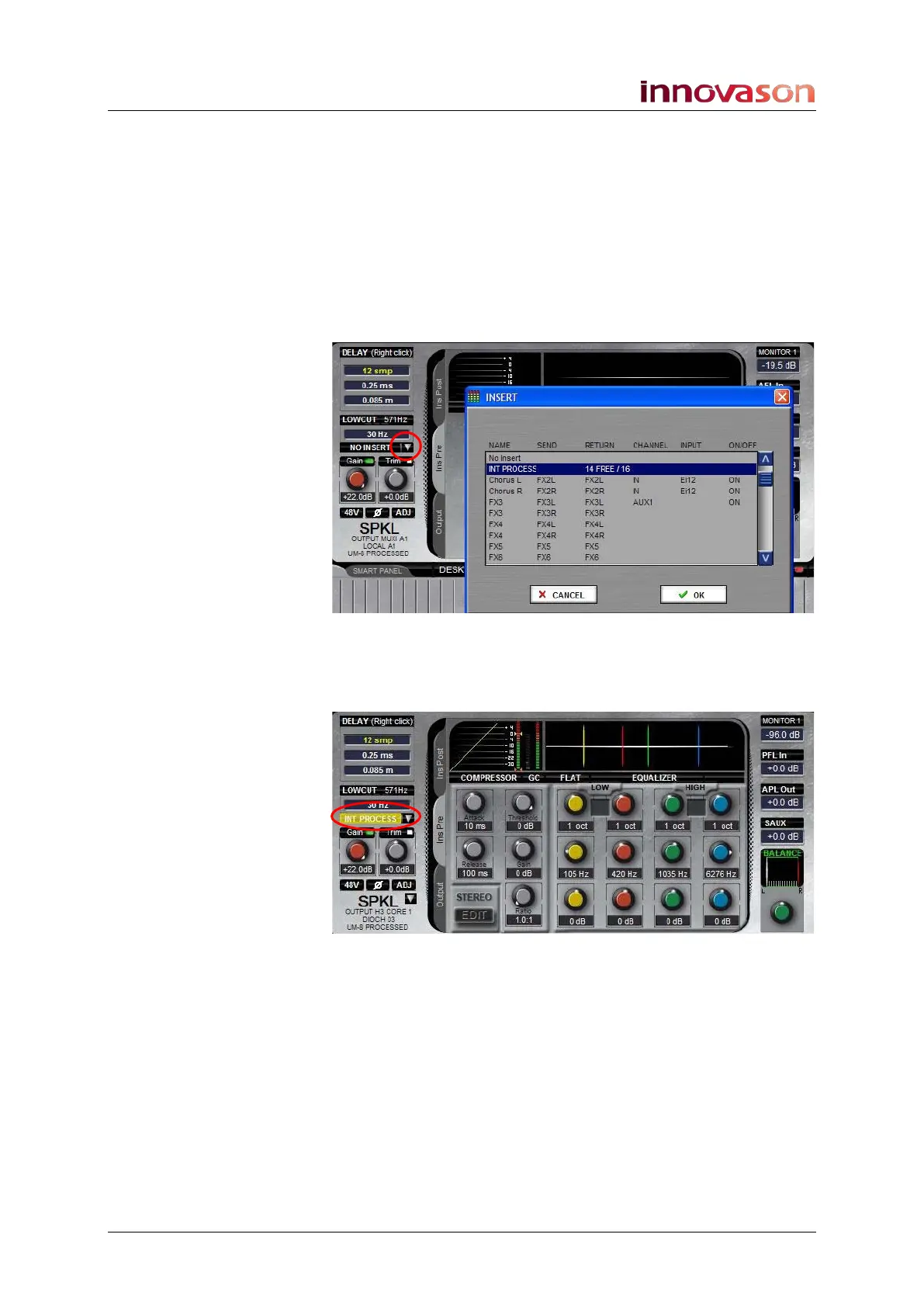
Inserting Internal Processing to a Mix Bus
To insert a DSP path to a mix bus:
1. Select the output channel (mix bus) you want to process
(press SEL on the fader or Smart Panel controller).
2. Then click on either the Ins Pre or Ins Post tab to select
whether the processing will be pre or post-fader.
3. Click on the down arrow beside the insert on/off button
to open the INSERT selection list:
4. Select INT PROCESS - and OK or press [Enter].
An internal DSP path is now assigned to the selected channel
and is automatically switched on:
If the output channel is stereo, then you are asked to assign an
internal DSP path to each component channel: left, right and
centre (if applicable).
5. You can now use the INPUT Trim, Ø DYNAMICS,
DELAY, LOW CUT and PARAM EQ controls to adjust
the internal processing parameters.
The method of control is identical to that used on input
channels, so please see Page 131 onwards for details.



 To Next Page