Chapter 8: Utilities & Preferences
Linking
422/ 526 2.0 Eclipse User Guide
Creating an IO Link Group
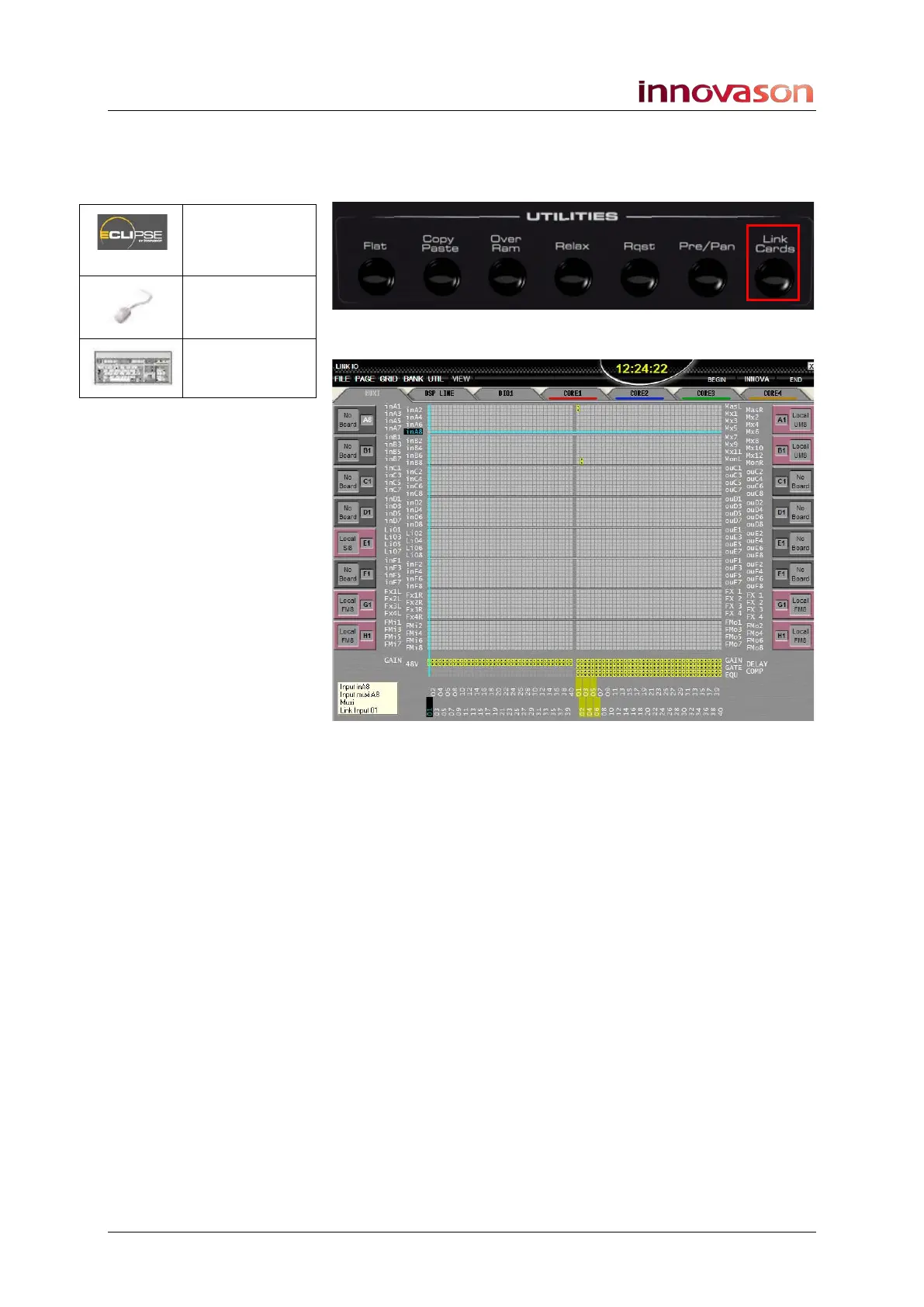
1. Press the Link Cards button on the UTILITIES panel:
The LINK IO grid appears:
On the left of the display you can configure input Link groups
(01 to 40) for input cards (GAIN ad 48V).
On the right of the display you can configure output Link groups
(01 to 40) for output cards (GAIN, GATE, etc).
2. Use the tabs at the top of the display to view different
system I/O cards:
• MUXI – Muxipaire I/O (local or Stagebox cards)
• DSP LINE – Line level I/O on the DSP card at the rear
of the console.
• DIO1 – Ethersound channels.
• Core 1 to Core 4 - DIO Core I/O cards
3. Use the grid to configure input and output link groups in
a similar manner to channel link groups, see Page 416.
In the example above, UM8 processing (GAIN, GATE, etc.) has
been linked on the Master Left and Right outputs (group 01),
and Monitor Left and Right outputs (group 02).
Link Cards
(UTILITIES)
“GRID ->
Link IO”
n/a



 To Next Page