MX7 Tecton without Label
MX7 Tecton without Label
If the MX7 Tecton Bluetooth address barcode label does not exist, follow these steps to create a unique Bluetooth address
barcode for the MX7 Tecton:
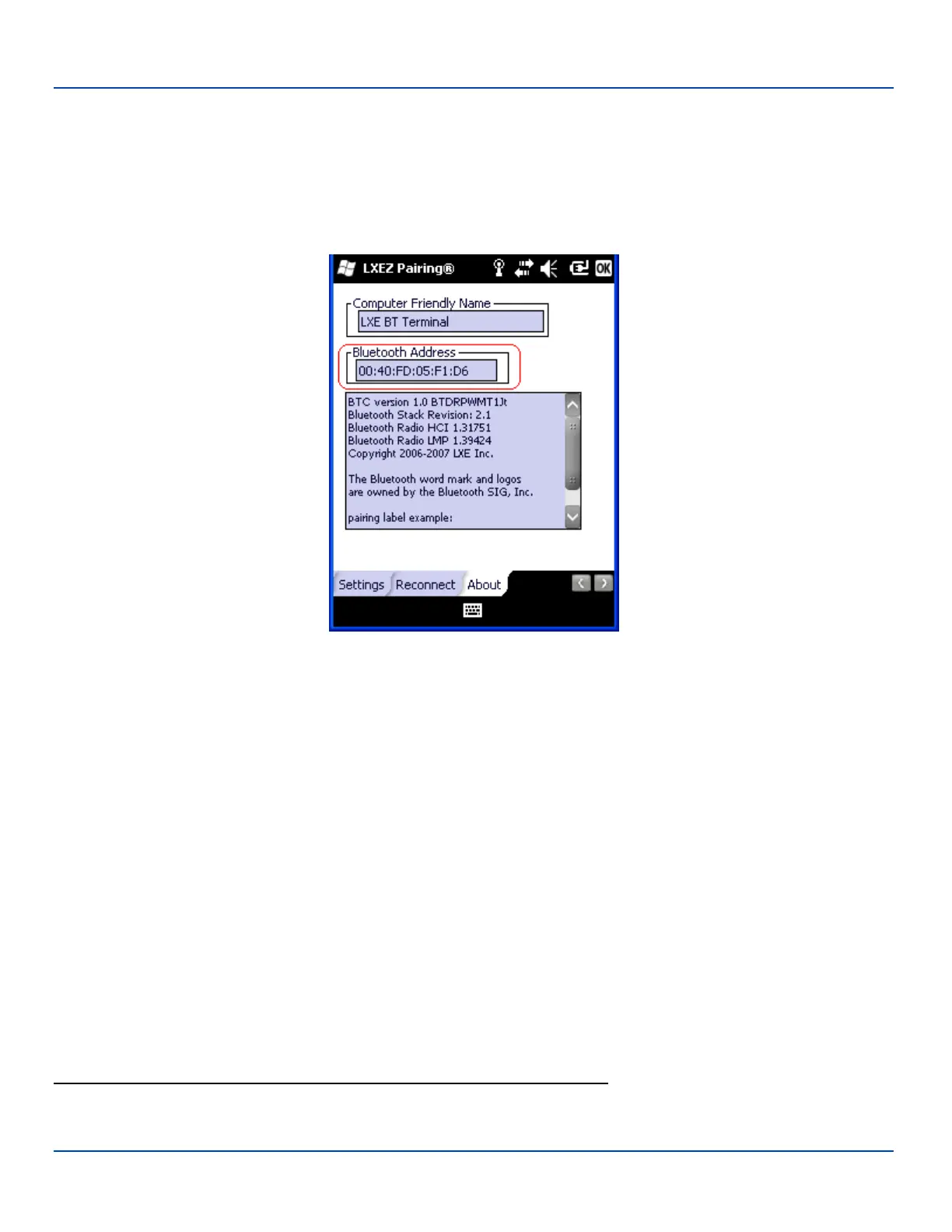
First, locate the MX7 Tecton Bluetooth address by tapping Start | Settings | System | Bluetooth | About tab.
About Tab and Bluetooth Address
Next, create
1
a Bluetooth address barcode label for the MX7 Tecton.
The format for the barcode label is as follows:
l Barcode type must be Code 128.
l FNC3 character followed by string Uppercase L, lowercase n, lowercase k, uppercase B and then the Bluetooth
address (12 hex digits, no colons). For example, LnkB0400fd002031.
Create and print the label.
Scan the MX7 Tecton Bluetooth address barcode label with the Bluetooth barcode reader.
The devices are paired. The Bluetooth barcode reader responds with a series of beeps and LED flashes.
Note: After scanning the MX7 Tecton Bluetooth label, if there is no beep and no LED flash from the Bluetooth device, the
devices are currently paired.
See "Bluetooth Reader Beep and LED Indications" on page 88
1
Free barcode creation software is available for download on the World Wide Web. Search using the keywords “barcode
create”.
E-EQ-MX7WMRG-A [ 87 ] MX7 Tecton™ for Windows Mobile Reference Guide



 To Next Page