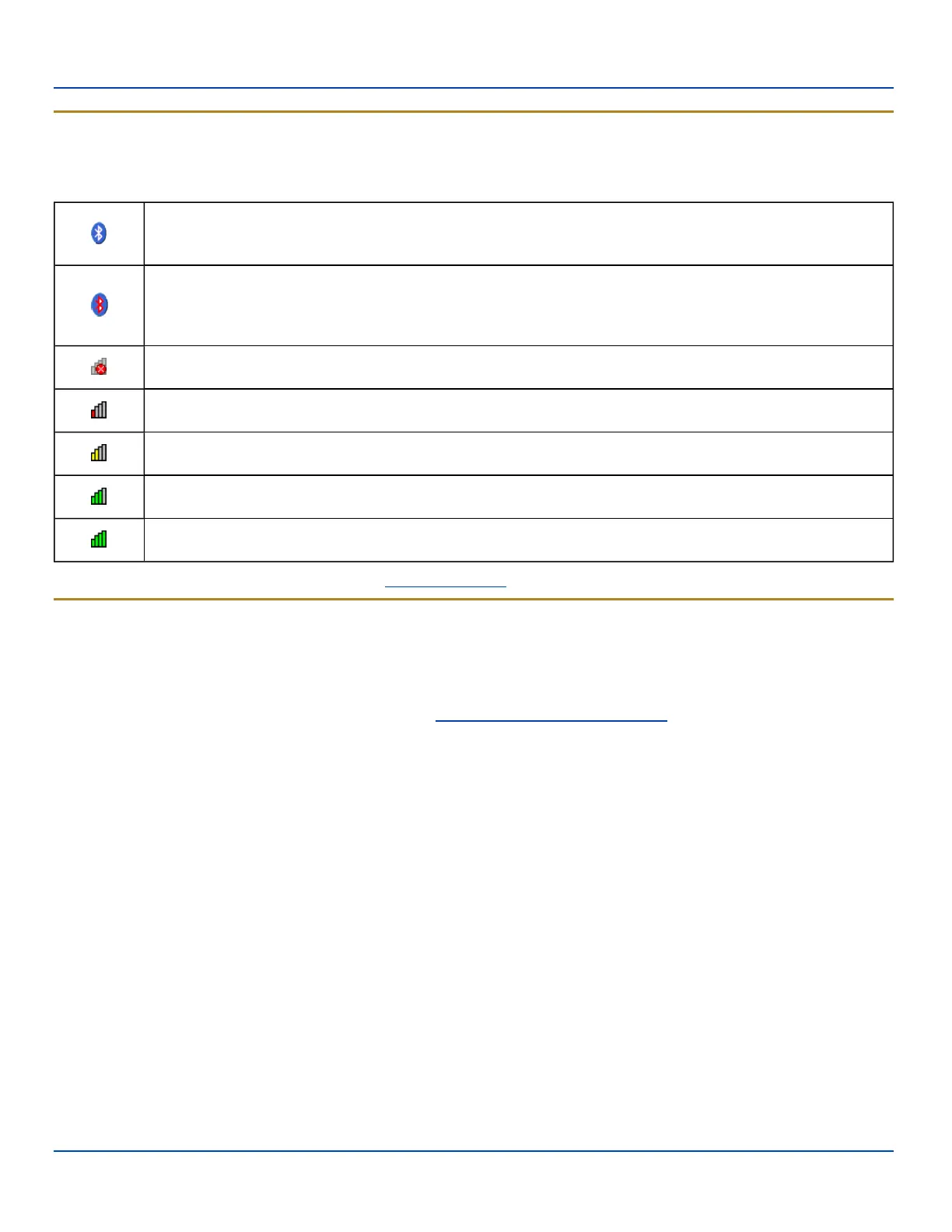
Status Icons
Status Icons
Additional icons may be displayed at the lower edge of the Today screen.
Note: Summit signal strength icons are displayed only when the Summit Client Utility is controlling the radio.
Bluetooth module is connected to one or more of the targeted Bluetooth device(s).
MX7 Tecton is not connected to any Bluetooth device.
MX7 Tecton is ready to connect with any Bluetooth device.
MX7 Tecton is out of range of all paired Bluetooth device(s). Connection is inactive.
Summit radio is not currently associated or authenticated to an Access Point.
The signal strength for the currently associated/authenticated Access Point is less than -90 dBm
The signal strength for the currently associated/authenticated Access Point is -71 dBm to -90 dBm
The signal strength for the currently associated/authenticated Access Point is -51 dBm to -70 dBm
The signal strength for the currently associated/authenticated Access Point is greater than -50 dBm
More information on Bluetooth can be found in the Bluetooth settings section.
Soft Keys
Soft Keys are displayed at the bottom of the Today screen. The keys displayed vary by the active screen/application.
The soft keys generally provide menus for the selected application. By default, on the Today screen, the left Soft Key
(Calendar) can also be accessed by pressing F1 and the right Soft Key (Contacts) can be accessed by pressing F2. The
assignments for the Soft Keys can be edited by selecting Start | Settings | Personal | Buttons.
E-EQ-MX7WMRG-A [ 30 ] MX7 Tecton™ for Windows Mobile Reference Guide



 To Next Page