MX7 Tecton Troubleshooting
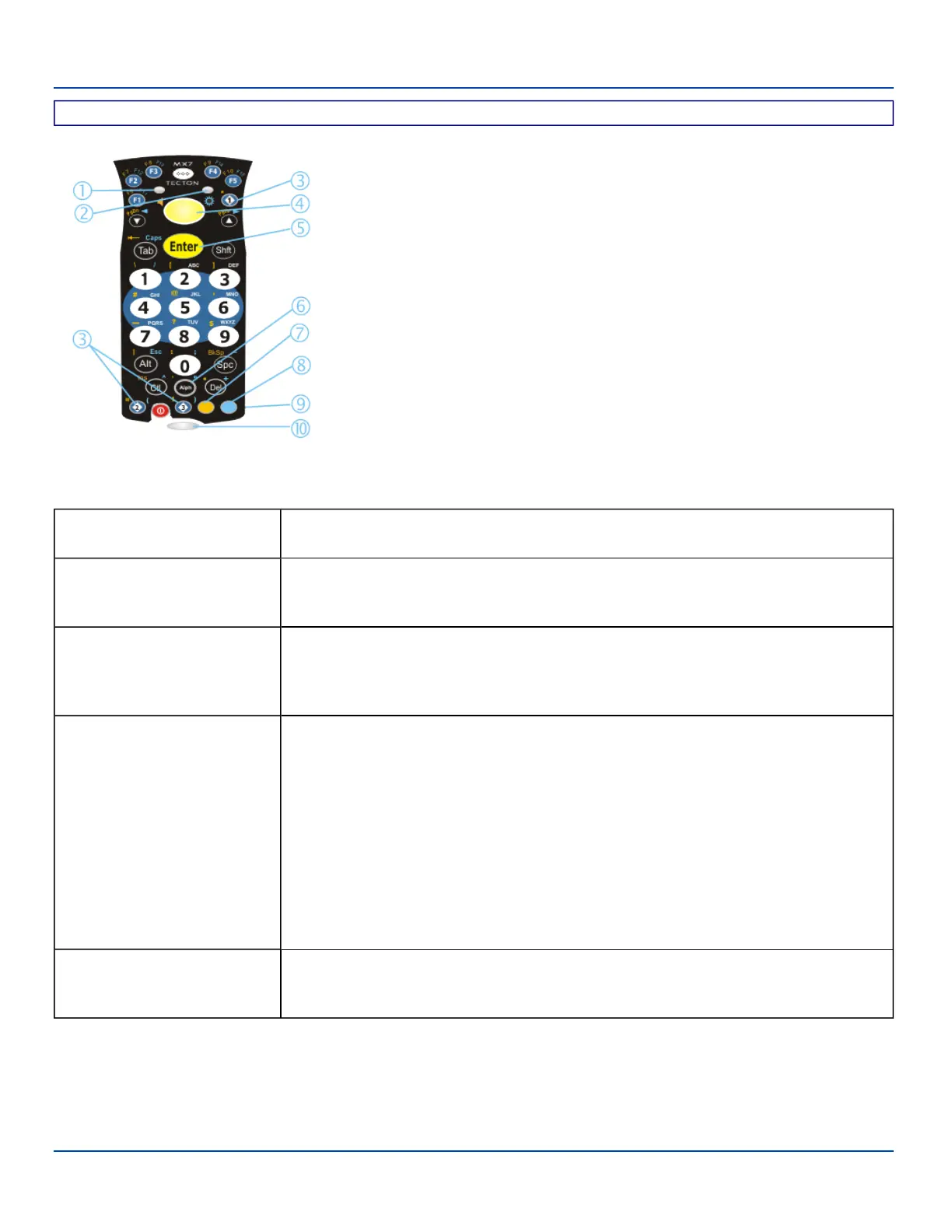
32 Key Numeric-Alpha Keypad
1. System Status LED
2. Alpha Status LED
3. Diamond Keys
4. Scan Button
5. Enter Key
6. Alph Key
7. Orange Key (Sticky Key)
8. Blue Key (Sticky Key)
9. On Off Button
10. Scan Status LED
MX7 Tecton Troubleshooting
Can’t change the date/time or
adjust the volume.
AppLock is installed and may be running in User Mode on the MX7 Tecton. AppLock user
mode restricts access to the control panels.
Touchscreen is not accepting
stylus taps or needs
recalibration.
Press <Ctrl>+<Esc (Blue+Alt)> to force the Start screen to appear. Use arrow keys to
move from program to program. Press Enter to start a program or open folder (Settings,
etc.).
The MX7 Tecton seems to
lockup as soon as it is rebooted.
There may be slight delays while the wireless client connects to the network, authorization
for voice-enabled applications complete, Wavelink Avalanche management of the MX7
Tecton startup completes, and Bluetooth relationships establish or re-establish. When the
desktop appears or an application begins, the MX7 Tecton is ready for use.
New MX7 Tecton main batteries
don't last more than a few hours.
New batteries must be fully charged prior to first use. Li-Ion batteries (like all batteries)
gradually lose their capacity over time (in a linear fashion) and never just stop working. This
is important to remember – the MX7 Tecton is always ‘on’ even when in the Suspend state
and draws a small amount of battery power at all times.
Note: Cold Storage Battery Life – minimum 2.5 hours while the unit is roaming,
powered on with ambient temperature -10°C (14°F) or above, Display backlight
turned on, Keypad LED backlight on, radio connected to Access Point, and scanner
decoding barcodes. The LXE Li-Ion main battery (MX7A381BATT and
MX7393BATT) has been designed specifically for the Cold Storage device. This
1250mAh battery has a blue label while the standard 2200mAh battery has a white
(MX7A380BATT and MX7392BATT) label.
Keep losing ActiveSync
connection between my host
computer and the MX7 Tecton.
Disconnect the cable, wait 1-2 seconds and reconnect the cable. The MX7 Tecton will not
enter suspend as long as an ActiveSync session is running. ActiveSync session prevents
it from going into suspend.
E-EQ-MX7WMRG-A [ 7 ] MX7 Tecton™ for Windows Mobile Reference Guide



 To Next Page