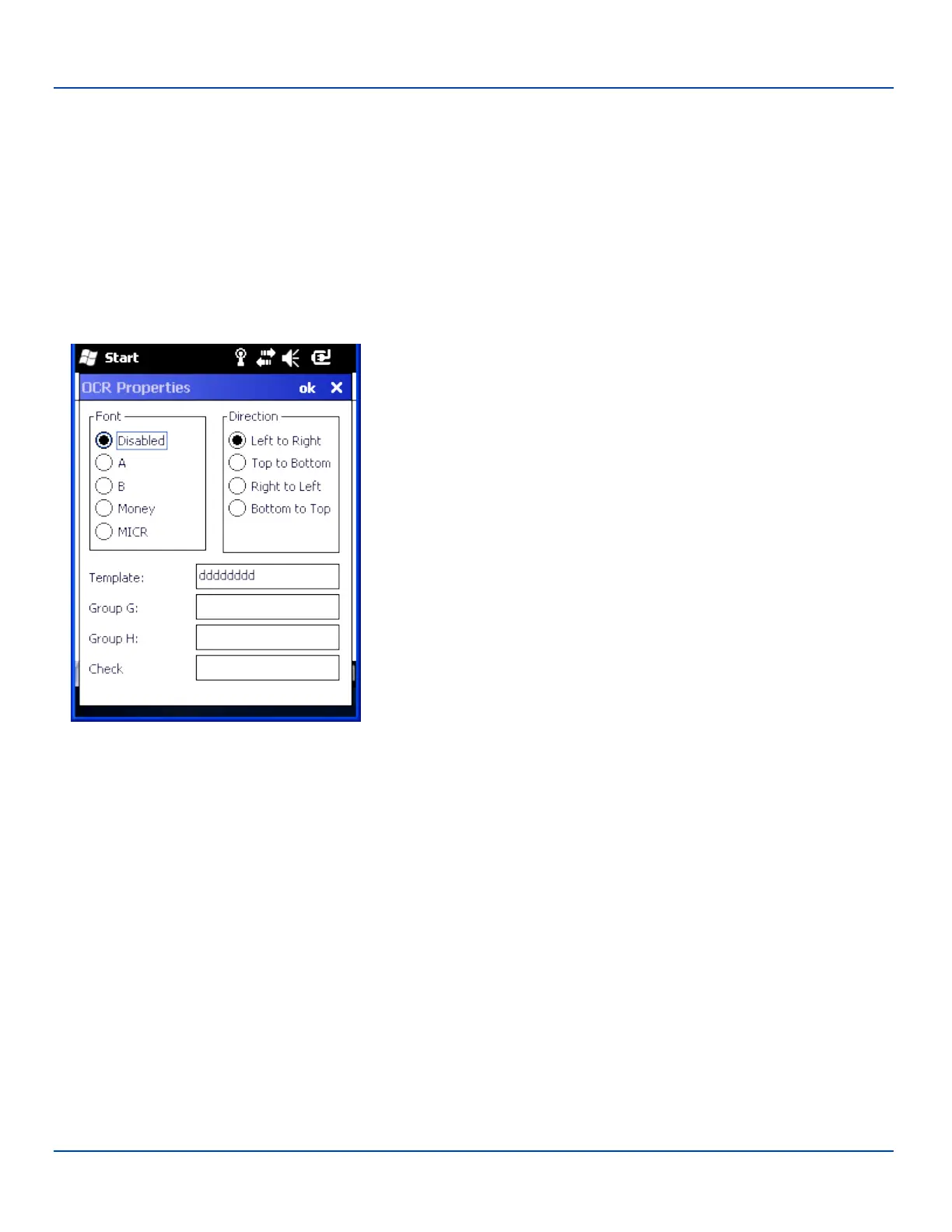
OCR Symbology
OCR Symbology
Font – Font selection:
Disabled
A = OCR A
B = OCR B
Money = OCR Money
MICR = Magnetic Ink Character Recognition
Default is disabled.
Direction – Decoder reads OCR fonts in any direction, but setting direction
parameter correctly can increase decoding speed:
Left to Right
Top to Bottom
Right to Left
Bottom to Top
Default is Left to Right.
Template – Template length must match the length of OCR string to be read.
Valid template selections are:
a - alphanumeric character (digit or letter)
c - check character
d - digits from 0 to 9
e - any character
g - any character specified in group G
h - any character specified in group H
l - alphabetic letter
r - delimits a row
t - delimits multiple templates
All characters are transmitted as is except for the selected template. Default is
dddddddd.
Group G – Null terminated string defines the set of characters in group G. The
default is null.
Group H – Null terminated string defines the set of characters in group H. The
default is null.
Check – Enter the string constant 0123456789 for modulo10 checksums and
the string constant 0123456789ABCDEFGHIJKLMNOPQRSTUVWXYZ for
modulo36 checksums.
The default is null.
E-EQ-MX7WMRG-A [ 119 ] MX7 Tecton™ for Windows Mobile Reference Guide



 To Next Page